




Active Directory Ransomware Protection: Strategies for 2026
Secure your Active Directory against ransomware. Discover the best protection strategies—plus native and third-party tools that lock down your AD environment.

By Lily Updated on May 8, 2026


Does ransomware encrypt Active Directory?
Yes—ransomware can encrypt parts of Active Directory (AD), but not always in the way people expect. Instead of simply locking a single database file, modern ransomware attacks often target Active Directory as a whole system, disrupting authentication, access control, and domain operations. Advanced ransomware strains can:
❗ Encrypt the NTDS.dit database: This database stores all user credentials and directory information. If encrypted, authentication across the domain can fail completely.
❗ Disable or corrupt domain controllers: Attackers may encrypt system files on domain controllers, making them unusable and preventing users from logging in.
❗ Modify or encrypt Group Policy Objects (GPOs): Malicious changes to GPOs can lock users out, deploy ransomware across endpoints, or weaken security settings.
❗ Target SYSVOL and shared resources: Encrypting SYSVOL can break policy distribution and login scripts, further destabilizing the network.
That’s why we should adopt strong strategies to protect Active Directory from ransomware.
How to enable Active Directory ransomware protection
Preventing ransomware from Active Directory isn’t a single switch—it requires a layered security approach that combines prevention, detection, and recovery. Below is a practical, step-by-step framework to secure your AD environment.
1. Harden Your Active Directory Environment
Start by reducing your attack surface:
- Apply the latest security patches to domain controllers and servers
- Disable legacy protocols like SMBv1 and NTLM where possible
- Limit Domain Admin accounts and avoid using them for daily tasks
- Secure Domain Controllers (DCs) by restricting physical and network access
2. Enforce Strong Access Controls
Identity security is the backbone of AD protection:
- Implement Multi-Factor Authentication (MFA) for all privileged accounts
- Follow the Principle of Least Privilege (PoLP)
- Use tiered administrative models (Tier 0, Tier 1, Tier 2)
- Deploy Just-in-Time (JIT) access for admin privileges
3. Protect Privileged Accounts
Privileged accounts are prime ransomware targets:
- Use dedicated admin accounts separate from user accounts
- Rotate credentials regularly and enforce strong password policies
- Monitor all privileged account activity in real time
- Consider implementing a Privileged Access Management (PAM) solution
4. Enable Continuous Monitoring and Threat Detection
Early detection can stop ransomware before it spreads:
- Enable Advanced Auditing in Active Directory
- Monitor logon attempts and failures, privilege escalation events, and changes to Group Policy Objects (GPOs)
- Integrate logs into a SIEM (Security Information and Event Management) system
- Use EDR/XDR tools for behavioral analysis
5. Secure and Test Backups of Active Directory
Backups are your last line of defense:
- Perform regular system state backups of domain controllers
- Store backups offline or in immutable storage (air-gapped if possible)
- Encrypt backup data and restrict access
- Test AD recovery procedures regularly to ensure backups are usable
6. Implement Network Segmentation
Limit how far ransomware can spread:
- Isolate domain controllers from general user networks
- Segment critical servers and sensitive systems
- Use firewalls and access control lists (ACLs) to restrict traffic
- Prevent unnecessary east-west movement within the network
Recommended tools for Active Directory ransomware protection
Here are commonly used tools that strengthen each layer of protection:
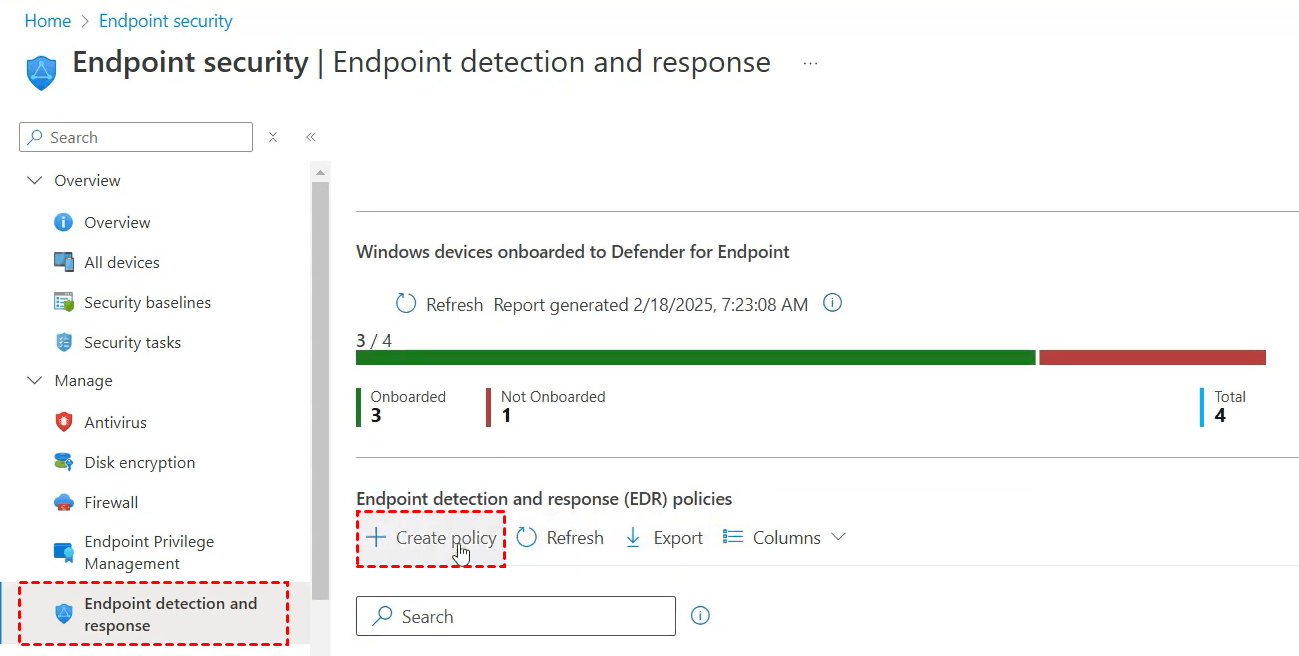
1. Microsoft Defender for Endpoint
Microsoft Defender for Endpoint is an enterprise-level endpoint security platform that helps prevent, detect, investigate, and respond to sophisticated cyber threats across an organization’s devices. It builds on the foundation of Microsoft Defender Antivirus with advanced features, including behavioral threat detection and endpoint detection and response (EDR).
Learn how to set up Microsoft Defender for Endpoint here.
2. AOMEI Backupper Server
AOMEI Backupper Server is a dedicated Windows Server backup software integrated with the ransomware protection feature. You can use it to protect Active Directory from ransomware.

 AOMEI Backupper
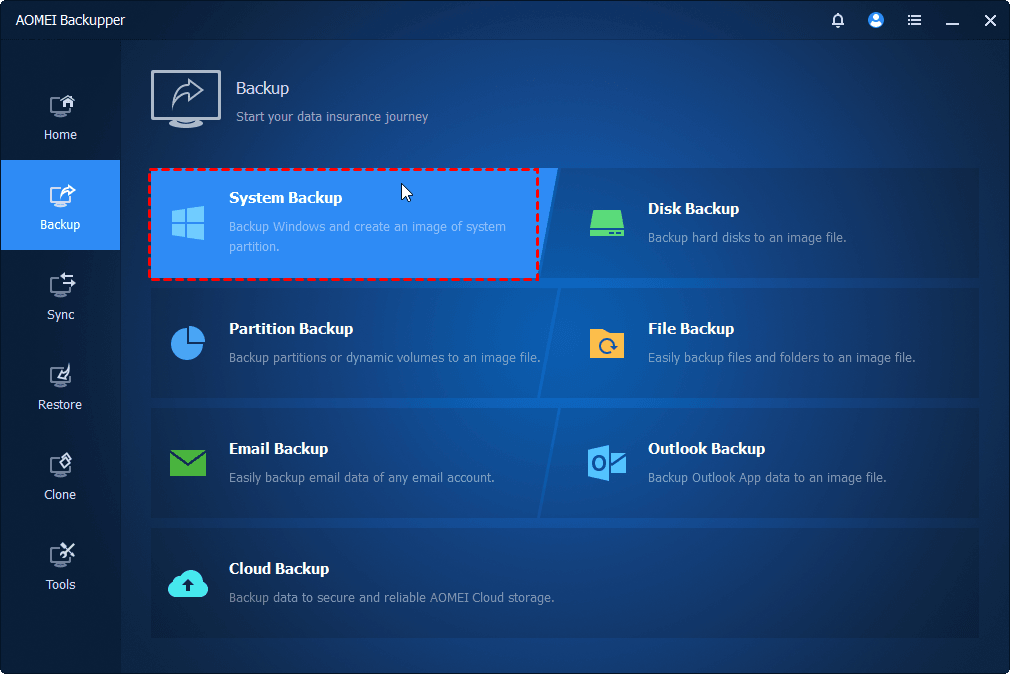
- It offers System Backup to capture complete server images, including AD database (NTDS.dit). You can also use it to create disk, partition, and file backups.
- It supports backing up to external drives, NAS/network shares, and cloud storage to protect backups from being encrypted by ransomware.
- It allows you to perform bare-metal recovery (restore entire server from scratch) and Universal Restore to different hardware.
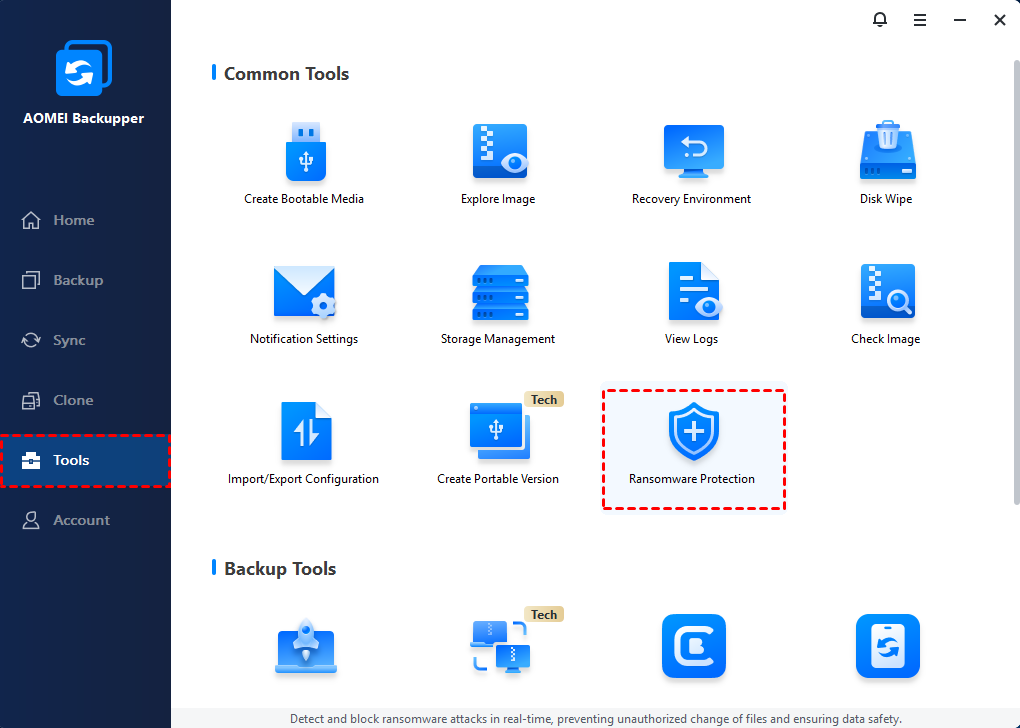
- It is embedded with Ransomware Protection to protect backups, certain file types, and specified file paths from unauthorized encryption.
 100% Secure
Download and install AOMEI Backupper on your server now!
👉 To backup Active Directory to a safe place:
Click Backup > System Backup, select a backup destination, enable Schedule and click Start Backup.
👉To enable ransomware protection:
Click Tools > Ransomware Protection, set your preferred protection rules, and click OK.
FAQs about Active Directory ransomware protection
1. What is the best backup strategy for Active Directory?
The recommended approach is the 3-2-1 backup rule:
- Keep 3 copies of your data
- Store backups on 2 different media types
- Maintain at least 1 offsite or offline copy
Also, ensure you perform system state backups of domain controllers and test recovery regularly.
2. How often should Active Directory be backed up?
- Daily backups are recommended for most environments
- More frequent backups (e.g., hourly) may be needed for critical systems
- Always create backups before major changes or updates
Regular backups ensure you can restore AD to a clean state before infection.
3. What tools help with Active Directory ransomware protection?
Common tools include:
- Microsoft Defender for Endpoint (threat detection)
- SIEM solutions like Microsoft Sentinel (log monitoring)
- Privileged Access Management (PAM) tools
- Backup solutions like AOMEI Backupper Server for reliable recovery
Using a combination of tools provides comprehensive protection.
Conclusion
Ransomware attacks on Active Directory are high-impact but preventable. By combining secure backups, strict access control, and real-time monitoring, you can significantly reduce risk and ensure fast recovery if an attack occurs.
This page walks you through proven strategies for Active Directory ransomware protection and recommends Microsoft Defender for Endpoint and AOMEI Backupper Server for layered security. Follow this article to protect your Active Directory now!

 as a preferred
source on Google
as a preferred
source on Google