




How to Recover Transcend Hard Disk without Losing Data
How to recover Transcend hard disk without losing data? The most effective way is to use data recovery software like AOMEI FastRecovery. Scroll down to learn how to use it.

By Ivy Updated on May 6, 2026


Transcend hard disk is convenient and efficient, we can save and transfer data among computers via it. But sometimes data loss is unavoidable due to various causes, such as accidental deletion or formatting, file system issues, and virus attacks.
After deleting files from Transcend hard disks, you may have no choice but to employ external hard drive recovery software, especially for users without regular file backups. Please read further to find more details on how to recover the Transcend hard disk without losing data.
5 Main Causes for Transcend External Drive Data Loss
Before beginning Transcend data recovery, let’s get an overview of the common reasons for data loss on Transcend external hard drives.
- Accidental Deletion or Formatting: If you delete files by mistake or format your Transcend external hard drive, you can usually recover them unless they are overwritten. The quick format allows recovery, but the full format makes it impossible.
- File System Issues: Problems caused by viruses or improper ejection can lead to data loss. If your PC recognizes the drive, recover data first, then attempt repairs.
- Unrecognized Drive: If your computer doesn't recognize the Transcend hard drive, check in Windows Disk Management. If it appears, use recovery software. If not, follow undetected drive-fix methods.
- Virus Attacks: Viruses can corrupt or delete files, causing data loss. Keep your antivirus up to date to protect your Transcend drive.
- Physical Damage: Dropping the Transcend hard drive or exposing it to extreme conditions can make it unreadable, leading to data loss.
How to Recover Data from Transcend External Disk
As mentioned above, without backups, it is crucial to choose the right data recovery software to recover Transcend external hard drive data. Here are 2 data recovery software.
#1. Recover Data from Transcend External Disk via RecoveRx
RecoveRx is an exclusive data recovery tool developed by Transcend. It is designed to recover Transcend hard disk data. You can also use it to recover data from Transcend external hard disks, memory cards, and USB drives. Below is a list of supported file types and formats in RecoveRx:
|
File types |
Formats |
|
Photos |
BMP/CRW/DSC/GIF/JPG/ORF/PNG/RAF/RAW/RW2/TIF/PEF/NEF/DCR/SR2/CR2 |
|
Videos |
BASF/WMA/WMV/M2TS/MKV/MOV/MP4/3GP/3G2/JP2/MPG/RIFF/WAV/CDR/AVI/SWF/TIVO/TS/WTV |
|
Documents |
CWK/DOC/XLS/PPT/DOCX/XLSX/PPTX/PDF/PSB/PSD/TXT/ZIP |
|
Other files |
AIF/FCP/ISO/ITU/MID/MP3/OGG/RA/RM |
Step 1. Connect your Transcend hard disk to the PC. Meanwhile, download and install RecoveRx for data recovery. Upon launching the software, choose the Recover option. The software will automatically detect and display Transcend hard disk.

Step 2. Select a new location to save the recovered files (default location is C:\Recovered Files). Then, click Next.
Step 3. Select the types of files you want to recover (such as photos, videos, documents, etc.) and click Start to scan and recover data from Transcend hard disk.
By following these steps, RecoveRx allows users to deeply search for traces of deleted files and retrieve recoverable data. However, it's worth noting that the software has limitations:
- Limited file types: It may not recover all types of files, like audio, emails, or compressed files, etc.
- Unsupported formats: Certain popular formats like DOCX, XLSX, MOV, WEBM, ZIP, and RAR might not be recoverable.
- Single scanning mode: It only has one scanning mode, and this process will take a long time.
- No pause or preview: You can't pause scans or preview files during the process.
- Possibility of damaged files: Recovered files might be damaged, affecting their usability. Its recovery success rate is very low.
#2. Recover Data from Transcend Hard Disk using AOMEI FastRecovery
Considering the limitations of RecoveRx, another powerful data recovery software, AOMEI FastRecovery, can avoid these limitations. Meanwhile, it's the simplest and most effective recovery method. With its advanced technology, you are able to find all the Transcend hard disk data easily, with a high success rate.
AOMEI FastRecovery- Recover permanently deleted Excel, Word, PPT, JPG, PNG, MP4, MP3, CDA, ZIP, MSG, and more., up to 1000+ data formats.
- Integrate Quick & Deep Scan to find as many deleted or missing files as possible.
- Organize and display data by Type or Path, along with options to sort, search, filter, and preview files.
- Recover data in any scenario, such as permanent deletion, disk formatting, virus attacks, lost partition, or system crashes.
- Support different hard drive brands, not only Transcend, but also Samsung, WD, SanDisk, Crucial, etc., as well as NTFS, FAT32, exFAT, and ReFS file systems.
 100% Secure
The software has a free version that you can use to recover files up to 500MB for free. So, why wait? Download AOMEI FastRecovery now to get data back quickly. Let’s take Transcend StoreJet drives as an example.
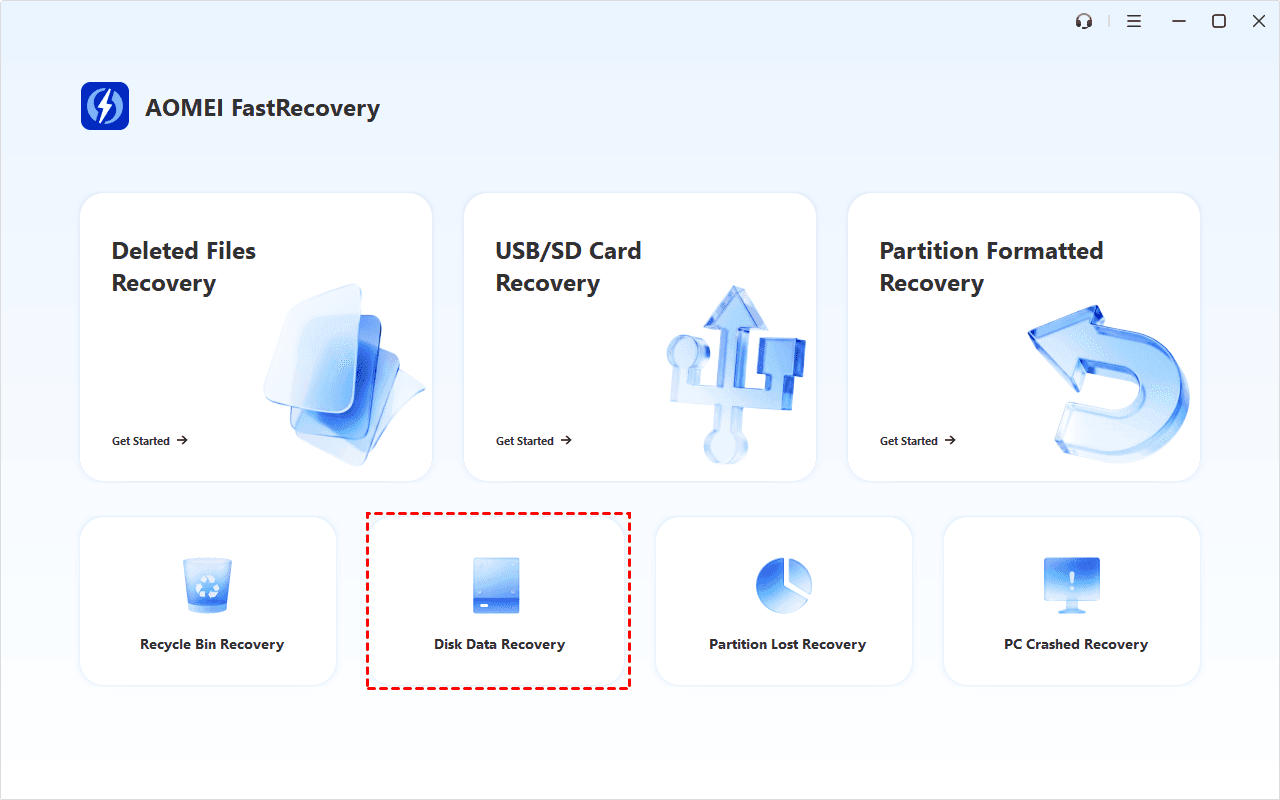
Step 1. Open AOMEI FastRecovery after installing. Click Disk Data Recovery at a lower location. To recover specific files or folders, click Deleted Files Recovery.
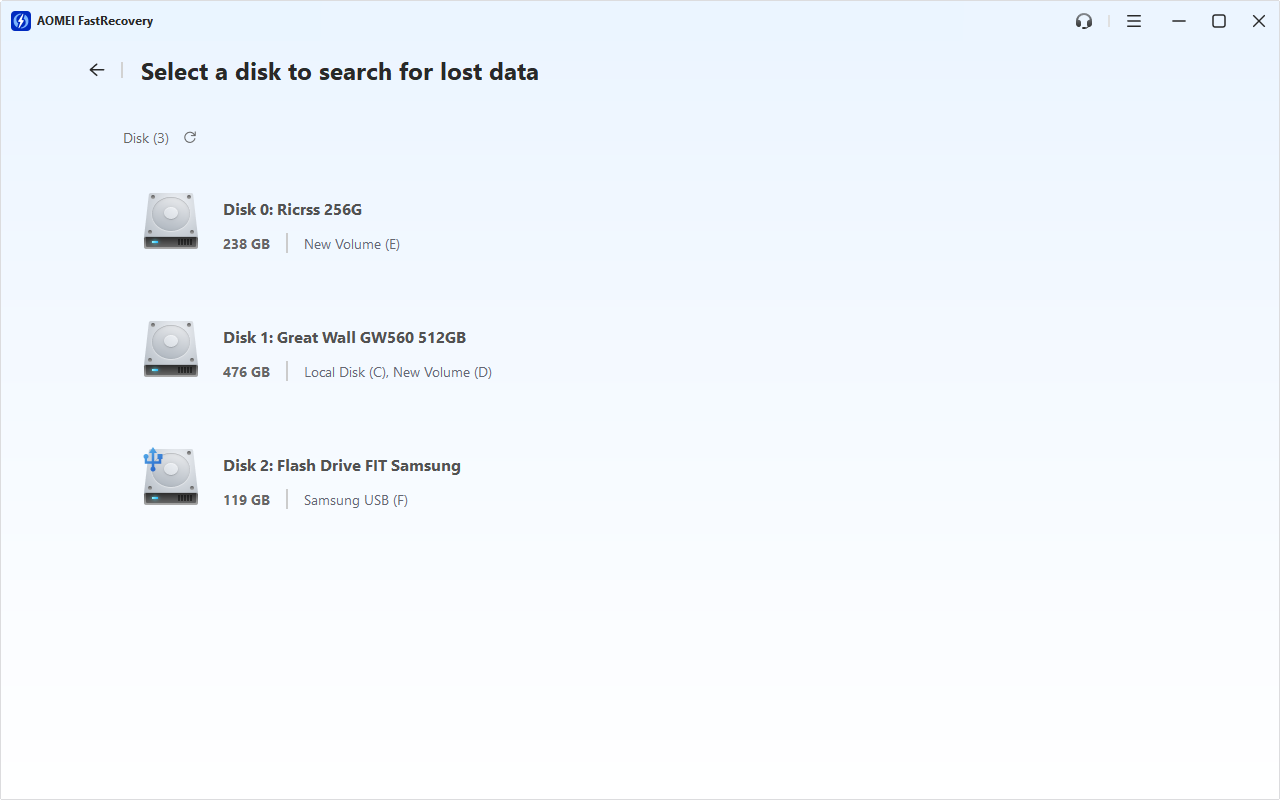
Step 2. You'll see all available drives. Select the Transcend StoreJet drives and click Scan to search this drive deeply and display all recoverable data.
Step 3. Under the Type section, check all the data types and expand them to find what you want. You can sort them or search the name to locate files quickly.
Step 4. Select your desired data and click the Recover button. Double-click to preview files if you are not sure.
⚠️Notes:
- Pleasesave the recovered files toa new location. Otherwise, your data may be overwritten.
- You can recover data from Transcend external hard disk for free, up to 500MB. To enjoy unlimited data recovery, please upgrade AOMEI FastRecovery to Professional or Technician edition.
What if Transcend Drive Not Detected in Windows?
Sometimes, you may encounter the issue of Transcend external drive is not recognized by your Windows. There are 3 fixes you can use to fix it.
Way 1. Check the Connection
A damaged USB cable or port might be the reason behind the inaccessibility of your Transcend external hard drive. Try using different cables and connect the drive directly to a USB port attached to your motherboard.
Way 2. Connect to Another Device
Connect your Transcend disk to another computer and check if it remains undetectable. Sometimes, the issue may be specific to your computer.
Way 3. Uninstall/Update Drivers
If the Transcend external hard drive is not being detected because of the driver, you can resolve it by reinstalling or updating the driver to the latest. You need to download the latest available hard drive driver from the official website of the drive manufacturer and follow the steps below.
Step 1. Type Device Manager in the search bar on your computer and open it.
Step 2. Locate Disk Drives and expand it. Right-click on the targeted drive and click Uninstall device or Update driver.
Step 3. Restart your PC to reinstall the hard drive. Or, if needed, click Browse my computers for drivers to find the latest driver you unpacked.
Way 4. Seek Help from Data Recovery Services
If none of the above methods work, and your data is crucial, consider seeking a professional data recovery service with expertise in recovering data from external hard drives, such as Geek Squad, SlavageData, DriveSaver, etc. Here are the overall steps:
-
Submit a request with details about the issue and device
-
Ship or deliver the storage device securely
-
Receive an evaluation and diagnosis report
-
Approve the recovery quote and process
-
Perform data recovery and ship the hard drive back
Conclusion
Data loss can be a distressing experience, but with the right tools and knowledge, it’s easy to solve the issue of how to recover Transcend hard disk. For example, AOMEI FastRecovery can not only recover data from Transcend hard disks, but also support other disks such as Western Digital, Seagate, Toshiba, Dell, Acer, etc.
Remember to prioritize data protection by implementing precautionary measures and maintaining regular backups of your important files. Here we recommend this professional data backup software for Windows - AOMEI Backupper Standard. When a crisis strikes, you'll be able to restore files from backups quickly and get your files back.

 as a preferred
source on Google
as a preferred
source on Google