




How to Recover Data from Transcend External Hard Disk Easily
Looking for a way to perform Transcend external data recovery? Try Transcend's data recovery tools, AOMEI FastRecovery and RecoveRx.

By Ivy Updated on February 6, 2026


Transcend external hard drives are known for their durability and dependability. However, they are not immune to data loss caused by accidental deletion, logical corruption, or physical damage.
Fortunately, you can learn how to recover data from Transcend external hard disk in this article. We will delve into the topic of Transcend data recovery and explore effective methods to retrieve lost data from these devices.
Recover data from Transcend external hard disk using AOMEI FastRecovery
Whether you have deleted or formatted files from Transcend storage devices, such as external hard drives and memory cards, you can recover deleted or formatted data with reliable Transcend data recovery software - AOMEI FastRecovery.
 AOMEI FastRecovery
- 👵 User-Friendly Interface: AOMEI FastRecovery is designed with simplicity in mind, making data recovery accessible to all users, regardless of technical expertise.
- 📃1000+file types: Recover deleted or lostdocuments, photos, videos, emails, and more.
- 👍 Quick and Deep Scan: Combine Quick Scan with Deep Scanfor comprehensive file recovery.
- 💾Various storage devices: Recover data from healthy or damaged Transcend devices, such as HDDs/SSDs, external hard drives, SD cards, USB flash memory, and more.
- 🔥 AOMEI FastRecovery is free for up to 500MB of data.
 100% Secure
Step 1. Connect your Transcend external hard drive to your computer. Install AOMEI FastRecovery and launch it. Hover the mouse over the Transcend card where the deleted files were before and click Scan.
Step 2. The software will automatically run Quick Scan to find deleted or lost files and display them by Type or Path, allowing you to sort across multiple options.
📍📍📍Notes:
✅ For specific files or folders, type the file name or the extension in the search box. Or click the filter button to specify the data type (e.g., Images).
✅ Click the Deep Scan button if the Quick Scan fails to locate the desired files. Deep Scan searches every sector of the disk to find more files.
Step 3. Select all the deleted files on your Transcend external hard disk and click the Recover button.
The software will prompt you to choose a new location for the recovered files instead of the original location.
Recover data from Transcend hard disk using RecoveRx
RecoveRx is a specialized data recovery tool developed by Transcend, specifically designed to help users recover data from Transcend storage devices, including Transcend SD cards, USB flash drives, internal and external HDDs, and SSDs.
Supported file types and formats in RecoveRx:
|
File types |
Formats |
|
Photos |
BMP, CRW, DSC, GIF, JPG, ORF, PNG, RAF, RAW, RW2, TIF, PEF, NEF, DCR, SR2, CR2 |
|
Videos |
BASF, WMA, WMV, M2TS, MKV, MOV, MP4, 3GP, 3G2, JP2, MPG, RIFF, WAV, CDR, AVI, SWF, TIVO, TS, WTV |
|
Documents |
CWK, DOC, XLS, PPT, DOCX, XLSX, PPTX, PDF, PSB, PSD, TXT, ZIP |
|
Other files |
AIF, FCP, ISO, ITU, MID, MP3, OGG, RA, RM |
Step 1. Connect your Transcend hard disk to your PC. Download and launch RecoveRx.
Step 2. Upon launching the software, select the Recover option. The software will automatically detect and display your connected Transcend hard disk.
Step 3. Choose a location for your recovered files (the default location is C:\Recovered Files). Click Next.
Step 4. Select the types of files you wish to recover (such as photos, videos, documents, etc.). Click Start.
Step 5. After the scanning is complete, a results page will appear, showing the total number of files recovered. Click Close.
By following these steps, RecoveRx enables users to thoroughly search for traces of deleted files and recover any available data. However, it's important to note that the software has some limitations:
- Limited File Types: It may not recover all file types, such as audio, emails, or compressed files.
- Unsupported Formats: Certain common formats like DOCX, XLSX, MOV, WEBM, ZIP, and RAR might not be recoverable.
- Single Scanning Mode: It only offers one scanning mode, which can take a considerable amount of time.
- No Pause or Preview: You cannot pause scans or preview files during the recovery process.
- Possibility of Damaged Files: Recovered files may be damaged, which can affect their usability. The recovery success rate is relatively low.
3 Quick fixes - Transcend external hard drive not detected
Sometimes, after damage, the Transcend storage devices may become inaccessible. If you want to recover files from an external hard drive not detected, you could try these quick tricks to fix it and bring it back to normal, and then turn to data recovery solutions.
Fix 1. Check the connection
A damaged USB cable or port might be the reason behind the inaccessibility of your Transcend external hard drive. Try using different cables and connect the drive directly to a USB port attached to your motherboard.
Or, connect your Transcend disk to another computer and check if it remains undetectable. Sometimes, the issue may be specific to your computer. Thus, to recover Transcend external hard disk.
Fix 2. Update drivers
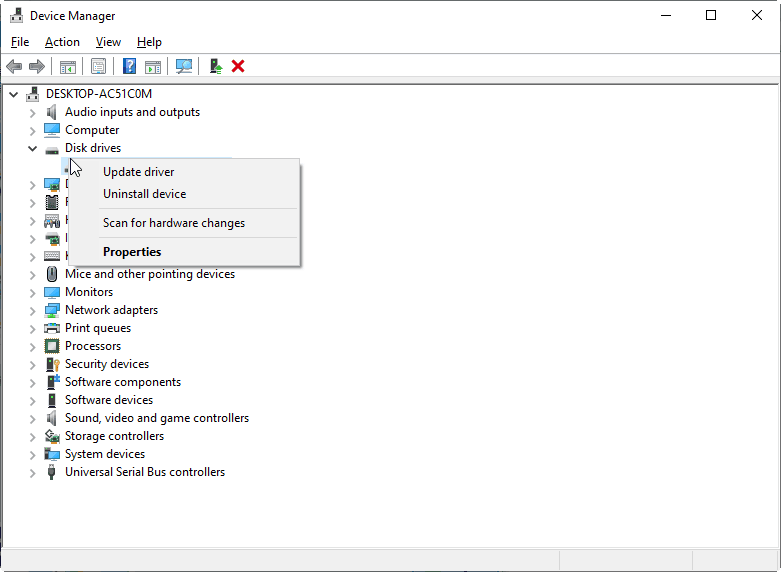
If you haven't updated your drivers or Windows recently, consider doing so. You can manually update your Transcend external hard drive drivers using the Device Manager in Windows. This is also an optional fix when Windows 10 keeps restarting after an update.
Also, it can be feasible to uninstall the driver and restart the computer. Windows will automatically reinstall the correct drivers for your Transcend external hard drive.
Fix 3. Turn to a data recovery service
If none of the aforementioned methods work, it's advisable to consult a professional data recovery service to repair your drive and retrieve your data. Keep in mind that expert evaluation comes with a high cost, so choose a reputable data recovery specialist for your Transcend external hard drive.
Reasons for Data Loss from Transcend External Hard Drive
What are the common causes of data loss in Transcend external hard drives? Here are some common scenarios you may meet.
✐ Deletion/formatting. Removing files from Transcend devices and performing disk formatting will absolutely lead to file loss.
✐ Corrupted file system. Issues like viruses, improper ejection, power loss, and overheating can corrupt the file system, leading to data loss. The typical symptom is the error message: “You need to format this disk before using it”.
✐ Damaged hard drive. Physical malfunctions (unusual noises or failure to start) and logical malfunctions (corrupt file system or damaged partition table) cause file loss from mild to severe.
How to prevent data loss on Transcend external hard drive
When using data recovery software, consider the following tips for optimal results:
✐ Emphasize regular data backups: To mitigate the impact of data loss, regularly back up your important files. Maintain backups on external storage devices or utilize cloud-based services. This ensures that even if your Transcend hard drive fails, you can still retrieve your files from a secure backup.
✐ Avoid writing new data to the drive: To maximize the chances of successful data recovery, refrain from saving new files or making any changes to the Transcend hard drive from which data loss occurred. Writing new data increases the risk of overwriting the lost files, rendering them unrecoverable.
✐ Avoid DIY repairs: If your Transcend hard drive has physical damage, it's best to avoid attempting any DIY repairs. Opening the drive can further damage its internal components and reduce the likelihood of successful data recovery. Instead, seek professional assistance from a data recovery specialist.
Conclusion
Data loss can be a distressing experience, but with the right tools and knowledge, it is possible to recover data from Transcend external hard drives.
In this article, we explored Transcend data recovery using professional and reliable data recovery software AOMEI FastRecovery and RecoveRx. Considering that RecoveRx has many limitations and shortcomings, it is recommended to use AOMEI FastRecovery to recover a Transcend hard disk without losing data. It also supports other storage devices such as Western Digital, Seagate, Toshiba, Dell, Acer, etc.

 as a preferred
source on Google
as a preferred
source on Google