



How to Recover Permanently Deleted Folder from Google Drive: 3 Proven Ways
Recover permanently deleted folders from Google Drive using 3 proven methods. This guide covers Google Support, Workspace admin recovery, and local data recovery with AOMEI FastRecovery when all else fails. Keep reading.

By Ivy Updated on July 14, 2026


You've emptied your Google Drive Trash, only to realize that folder of important work documents was still in there. Or maybe 30 days have passed, and Google automatically wiped it.
Either way, your folder is gone. Or is it?
Permanently deleted doesn't always mean permanently lost. This guide covers 3 ways to recover permanently deleted folders from Google Drive, from official Google support to local recovery tools.
Quick Guide: Which Recovery Method Should You Use?
| ❓ Your Situation | 🎯Best Method |
|---|---|
| You're a regular Google Drive user, and the folder was deleted recently | Method 1: Contact Google Support |
| You're a G Suite/Google Workspace user | Method 2: Ask your administrator |
| You've tried both and failed, or the folder was deleted more than 30 days ago | Method 3: Use AOMEI FastRecovery |
Method 1: Contact Google Support
If your folder is permanently deleted from Google Drive, Google Support may still be able to recover it, especially if the deletion happened recently. This is the safest first step to take.
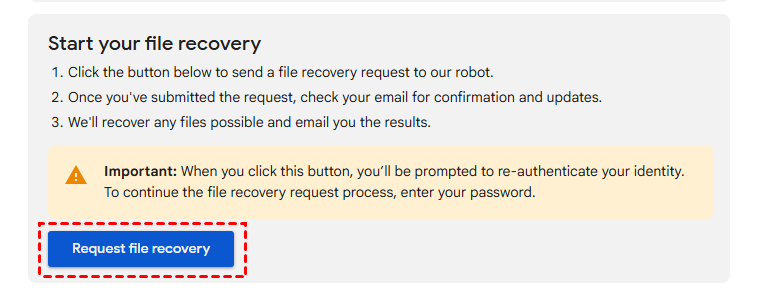
Step 1. Go to the Google Drive Help page. Click Request file recovery at the bottom.
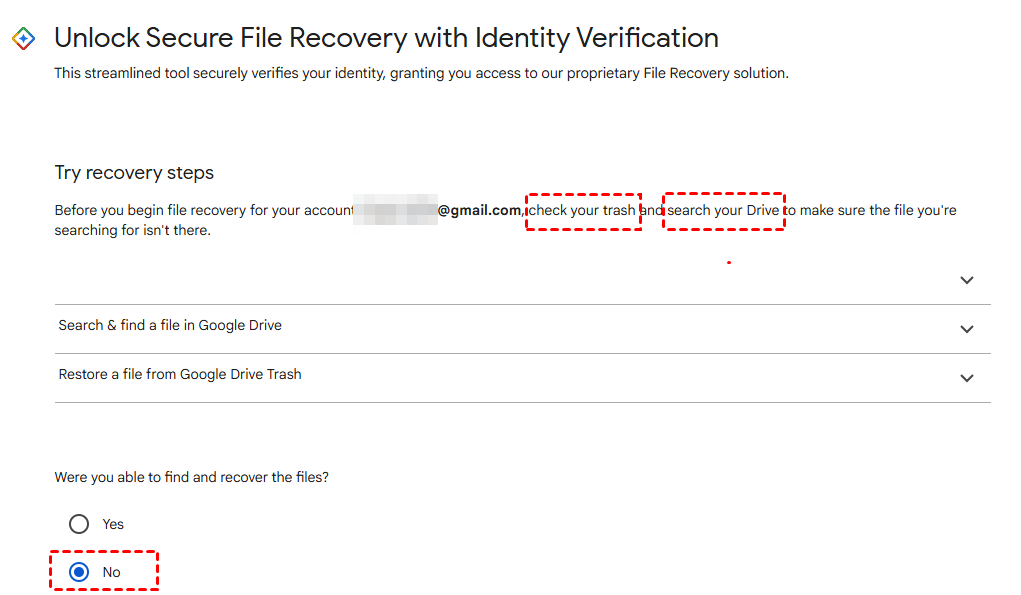
Step 2. Sign in with your Google account. You'll be asked to try recovery steps - check your Trash, or search your drive. If not, click No > Continue.
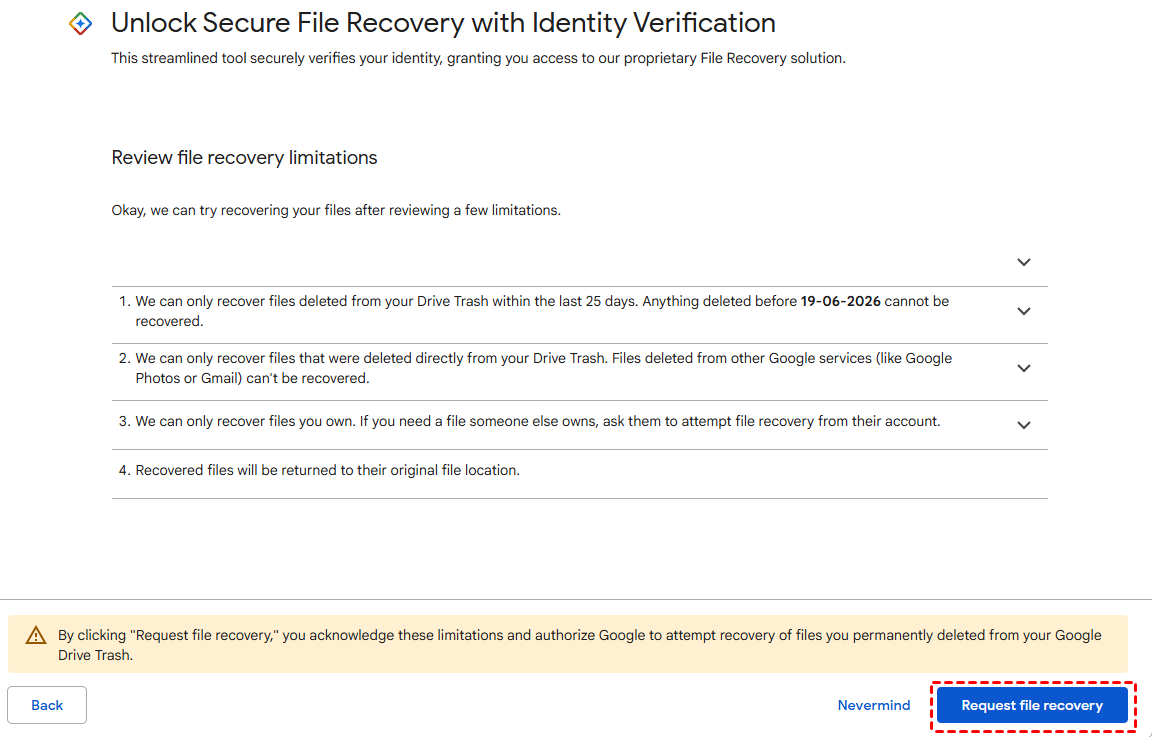
Step 3. Review the file recovery limitation and click Request File Recovery.
After submitting your request, just wait, and you'll receive an email with the result within the next hour.
What If Google Can't Recover Your Folder?
If Google Support is unable to recover your permanently deleted folder, you still have two options:
-
Check if you're a G Suite user, if so, skip to Method 2 below.
-
Try local recovery if you have Google Drive for Desktop installed, your folder may still exist in your local Google Drive folder. Jump to Method 3.
Method 2: Ask Your Google Workspace Administrator
If you're using Google Drive through an organization (school, company, or enterprise), your administrator may be able to recover permanently deleted folders.
How to proceed:
Step 1. Contact your IT administrator or Google Workspace super admin, providing the following details:
-
Your email address
-
The folder name or file names
-
The approximate date of deletion
Step 2. Ask your admin to restore the folder from the Google Admin Console or Google Vault (if enabled).
👉 From the Google Admin Console:
- Log into the Google Admin Console. Then, go to Menu > Directory > Users.
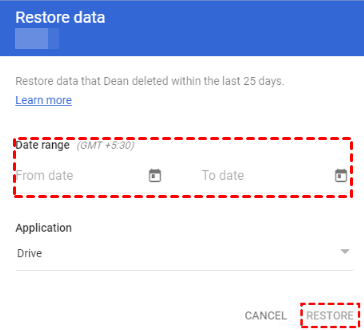
- Locate the target user, right-click it, and select Restore data.
- Select the date range for the data you want to restore. Then, click Restore. Only the last 25 days' data are available.
👉 From Google Vault:
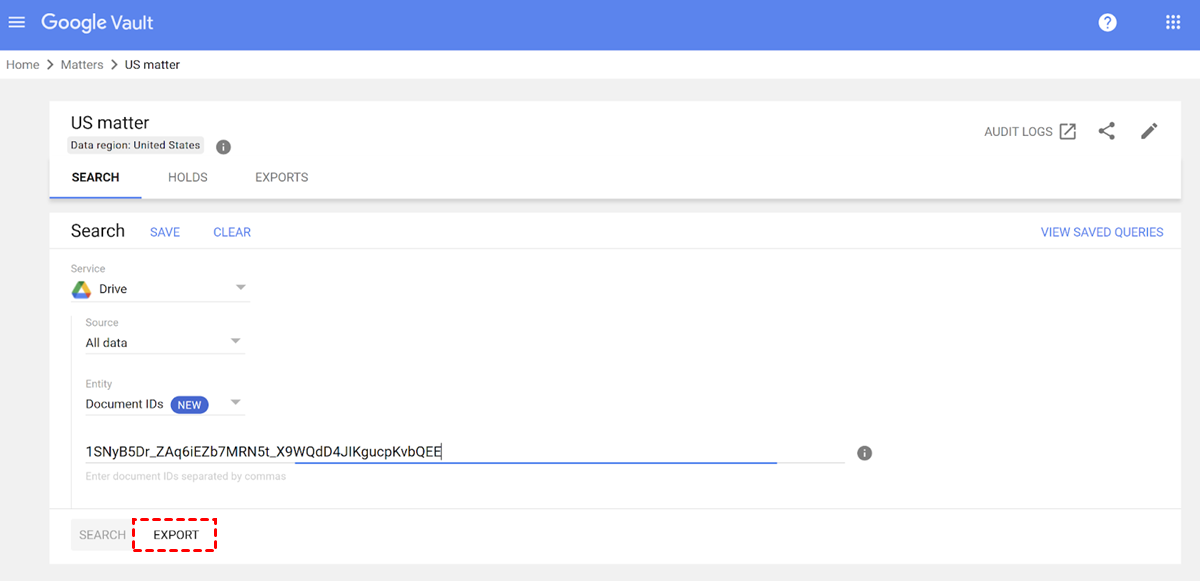
- The administrator signs in to vault.google.com. Go to Matters and create a new matter (or open an existing one).
- Search for the deleted folder or files using the appropriate search queries.
- Select the files you want to recover and export them. Then, download the exported data and manually upload it to Google Drive.
- Neither method preserves share settings, so you'll need to reshare the restored folder if necessary.
- You can only restore data for one user at a time in the Google Workspace Admin Console.
- With Google Vault, deleted items can often be retained for years, provided Holds or Retention Rules are configured.
Method 3: Recover Permanently Deleted Folders with AOMEI FastRecovery
If Google Support can't help, and you don't have a Workspace admin, or if the deletion happened more than 30 days ago, your last option is local data recovery.
If you had Google Drive for Desktop installed and synced, your folder may have left traces on your local hard drive. Even if the folder was deleted from the cloud, local copies may still be recoverable.
AOMEI FastRecovery is a professional data recovery tool that can scan your local Google Drive folder and recover permanently deleted folders in a few clicks.
 AOMEI FastRecovery
 - 🔎 Dual-Scan Mode: Quick Scan for recently deleted files, Deep Scan for complex data loss. Together, they give you the best chance of recovery.
- 📁 1000+ Data Types: Recover deleted or lost documents (TXT, DOC, XLSX, CSV), images (JPG/JPEG, PNG, GIF), videos (MP4, MOV, AVI, WMV), audio, and more.
- 🛡️ Wide Range of Scenarios: Recover files from accidental deletion, disk formatting, system crashes, unbootable drives, and more.
- 🚀 Find Your Files Fast: Browse by type or path, preview files, and recover only what you need. No more digging through endless lists.
- ✅ Safe & Easy to Use: Read-only, no data overwriting. simple, intuitve interface.
- 🎁 Try It with No Risk: Free edition recovers up to 500MB - no commitment, no quality compromise.
 100% Secure
How to Recover Permanently Deleted Folders with AOMEI FastRecovery:
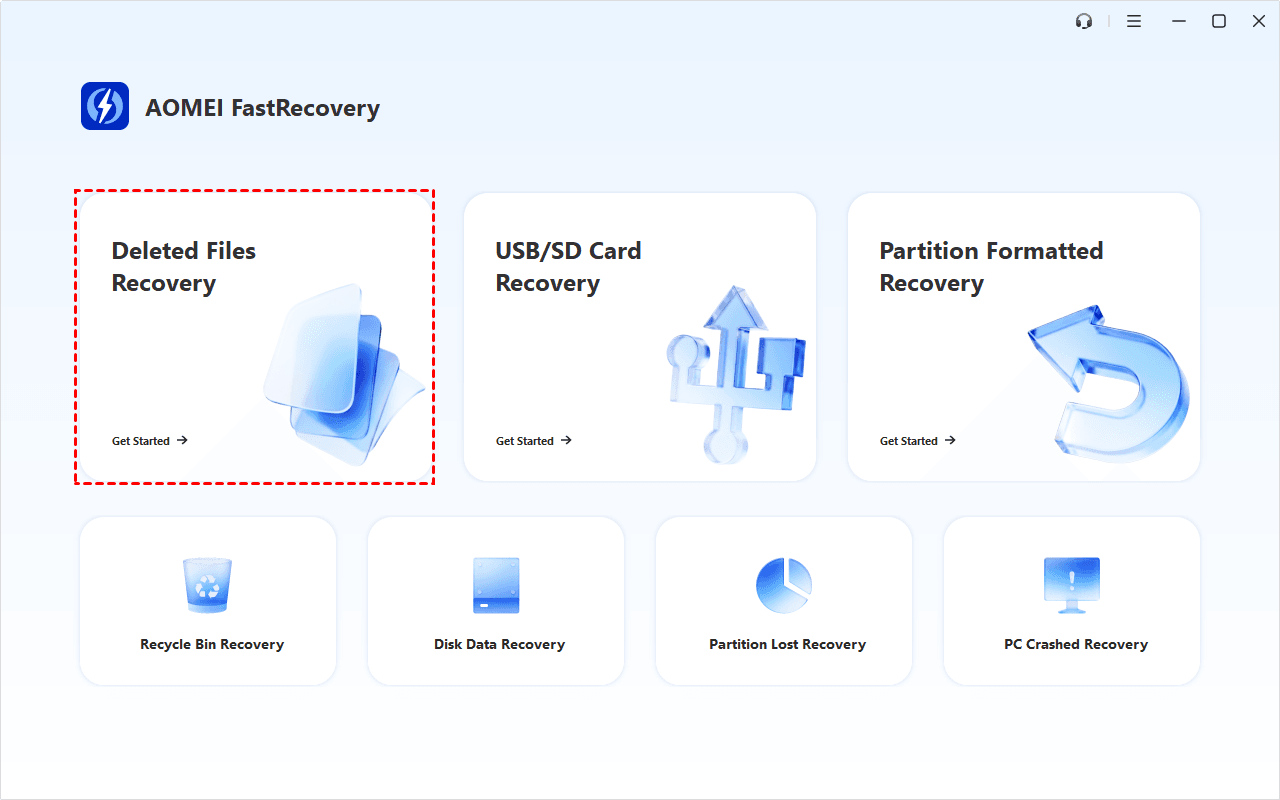
Step 1. Install AOMEI FastRecovery on your Windows PC and launch it. Then, click Deleted Files Recovery for fast recovery. You can also choose Recycle Bin Recovery, Disk Data Recovery, etc., to find a more suitable one.
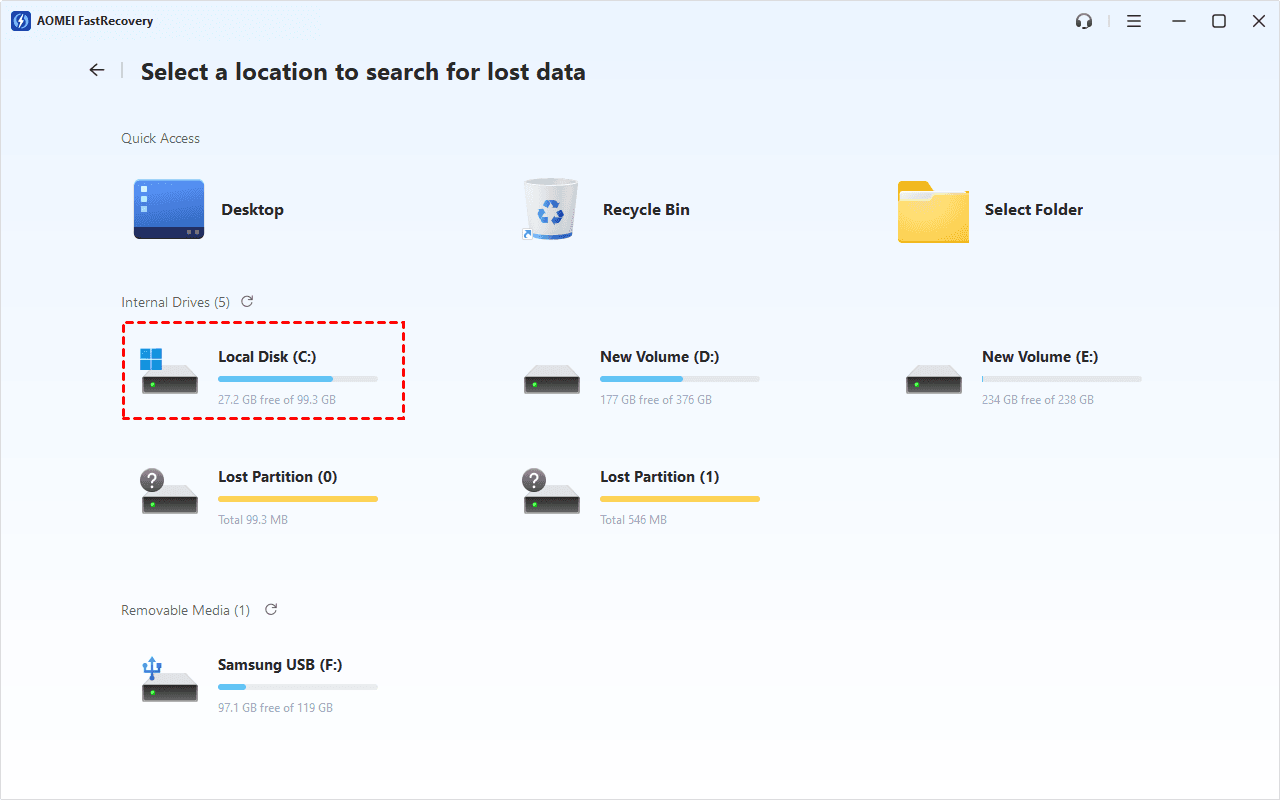
Step 2. Hover over the drive that contains your local Google Drive folder and click Scan. The Quick Scan starts automatically.
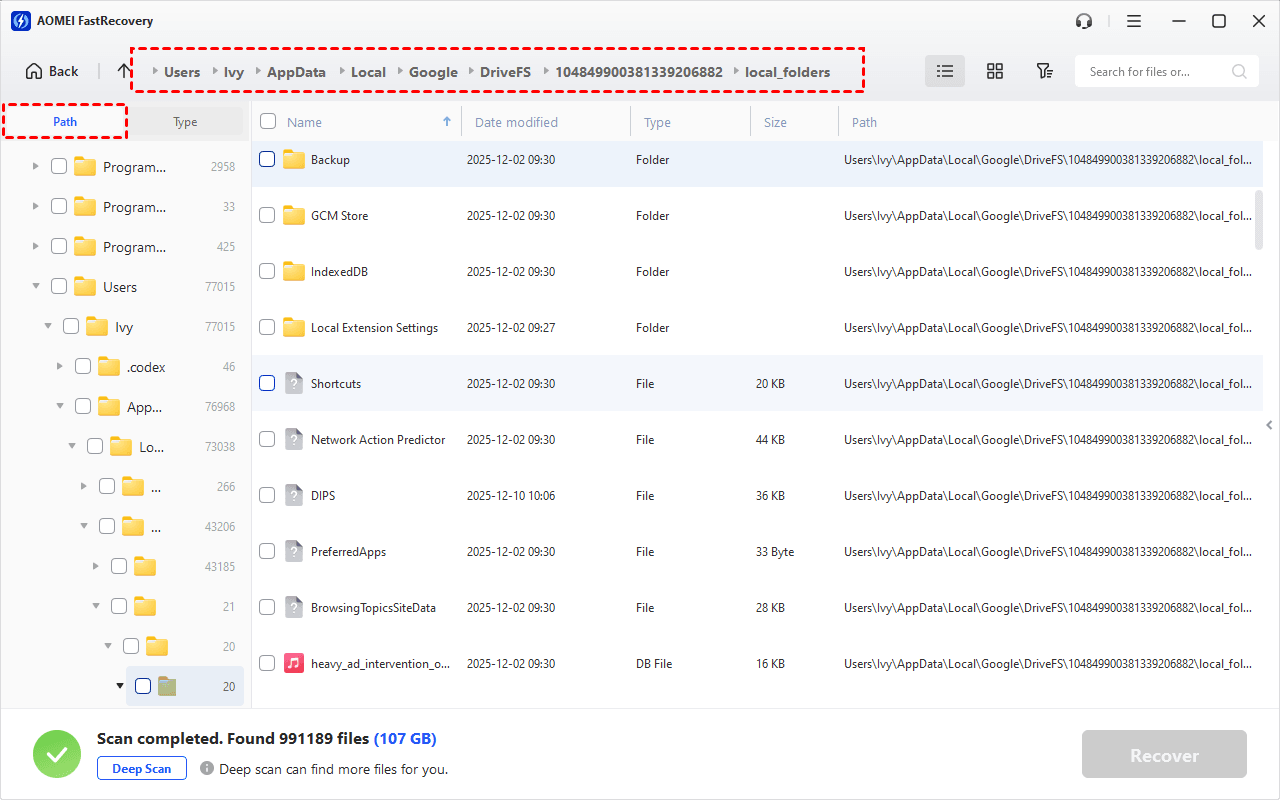
Step 3. Once the scan completes, you'll see all recoverable files. Under the Path section, go to where your permanently deleted Google Drive folders were and sort the results using column headers (Name, Date Modified, Type, etc.).
-
You can find permanently deleted Google Drive folders by Type, along with search or filter features.
-
Click the Deep Scan to find more data if Quick Scan fails. It will scan every sector of the disk and take longer.
Step 4. Preview the files by double-clicking them. Select the folders and files you want to recover and click Recover to get your permanently deleted folder from Google Drive back.
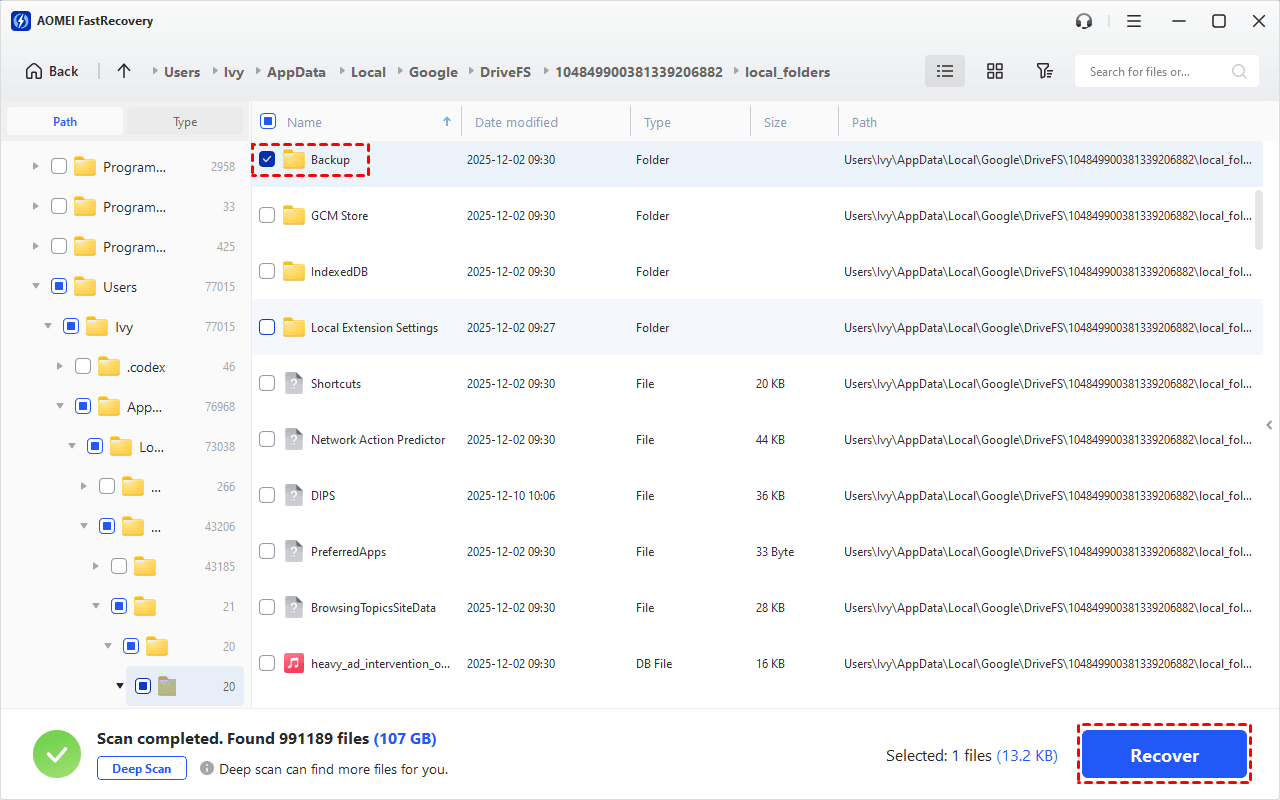
Always choose a new location to save your recovered folder. Do NOT save recovered files to the original Google Drive folder location, as this may permanently overwrite the data you are attempting to recover.
FAQs About Google Drive Folder Recovery
1. How long does Google keep permanently deleted files?
Google keeps deleted files in the Trash for 30 days for regular accounts. After that, they're permanently deleted but may still be recoverable via Google Support or local recovery tools.
2. Can I recover a folder deleted by someone else?
If the folder was shared with you and the owner deleted it, you'll need to contact the owner directly. Google Support can't recover folders you don't own.
3. What's the difference between regular and G Suite accounts for recovery?
Regular accounts can request recovery via Google Support. G Suite/Workspace accounts must go through their administrator, who has a 25-day window for restoring deleted data.
How to Protect Your Google Drive Folders from Permanent Deletion
Prevention is always better than recovery. Here are three practical steps to avoid permanent data loss:
#1: Enable version history: Google Drive keeps file versions for 30 days (or longer for Workspace). Right-click a file > Manage versions to access older copies.
#2: Set up Google Drive for Desktop: Keep a local copy of your Google Drive folders on your computer. Even if files are deleted from the cloud, the local copies may still be recoverable.
#3: Back up regularly: Use a free backup tool like AOMEI Backupper Standard to schedule automatic backups of your local Google Drive folder.
Final Words
Losing a permanently deleted folder from Google Drive can feel like a nightmare. But as this guide shows, recovery is often possible — whether through Google Support, your admin, or local recovery tools.
Here's the simple rule:
-
If the deletion happened recently, try Google Support first.
-
If you're a Workspace user, contact your admin.
-
If both fail, use AOMEI FastRecovery to scan your local drive.
Your files are worth saving. Start recovery now.

 as a preferred
source on Google
as a preferred
source on Google