




How to Recover Deleted Ring Videos [2026]
Want to recover deleted Ring videos? Scroll down to learn the retention, possibility, and 2 proven methods, along with step-by-step instructions.

By Ivy Updated on May 6, 2026


Does Ring automatically delete videos?
Ring LLC manufactures intelligent home devices to guard people’s home security. With video doorbells, alarm systems, and cameras, users can know who is visiting from recorded videos. Similar to backing up PC to cloud, Ring saves the recorded videos in the cloud storage space, allowing users to check, share, and delete.
Ring has suggested that users download the videos to their local storage devices before they are deleted automatically. However, many users are still facing video loss from Ring. No matter whether they have downloaded the videos to their local devices.
Need to retrieve an accidentally deleted video from Ring
I deleted a video by accident that I needed. Is there a way to retrieve it??
- Question from Ring Community
I Want to Recover Accidentally Deleted Video from Web Interface
I just discovered that if you are looking at your event history on the web interface, then ACCIDENTALLY tap the delete button, it does NOT ask you to confirm deletion! It WAS something I wanted to keep and potentially very important, so I am very upset that this happened! How can I recover them??
- Question from Ring Community
Perhaps you are now in a similar plight. Before saving you from the trouble, let’s check how long the videos will be kept, and whether it is possible to recover them first.
How long does Ring keep videos?
By default, Ring allows users to store recorded videos in the cloud for 60 days. With Ring Protect Plan subscribed, the videos will remain for 180 days.
It also offers customized video storage selections from at least 1 day to 180 days. After 180 days, the videos will be permanently removed.
Is it possible to recover accidentally deleted Ring videos?
Simply put, it depends on the location of the Ring videos.
✘ On the Cloud storage space (Server).
✔ On the local storage devices (your computer/external hard drives/SD card/flash drives).
Since the videos are kept on the Ring’s Server to protect users’ privacy by default, users cannot recover the videos after deletion. But things will be different if the videos have been downloaded to your local hard disks.
With proper and advanced tools, users can recover permanently deleted videos from local devices. Check out the detailed guide below.
How to recover deleted Ring videos (2 Ways)
The longer a video is deleted, the more difficult it is to recover because the data might get overwritten in your daily use. So there is no time to lose, and start getting the videos back in the following 2 proven ways right now.
Method 1. Recover deleted Ring videos with software effortlessly
How to retrieve deleted Ring videos from local storage space? The first action is to check the Recycle Bin. Luckily, the videos are still there and can be restored quickly. If the deleted files are not in the Recycle Bin, then try using a professional data recovery tool to restore them.
How to pick a tool? The eligible and trustworthy apps should be:
- The interface is clean and user-friendly.
- Covers multiple data loss scenarios.
- Fast data recovery with a high success rate.
- Compatible with operating systems/data types/multiple devices/file systems.
Among the seas of data rescue apps, AOMEI FastRecovery will be the best choice. It is developed by AOMEI, the leading benchmark in the data security industry. You can find delete Ring videos and restore them in a breeze.
 AOMEI FastRecovery
- With 2 advanced scanning technologies, you can recover data in any scenario, such as permanent deletions, disk formatting, system crashes, virus attacks, etc., with a high success rate.
- Support a wide range of video formats, such as MP4, MOV, AVI, ASF, WMV, RM, FLV, QSV, RMVB, X3F, etc.
- Support file filter, search, preview, and crashed PC recovery, making recovery simple and efficient.
- Recover lost or missing files from internal/external HDD, SSD, USB flash device, SD card, etc., regardless of whether they are healthy, formatted, or damaged.
- Support Windows 11/10/8/7 SP 1 & Server, as well as NTFS/FAT32/exFAT/ReFS, and so on.
- 👍Free data recovery, supporting up to 500MB.
 100% Secure
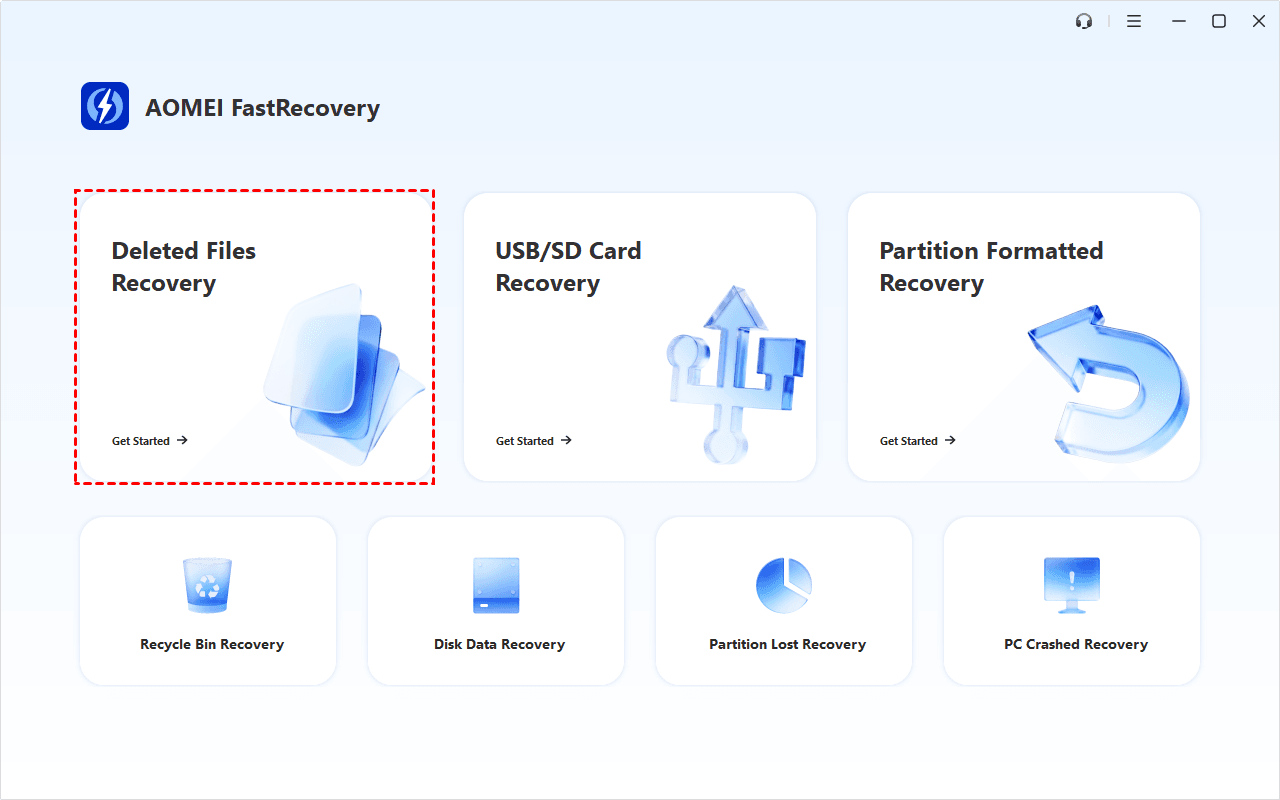
Step 1. Start deleted files recovery
Install and run the dedicated data recovery tool - AOMEI FastRecovery. Connect the external storage device to your PC correctly as well. Then, click Deleted Files Recovery to get started.
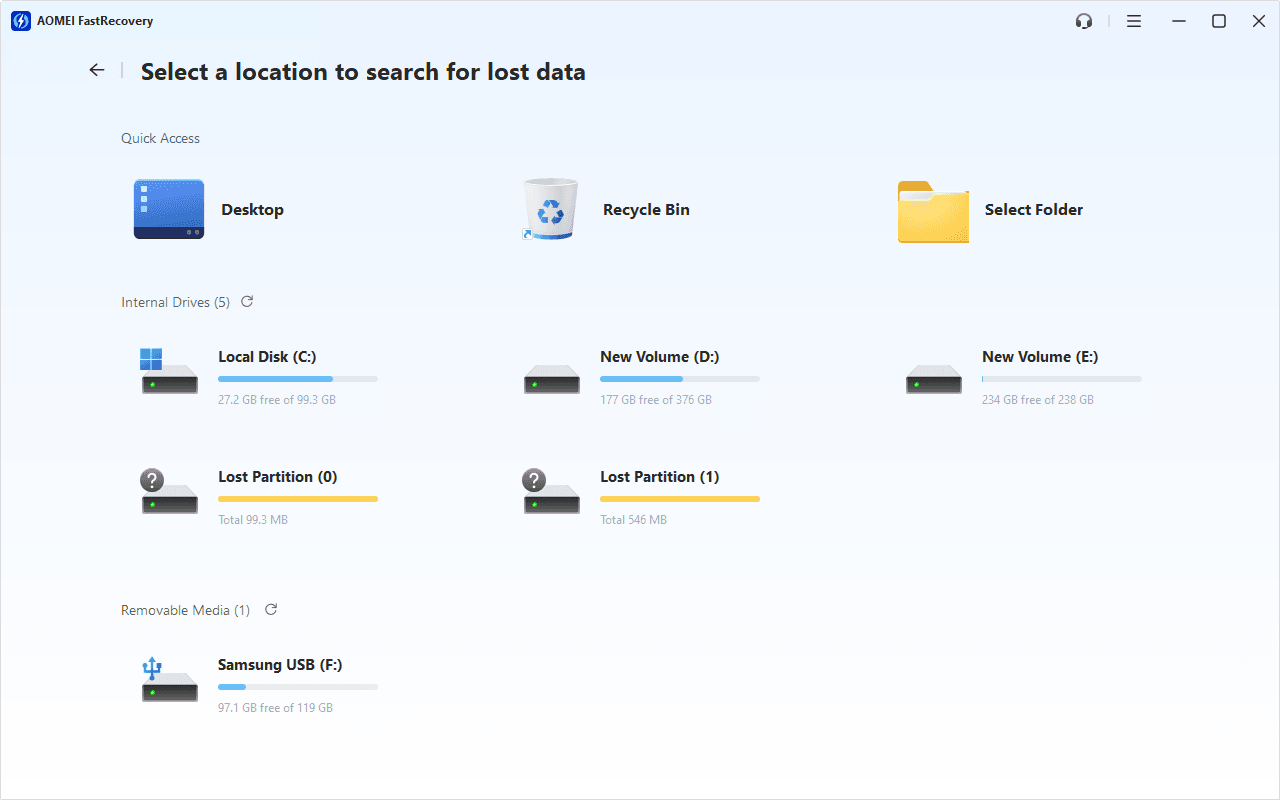
Step 2. Scan your drive
You'll see a list of devices. Hover the mouse over the drive saved deleted files are, and click Scan to start the quick scanning process and display all recoverable data.
Under the Type section, check Videos and find deleted Ring videos, usually displayed as .mp4 files. To locate files quickly, directly type the name.
Step 3. Recover deleted Ring videos
Select deleted Ring videos and click Recover. Double-click to preview them if you are not sure. It is suggested to store the recovered videos in another place to avoid overwriting.
-
You can also locate deleted files by Path if you remember this.
-
Click the Deep Scan button if the Quick Scan fails. Deep Scan searches every sector of the disk to find more files.
-
You can recover deleted Ring videos for free, up to 500MB. To enjoy unlimited data recovery, please upgrade to the advanced edition of AOMEI FastRecovery.
Method 2. Check the share link to other platforms
Ring allows users to share videos with others or on other platforms. According to Ring, users can access the shared link even after deletion. Just go and check the share link to other platforms. Don’t forget to save or download the videos to a safe place.
Conclusion
This article teaches users to recover deleted Ring videos from the local drives and the shared platforms. Since Ring keeps the video recordings on the cloud server and protects them from being accessed after deletion, users can only download the videos to local drives.
Thus, the videos can be recovered using professional data recovery apps like AOMEI FastRecovery. What’s more, some tips and suggestions are ready to promote data security and avoid data loss in the future.
- Subscribe to the Ring Protect Plan to prolong the storage time.
- Download important videos before they get automatically deleted.
- Be careful when deleting files manually.
- Back up important videos using professional data backup software for Windows.
- Save videos and other essential files in different places as copies.

 as a preferred
source on Google
as a preferred
source on Google