




AVI File Recovery: How to Recover Deleted AVI Files Easily
Need to recover deleted AVI files? Get powerful data recovery software to perform AVI file recovery with ease. It also includes ways to repair AVI files and some tips on AVI file recovery.

By Ivy Updated on July 27, 2026


What is an AVI file?
AVI stands for Audio Video Interleave and is a popular video file format. Developed by Microsoft in 1992 as an extension of the RIFF format, AVI is widely used for storing high-quality multimedia content.
So the process of creating, editing, or downloading them can be laborious and time-consuming, especially when dealing with original content. Unlike other file extensions like MP4 or MOV, large AVI file sizes can be problematic for users with limited space.
But AVI continues to be widely utilized as a global video extension due to its capability to store and playback video and audio content, employing various codecs such as DivX and XviD for coding purposes. This versatility in handling different codecs contributes to its continued popularity as a preferred multimedia storage and playback format.
How to recover deleted AVI files effortlessly
To easily recover deleted or lost AVI videos, using powerful AVI video recovery software - AOMEI FastRecovery is the best choice. Designed to recover deleted or lost videos from any storage device, it can maximize the chances of a successful AVI video recovery and minimize the impact of data loss.
 AOMEI FastRecovery
- 🧩 All-inclusive: Handle data loss scenarios such as deletion, disk formatting, system crashes, or virus attacks.
- 📚 1000+ data types: Recover deleted or lost videos (AVI, MP4, MOV, WebM, etc.), photos (JPG, PNG, TIF, HEIC, GIF), documents (TXT, DOC, XLSX, CSV, PDF), etc.
- 🔎 Advanced scanning methods: Integrate Quick Scan & DeepScan to search all the recoverable files.
- 🚀 High-efficiency: Organize and display recoverable data by Type or Path, allowing you to sort, search, filter, and preview files before recovery.
- ✅Excellent compatibility: Support NTFS, FAT32, exFAT, and ReFS file systems and be compatible with Windows 11, 10, 8, 7, or Server PC.
 100% Secure
🔥Bonus! AOMEI FastRecovery offers unlimited times for you to recover 500MB of files for free. If you only need to recover one AVI file within 500MB, you do not need to pay for it. Have a try!
Step 1. Choose the drive to scan
Install and launch AOMEI FastRecovery on your Windows> hover the mouse over the C drive > click Scan.
Step 2. Filter and preview files
AOMEI FastRecovery will automatically run Quick Scan to scan your C drive and display all the recoverable files.
The scanning results are displayed by Type or Path. Under the Type section, select Videos and sort for AVI files by name, date modified, type, size, etc.
Step 3. Recover AVI videos
Go to the Recycle Bin folder and select the needed AVI video files. Then, click “Recover” to start the AVI video recovery.
After the process, you can check your recovered AVI video files.
⚠️Notes:
✅ After video recovery, please save your retrieved AVI videos in another path.
✅ Please avoid writing new files to yourcomputer because any newly added data can overwrite the deleted or lost AVI videos. Once overwritten, your videos may be lost forever.
How to repair AVI files if your AVI file not playing
Once the AVI videos are recovered, it is not uncommon for some of them to be broken or unplayable. Why is the AVI file not playing? Bad sectors of the storage drive, virus or malware infection, or power interruptions are also blamed for corrupted AVI files.
So, how to repair AVI files? Perhaps the following fixes can give you a hand.
Fix 1. Run CHKDSK with parameters to fix errors on storage devices
In some cases, it’s a corrupt storage drive instead of the AVI videos that discourage the videos from playing. Try the built-in Windows tool, CHKDSK, to scan and repair errors on the storage drive.
⚠️Note: Please enter the command with specific parameters such as /f, /r, /x, or /b because CHKDSK can actively fix errors on the volume rather than simply displaying the volume status.
Step 1. Connect your storage device to a working computer and type “cmd” in the search bar. Then, select “Run as administrator” to open the command prompt window.
Step 2. Type “chkdsk X: /f /r /x” in the command prompt window. Please remember to replace X with the real drive letter of your storage device.
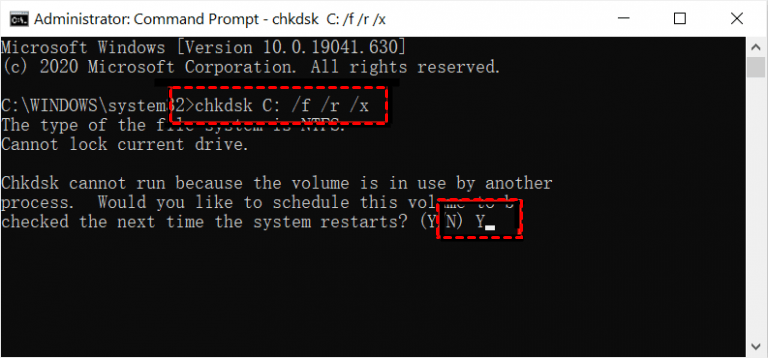
Please wait to see this notice: Windows has made corrections to the file system.
Fix 2. Repair AVI files using VLC Media Player
VLC is a famous video player known for its versatility and ability to handle a wide range of audio and video file formats without the need for additional codec downloads.
Besides multimedia playback, VLC serves as a proficient AVI repair utility by building an index and making them playable again. Please note that the size of the video can affect the speed of the repair process.
Step 1. Install and run VLC media player > select Preferences under the Tools tab.
Step 2. In the Input & Codecs Settings interface, go to Damaged or incomplete AVI and select Always fix. Click “Save” to keep these modifications.
Fix 3. Convert AVI to MP4 or other formats
It's worth noting that AVI files are primarily designed for Windows devices, which can cause compatibility issues with Mac’s default QuickTime player. Therefore, you can convert AVI videos to other supported formats, such as MP4, MOV, or WMV, using free online tools like CloudConvert.
Additionally, if an AVI file fails to open after downloading from the Internet, please re-download the file to ensure a complete and uninterrupted download process.
How to open AVI files on Windows 10 and Mac
How to open a AVI file? You can seek help from various video players to access, convert, or edit AVI videos.
For Windows OS:
Microsoft Movies & TV, Microsoft Windows Media Player, Abode Premiere Pro 2023, CyberLink PowerDirector 365, VideoLAN VLC media player, Kodi, FFmpeg
Press Win + E to open File Explorer > click Downloads > right-click on your stored AVI video file > select Open with > Media Player to open a downloaded AVI file on a Windows 10 PC.
For Mac:
When it comes to problems regarding how to open AVI files on Mac operating systems, please try the following video players.
- Apple QuickTime Player
- Adobe Premiere Pro 2023
- Eltima Elmedia Player
- VideoLAN VLC media player
- ShedWorx Smart Converter
- Kodi
- FFmpeg
Conclusion
What is AVI? How to open AVI files on Windows 10 and Mac? And how can I recover permanently deleted AVI files on Windows? You can restore videos from ready backups or powerful AVI recovery software like AOMEI FastRecovery.
Please keep in mind that professional services may come with a cost, but they can be invaluable if your AVI files are of great importance or value. Why not give the free version a try to recover up to 500MB of data for free!

 as a preferred
source on Google
as a preferred
source on Google