




What Is an ASF File & How to Recover ASF Files
Get ways to recover ASF files after finding out what an ASF file is in this article. Meanwhile, there’s a recommended Windows backup tool and some ASF file recovery tips.

By Ivy Updated on February 28, 2026


What is an ASF file?
ASF (Advanced Systems Format) is a flexible container file format developed by Microsoft for storing, playing, and streaming digital media like audio and video. It acts as the "wrapper" for Windows Media Audio and Windows Media Video, comes with the WMA extension, and the WMV extension.
In simple terms, ASF is designed to make media delivery smooth and reliable across different situations. Its main goals are:
- Play files perfectly from local drives, HTTP web servers, or media streaming servers.
- Support different types of media (audio, video, etc.) and adjust quality for various devices and internet speeds.
- Let a single multimedia composition perform well across various bandwidth conditions (scalability).
- Give creators control over which parts of the media get priority when bandwidth is low.
- Maintain independence from specific multimedia or computer OS, data communications protocols, ensuring compatibility and interoperability across different platforms and environments.
Overall, ASF helps ensure synchronized, adaptable, and cross-platform playback of Windows Media files, whether you're streaming online or playing locally.
Possible reasons for ASF file loss
Besides deletion, other relevant reasons cause ASF video loss:
◆ Corrupted file systems of your memory card render ASF video files unreadable.
◆ Prematurely disconnect a memory card from a camera to your PC during photo transfer.
◆ Windows Defender automatically deletes files infected by virus or malware software.
◆ Accidentally formatted the card containing your desired ASF videos after receiving the following error message.
◆ Unexpected system shutdowns.
◆ Power outages.
How to recover deleted/lost ASF files without backups
Deletion emerges as the predominant scenario among various circumstances that result in the loss of ASF files. So, can you recover deleted ASF audios or videos even without backups?
Without backups, powerful video recovery software - AOMEI FastRecovery guarantees a significantly high recovery rate for deleted and missing ASF files if they haven’t been overwritten by new data. Usually, the earlier you begin file recovery, the greater your chances of success.
 AOMEI FastRecovery
- 📚 1000+ recoverable file types: Recover deleted or lost videos (ASF, AVI, MKV, WMV, RMVB, WebM, etc.), audios (WMA, MP3, WAV, AIFF), photos (JPG, PNG, TIF, HEIC, GIF), etc.
- 🧲 Complete recovery: With Quick Scan and Deep Scan methods, it ensures comprehensive data retrieval and recovery without compromising file quality.
- 💪 Simple and efficient: Support sort, search, and filter to quickly narrow down your search; Preview files to find them precisely.
- 💾 Excellent compatibility: Support HDDs/SSDs, external drives, USB drives, SD cards, andNTFS, FAT32, exFAT, and ReFS file systems.
- 💻Recoverable scope: Recover data in any scenario, such as permanent deletions, disk formatting, system crashes, virus attacks, etc.
 100% Secure
📍📍📍Notes:
✅ Please install AOMEI FastRecovery and saveretrieved ASF files in a new path to avoid data overwriting.
✅ With AOMEI FastRecover, you can recover data for free, up to 500MB.
Step 1. Open AOMEI FastRecovery after installing. Hover the mouse over the drive (e.g., C drive) where the deleted ASF files are saved, and click Scan.
Step 2. It will automatically run Quick Scan to scan your selected drive and display all the recoverable files. Under the Type section, select Audios and WMA. Or select Videos, then ASF or WMV.
Step 3. Double-click the files to preview and select the right ones. Click “Recover” to start the recovery process. Remember to save retrieved ASF files to a new location to prevent data overwriting.
After data recovery, you can go to the path where you saved the retrieved ASF files.
Another 3 methods to recover ASF files
Apart from that, there are 3 feasible solutions to perform ASF file recovery.
Way 1. Show hidden files, folders, and drives
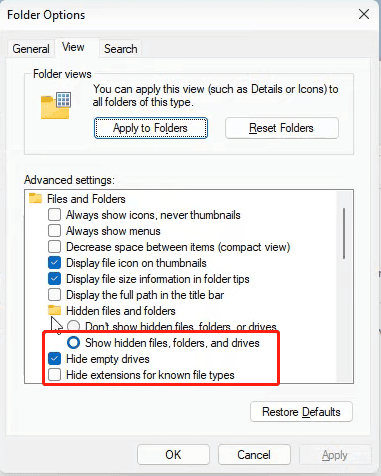
In some cases, ASF video files may become invisible when your storage devices get infected by viruses or malware. Try to show hidden files in File Explorer.
Step 1. Press Win + E to open File Explorer. Click the drive that stores your wanted ASF videos before missing, and click View > Options.
Step 2. Under the View tab, scroll down and tick Show hidden files, folders, and drives. Then, click Apply to save modifications.
Way 2. Restore deleted ASF files from Recycle Bin
Recycle Bin is a temporary storage to save deleted files before permanent deletion, especially recently deleted files, whether it's accidental deletion or not.
Step 1. Double-click to open your desktop Recycle Bin.
Step 1. Find the deleted ASF files you want to retrieve, right-click on them, and select Restore.
Way 3. Restore deleted ASF files from File History
The presence of backups is crucial for the restoration process. As a free backup feature, File History provides the ability to back up user files, such as Videos, Documents, Music, Pictures, Desktop folders, and offline OneDrive files on your PC. You can restore them when your files are deleted, missing, or overwritten.
Step 1. Type “System and Security” in the search bar to open it. Under the File History tab, select the “Restore your files with File History” option.
Step 2. Click the “Restore personal files” button.
Step 3. Select the desired ASF files and click the “Restore” button. To change the location, click the Settings icon and select Restore to.
How do I open an ASF file in Windows 10/11?
In Windows, you can seek help from Microsoft Movies & TV, Windows Media Player, File Viewer Plus, CyberLink PowerProducer 6, VideoLAN VLC media player, Nullsoft Winamp, or Applian Relay Converter to open ASF files.
Let’s show how to open ASF files via Microsoft Windows Media Player.
Please press Win + E to open File Explorer > click Downloads > find the downloaded ASF video you want to open > click Open with > select Media Player.
For Mac OS, you can try the following media players.
- VideoLAN VLC media player
- ShedWorx Smart Converter
- Aiseesoft Mac Video Converter Ultimate
- NCH WavePad
In the End
In summary, losing ASF video files from digital storage devices could be disheartening. The importance of these deleted/lost videos prompts the desire for ASF video recovery. Occasionally, ASF files can become corrupted due to various reasons, resulting in ASF video loss.
To prevent such situations in the future, it’s strongly recommended to regularly back up all your ASF videos on different digital devices. Try built-in tools like Backup and Restore (Windows 7), File History, etc., or third-party backup software - AOMEI Backupper.

 as a preferred
source on Google
as a preferred
source on Google