




How to Recover Deleted CCTV Footage from DVR
How to recover deleted CCTV footage from DVR? Try powerful data recovery software - AOMEI FastRecovery, or command line utility - Windows File Recovery.

By Ivy Updated on March 25, 2026


What does CCTV footage mean?
Known as video surveillance, CCTV (Closed-circuit television) uses video cameras to send a signal to a specific location and display it on a limited number of monitors. It differs from broadcast television in that the signal is not broadcast openly, but it may use point-to-point (P2P), point-to-multipoint (P2MP), or mesh-wired or wireless links.
CCTV cameras are commonly installed in areas that are frequently crime hotspots, such as entrances and exits. Besides, it can be used to keep an eye on pets or children in the home and monitor blind spots around the home.
How to recover deleted CCTV footage from DVR
As you can see, the Micro SD card is the data carrier of CCTV cameras. In this scenario, recovering deleted videos from CCTV footage refers to recovering data from Micro SD cards. There are 2 feasible data recovery tools for retrieving CCTV footage from DVR.
Method 1. Recover deleted CCTV( DVR) footage with AOMEI FastRecovery
Supported by advanced high-tech, professional CCTV footage recovery software, AOMEI FastRecovery makes it easier for you to recover deleted CCTV footage from DVR. It is easy to use and recover CCTV footage without losing quality.
 AOMEI FastRecovery
- Handle deleted file recovery, formatted file recovery, computer crashed recovery, virus attack recovery, and more.
- The two advanced scanning methods, Quick Scan and Deep Scan, can search all the recoverablefiles.
- Recover multiple video formats, including MP4, MOV, AVI, ASF, WMV, MJPEG,RM, FLV, QSV, RMVB, X3F, etc.
- Support file filter, search, preview,crashed PC recovery, etc., making recovery simple and efficient.
- Recover the deleted/lost files from SSD, HDD, USB flash drive, Micro SD card, and other storage media.
- Recover a total of 500MB of files for free. 🔥
 100% Secure
Step 1. Download and install AOMEI FastRecovery on your Windows. Then, connect your Micro SD card to this PC.
Step 2. After launching AOMEI FastRecovery, hover the mouse over your connected Micro SD card and click Scan.
Step 3. You can quickly locate your desired video files. Under the Type section, click Videos and select the deleted footage to recover.
Step 4. Once found, preview the selected footage and click the “Recover” button. Please select a new location to recover deleted CCTV footage to prevent data overwriting.
Method 2. Recover deleted CCTV footage with Windows File Recovery
If you’re proficient in CMD, you can recover data from a Micro SD card using Windows File Recovery, released by Microsoft. It interacts with users through a command-line interface because there is no accessible graphical user interface.
You’ll be prompted to use CMD to recover files if you’re going to recover the lost files from your local storage media (HDD/SSD/USB/SD card/Micro SD card) via this command-line software.
Notes:✎...
- It allows you to recover Word, PPT, Excel, MP3, MP4, ZIP, PDF, PNG, MPEG, and JPEG.
- The destination drive (where to save the retrieved files) is different from the source drive (the Micro SD card saves your deleted files).
- Two basic modes (Extensive and Regular) and two advanced modes (Segment and Signature)
- Support NTFS, FAT, exFAT, and ReFS file systems. Click This PC > the source drive >Properties to figure out your file system.
Step 1. Select a suitable mode according to your file system and data loss scenarios.
|
File system |
Scenarios |
mode |
|
NTFS |
Deleted recently |
Regular |
|
NTFS |
Deleted for a while |
Extensive |
|
NTFS |
Formatted disk |
Extensive |
|
NTFS |
corrupted disk |
Extensive |
|
FAT and exFAT |
Any |
Extensive |
Step 2. Select the recovery swicthes.
|
Switches |
Definition |
Supported mode(s) |
|
/n |
Filter the scan range: scans for a specific file with its file name/path/type, etc. |
All |
|
/y: |
Recover specific extension groups. |
Signature |
|
/k |
Recovers system files. |
NTFS Segment |
|
/u |
Recovers undeleted files, for example, from the Recycle Bin. |
NTFS Segment |
Step 3. Click “Get” to download Windows File Recovery from the Microsoft Store and then install it on your PC.
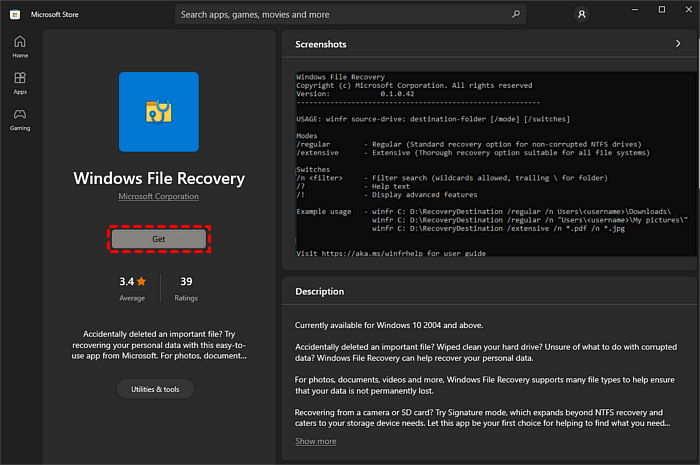
Step 4. Click “Open” after installation. Then, put your adjusted command lines in the Command Prompt window.
For instance, to recover deleted videos (MP4 files) from F drive to D drive, enter “winfr F: D: /extensive /n *.mp4”. Then, press the “y” key to continue. You can also press the “Ctrl + C” keys to stop the recovery process.
Conclusion
How to recover deleted CCTV footage from DVR? Please get an overview of the above data recovery tools. In theory, powerful Windows File Recovery can help you recover data from Micro SD cards.
But in practice, adjusting and resembling command lines is difficult for non-tech users to operate. So why not give the above-recommended software, AOMEI FastRecovery, a shot? It allows you to recover deleted videos from Hikvision CCTV effortlessly.
If you’ve realized the importance of regular backups, in this case, you must make disk backups using free backup software for Windows. Because only backups can prevent data loss at the source.
Recover deleted CCTV footage FAQs
1. Where is CCTV footage stored?
CCTV footage is typically stored on a Digital Video Recorder (DVR), Network Video Recorder (NVR), or in the cloud, depending on the system setup.
2. Does CCTV footage get deleted automatically?
Yes, most CCTV systems automatically overwrite old footage when the storage is full, following a loop recording method.
3. Is it really possible to recover deleted CCTV footage?
Yes, it is often possible to recover deleted CCTV footage from Hikvision DVR using data recovery software, professional services, or backups.
4. Can I get CCTV footage from 2 years ago?
Generally, no. If the system uses loop recording, footage older than the storage capacity will have been overwritten unless you have a backup.
5. How can I prevent losing CCTV footage in the future?
Regular backups, checking system settings, and ensuring your hardware is in good condition can help prevent data loss.
6. How to delete CCTV footage?
You can delete CCTV footage through the DVR or NVR menu, usually by selecting the specific recordings you want to remove and choosing the delete option.

 as a preferred
source on Google
as a preferred
source on Google