


Best Gptgen Alternative for Windows PCs: Convert MBR to GPT Safely
Looking for the Gptgen alternative to convert a disk to MBR or GPT more easily? Follow this guide to get the best reliable Gptgen alternative to complete the MBR2GPT conversion on Windows PCs.

By Hedy Updated on May 29, 2026


About Gptgen
Gptgen is a specialized utility designed to convert a hard drive from the traditional MBR (Master Boot Record) partition style to the modern GPT (GUID Partition Table) format without deleting existing data. It supports extended and logical partitions during the conversion process. However, because GPT does not use the same partition structure as MBR, all converted partitions will function as primary partitions afterward.
Compared with MBR, GPT offers several important benefits, including improved disk capacity support, better partition management, and enhanced reliability. In situations where system compatibility or data protection is a priority, converting an MBR disk to GPT may become necessary. Gptgen provides a command-line method to complete this conversion while keeping files intact.
1. To begin, download Gptgen from a trusted online source and extract the files to a preferred folder. Make sure to remember the installation location. Next, launch the tool with administrator privileges on your Windows 10 computer.
2. After opening Command Prompt, run the diskpart command and enter list disk to display all connected drives. Identify the target disk number carefully before proceeding.
3. Use the following command syntax to convert the selected drive from MBR to GPT:
gptgen.exe -w \\.\physicaldriveX
Replace “X” with the correct disk number of the drive you want to convert.
4. During the process, Gptgen displays a warning message stating that it cannot guarantee the disk will remain bootable after conversion. When prompted with “Do you want to continue? [Y/N]”, type Y to start the operation immediately.
Although Gptgen can perform the conversion without formatting the drive, it is not considered beginner-friendly. The command-line environment may be challenging for inexperienced users, and incorrect operations can lead to data corruption because the conversion cannot be undone easily. In addition, Gptgen does not support dynamic disks, which limits its compatibility in some advanced storage environments.
Why need Gptgen alternative?
Gptgen is a useful command-line tool for converting MBR disks to GPT without deleting data, but many users still look for safer and easier alternatives because of its limitations.
Here are the main reasons why people need a Gptgen alternative:
➤ No graphical interface: Gptgen is completely command-line based. Beginners may find it difficult and confusing to use correctly. A wrong command can lead to conversion failure or boot issues.
➤ Risk of boot problems: When converting a system disk, Gptgen cannot guarantee the computer will remain bootable afterward. Users may need additional manual repairs.
➤ Limited compatibility: Gptgen does not support some modern disk types, such as dynamic disks and certain RAID configurations.
➤ Outdated development and support: The tool has not received frequent updates in recent years, and official technical support is very limited.
➤ Complex operating process: Users must manually identify disk numbers, run DiskPart commands, and enter conversion syntax. This process is unsuitable for non-technical users.
➤ No advanced partition management features: Gptgen only focuses on MBR-to-GPT conversion. Modern alternatives usually include disk cloning, partition resizing, OS migration, boot repair, and disk optimization tools together.
Reliable Gptgen alternative for MBR to GPR conversion
When users need to convert a disk from MBR to GPT without reinstalling Windows or losing files, many people first think about Gptgen. However, Gptgen is an old command-line utility that may not work properly on modern Windows systems, especially Windows 10 and Windows 11. It also lacks a graphical interface and can easily cause boot problems if used incorrectly.
A better and safer alternative is AOMEI Partition Software, a professional disk partition management tool designed for Windows PCs and servers.
One of the biggest advantages of AOMEI Partition Software is its ability to convert MBR disks to GPT disks without deleting partitions or losing data. Unlike traditional methods such as Disk Management or DiskPart, which usually require wiping the drive first, AOMEI simplifies the entire conversion process with just a few clicks.
 AOMEI Partition Software
A safe and reliable disk partition management tool that helps you migrate OS to SSD or HDD, reorganize disk space, and improve overall PC performance.
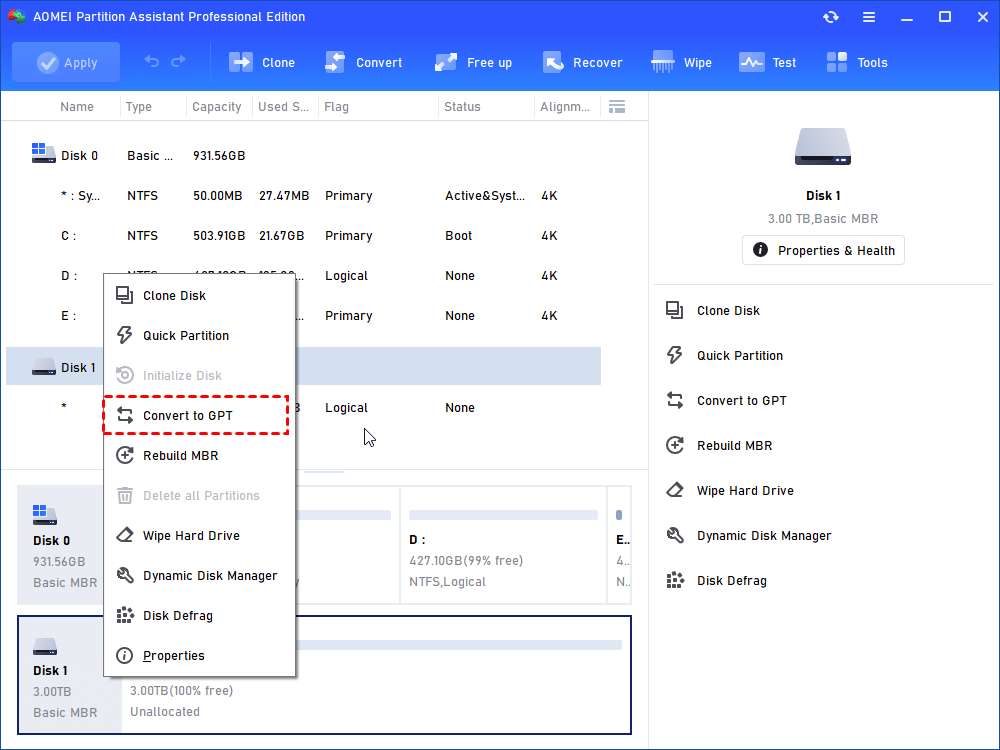
Step 1. Install and launch AOMEI Partition Software. Pitch on the disk you want to convert, right-click it and select "Convert to GPT".
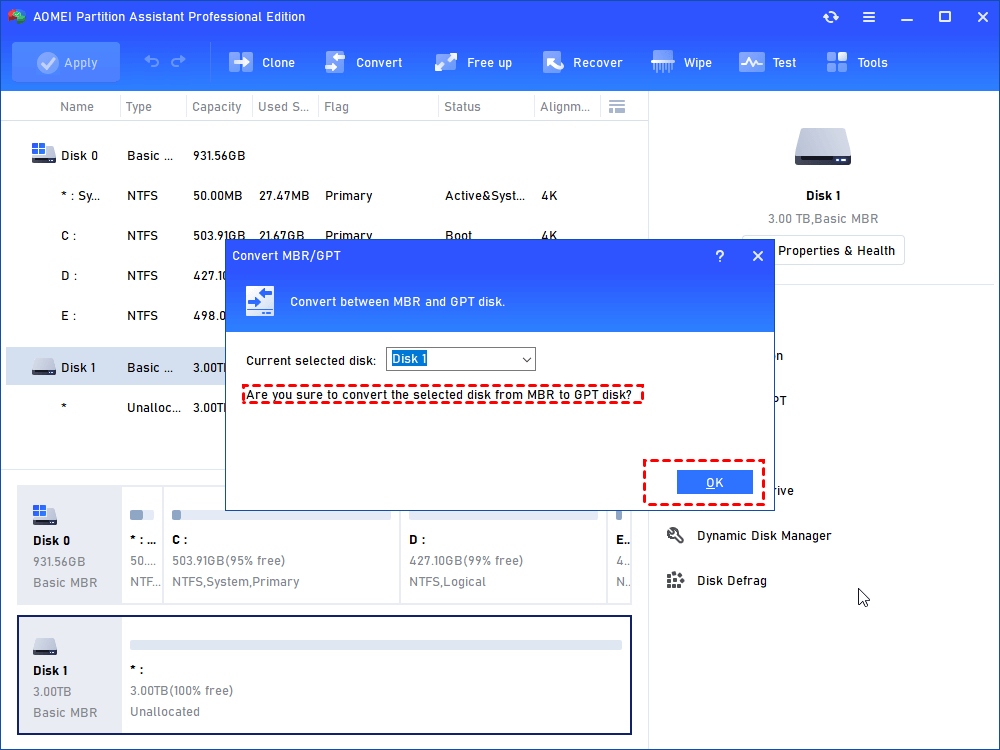
Step 2. Click "OK" -> "Yes" in the pop-up window.
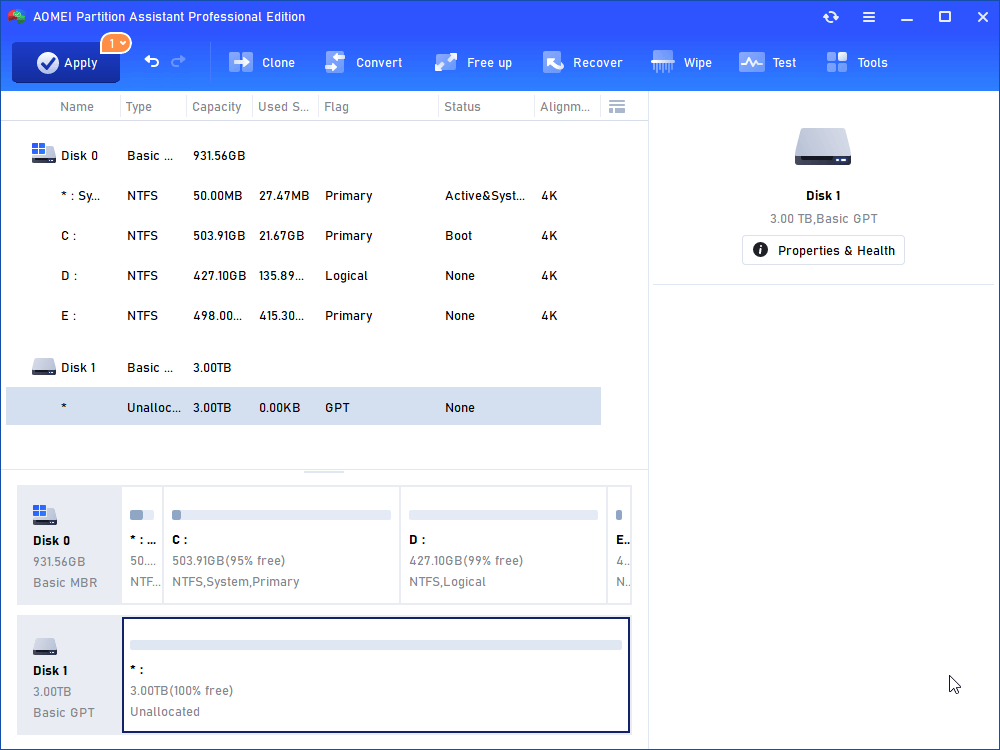
Step 3. Now the disk has changed to GPT, click "Apply" to make it real.
FAQs
♦ Can Gptgen convert a system disk without data loss?
Yes, Gptgen is designed to convert MBR disks to GPT without formatting the drive or deleting files. However, incorrect commands or unexpected interruptions may still lead to partition corruption or boot failures.
♦ Why is AOMEI Partition Software considered a better Gptgen alternative?
AOMEI Partition Assistant provides a user-friendly graphical interface, supports modern Windows systems, and allows users to convert MBR to GPT disks safely without reinstalling Windows or losing data. It also includes additional features like partition resizing, disk cloning, OS migration, and boot repair.
♦ Does Gptgen support dynamic disks?
No, Gptgen does not support dynamic disks. It mainly works with basic disks, which limits its usability in advanced storage configurations or RAID environments.
♦ Is it necessary to reinstall Windows after converting MBR to GPT?
No, tools like Gptgen and AOMEI Partition Assistant can convert MBR disks to GPT without reinstalling Windows or deleting personal files, provided the conversion process is completed correctly.
Conclusion
Gptgen can convert MBR disks to GPT without deleting data, but its command-line design, compatibility limitations, and potential boot risks make it unsuitable for many users. For a safer and easier experience, GUI-based tools like AOMEI Partition Software provide reliable MBR-to-GPT conversion with additional features such as partition management, PC cleaning, and boot repair, making disk conversion more convenient for both beginners and professionals.

 as a preferred
source on Google
as a preferred
source on Google