




How to Recover Files from RAW External Hard Drive Safely
We will show you how to recover files from RAW external hard drive safely in 3 simple and effective methods. Scroll down to explore more.

By Ivy Updated on April 2, 2026


If your external hard drives suddenly become RAW, take a deep breath and calm down. This is a common issuecaused by hardware failures, malware infections, filesystem errors, etc.
Fortunately, there are many ways to recover files from RAW external hard drives. We will introduce you to some of the most effective methods in the following, including a powerful recovery tool.
| 🔥Recommended software - AOMEI FastRecovery |
|
| ✅How-to Steps | You need to download and install Windows data recovery software - AOMEI FastRecovery. Then, open it. Hover the mouse over ...Full Guide |
Why Does My External Hard Drive Become RAW?
Like other file systems, RAW is a file system, but not recognized by the Windows system. It often indicates a file system error. Also, there are some other reasons for this RAW drive.
- incompatible or corrupted file system
- improper format
- malware infection
- exhausted reserve of write/rewrite cycles
- aging of the device
- sudden power failure, or abrupt removal
- long unplugged/untouched power supply
Is It Possible to Recover Files from RAW External Hard Drive?
When your external drive becomes RAW, you are not able to access your drive as normal, along with its data. While trying to access it, you will receive the “F:\ is not accessible. The volume does not contain a recognized file system.” error message.
Fortunately, if your disk is still showing up in Disk Management, you can try to access this external disk and recover data from it using professional data recovery software. In addition, you need to be sure your data is not overwritten. Remember:
- Avoid using the RAW external hard drive.
- Don't reformat the RAW drive.
- Employ reliable software or services and act swiftly.
If not, you can't recover files from a RAW external hard drive. At this time, your system may not recognize memory cells, causing the externalhard drive not showing up in Disk Management.
How to Recover Files RAW External Hard Drive Recovery Safely
If your external hard drive still exists in Disk Management, try reliable Windows data recovery software or services to recover files from RAW external hard drive. Here are the top 3 options.
Way 1: Recover Data from RAW External Hard Drive using Software
AOMEI FastRecovery is one of the best Windows data recovery software, which can be used on Windows 7, 8, 10, 11, and Windows Servers. With two advanced scanning methods, it will scan the selected disk quickly and deeply to find all recoverable data.
 AOMEI FastRecovery
- It has a free edition that can recover data up to 500MB.
- Integrate Quick Scan & Deep Scan to search all the recoverable files.
- In uphold 1000+ formats, such as recover deleted Word/Excel/PPT documents, JPG/PNG/TIF images, MP4/MOV/AVI/WMV videos, and more.
- Organize and display files by Type or Path, allowing you to sort, search, filter, and preview files.
- Recover specific files or folders instead of all.
- Handle different data loss scenarios due to accidental deletion, disk formatting, virus infection, etc.
 100% Secure
In addition, AOMEI FastRecovery stillhas a clear and straightforward interface, even novices can understand it easily and quickly.
Step 1: Scan the RAW external hard disk
Launch powerful data recovery software - AOMEI FastRecovery. Hover the mouse over the RAW external hard drive, and click Scan.
Step 2: Filter and preview files
It will run Quick Scan automatically to find all the recoverable data. The scanning results are displayed by Type or Path, allowing you to sort, search, filter, and preview.
Step 3: Recover data from RAW external hard drive
Select all the deleted or lost files on the RAW external disk and click the Recover button. Please select a new location to save the recovered files instead of the original location.
-
Saving the recovered files to their original location may cause data corruption.
-
You can recover data from RAW external hard drive for free, up to 500MB. To recover all files on it, try the advanced editions.
Way 2: Use Microsoft's Windows File Recovery
Also, it’s worth trying Windows File Recovery, a free file recovery software from Microsoft, to recover data from RAW external hard drive in Windows 10 version 2004 and above. It’s a command-line software, which requires you to learn the syntax as well as recovery modes & parameters.
-
The syntax: winfr source-drive: destination-folder/mode /switches
-
source drive and destination folder: paths contain deleted files and recovered paths, respectively.
-
recovery mode: specific algorithms for different file systems and data loss scenarios.
-
switches: decide the file or file types to search.
Step 1. Type Microsoft Store in the search box and select the top result. In the Microsoft Store, search for Windows File Recovery and press Enter. Then, click Get to download and install Windows File Recovery.
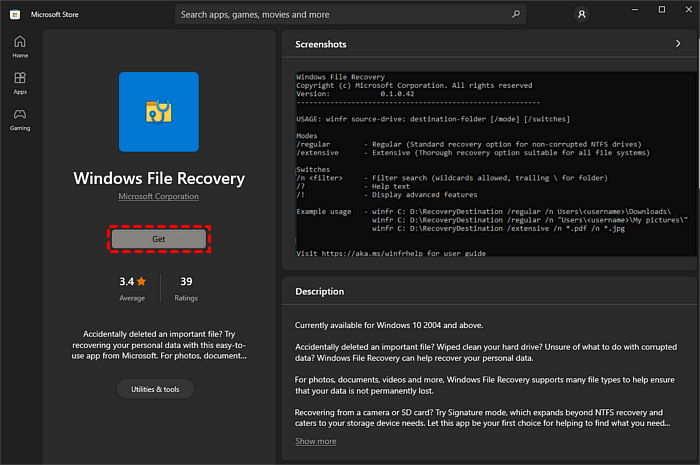
Step 2. After the installation process completes, click the Open button. You will have access to its command-line interface.
Step 3. Identify the drive letter of the AW external disk. Then, type the command: winfr D: E: /regular /n *.docx and press Y to start the RAW external hard drive recovery.
The recovered files will be stored in a directory named “Recovery_[date and time]” in the destination folder. This process is slightly cumbersome, which confuses many users.
Way 3: Employ a Professional Data Recovery Service
If your disk has a hardware issue or controller failure, it prevents your system from recognizing memory cells. In this case, you need to seek help from a professional data recovery service, such as SlavageData, DriveSaver, Secure Data Recovery, etc.
It usually has professional equipment and data recovery experts. However, you should also be prepared that the price will be higher.
How to Fix RAW External Hard Drive without Losing Data
After recovering files from a RAW external hard drive, you can format itto fix any disk errors. Here are 3 easy and quick ways.
Way 1: Format RAW External Disk in File Explorer
Step 1. OpenWindows Explorer. Locate the RAW external drive, right-click on it, and select Format.
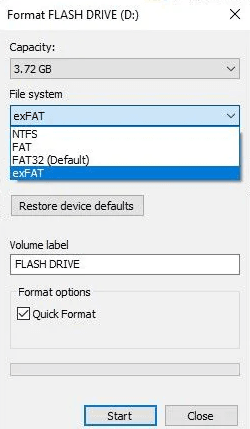
Step 2. Select a compatible file system, such as NTFS, FAT32, exFAT, etc.
Step 3. Be sure the Quick format option is checked, and click Start to format this RAW external disk. You can also set a new volume label as well.
Way 2: Format RAW External Disk With Disk Management
Step 1. Press Win + R and type diskmgmt.msc in the Run box. Then, click OK to open Disk Management.
Step 2. It will display all the available disks here. Locate your RAW external drive and select the Format disk option.
Step 3. Select a compatible file system (eg, NTFS, FAT32, exFAT, etc), and click OK. Be sure the Perform a quick format option is checked and set a new name in the Volume label.
Way 3: Format RAW External Disk using CMD
Step 1. Be sure your RAW external hard drive is recognized. Click the Start button, search for cmd, and select Run as administrator.
Step 2. Type diskpart and press Enter. It will navigate you to the DiskPart tool.
Step 3. Type the following commands and press Enter after each line.
- list volume
- select volume x (x is the drive letter of your RAW external hard drive)
- format fs=ntfs quick (or format fs=fat32 quick)
- exit
Wrapping Up
If your disk suddenly becomes RAW, the first thing is to recover files from RAW external hard drive. Because any operation on this disk may cause data loss. AOMEI FastRecovery is one of the best Windows data recovery software, with a high success rate and over1000+ file formats.
However, it is not guaranteed that all of your desired data will be recovered successfully every time. The best practice to protect your files safely is to use a reliable Windows backup software. We strongly recommend you use AOMEI Backupper Standard.
FAQs
✍ Can data be recovered from a RAW external hard drive?
Yes, you can easily recover data from RAW external hard drive if you act quickly. Please don't add new data to RAW drive or continue using it. Otherwise, your data will be overwritten, making data recovery more difficult.
✍How do I fix a RAW external hard drive without losing data?
Formatting is the quickest method to fix a RAW external hard drive. However, it will cause data loss. To avoid any loss, you’d better recover data from RAW external hard drive first. We recommend you use data recovery software like AOMEI FastRecovery.
✍ How can I fix my RAW hard drive without formatting?
- Type device manager in the search box and select it.
- Locate and expand the RAW hard drive. Then, select Update driver.
- Select Search automatically for updated driver software. Your system will automatically search for the latest driver.
✍ How do I recover files from RAW external hard drive without software?
If your disk has a file system error, you can try the chkdsk E: /f or chkdsk E: /f /r command. It will scan the file system and metadata of this disk and repair the found errors.

 as a preferred
source on Google
as a preferred
source on Google