




How to Recover Deleted Wedding Videos
You can easily recover deleted wedding videos from any device, such as Windows computers, SD cards, USB drives, etc., as long as there is reliable data recovery software. Scroll down to learn more.

By Ivy Updated on April 2, 2026


Is it possible to recover deleted wedding videos?
“Hey, folks! Has anyone ever successfully recovered their deleted wedding videos? I had a total disaster because my husband accidentally deleted our wedding videos from the camera SD card and we lost all those precious moments. I’m using a Canon EOS Rebel T6i camera, and I’m wondering if any reliable software can help me get those videos back. Any recommendations? Thanks in advance for your help!”
- Question from a user
Yes, many data recovery software claim to be able to recover deleted wedding videos, but the success rate may vary due to several factors, such as timeline, data overwriting, whether the device is physically damaged, etc.
So it's necessaryto check the possible reasons. It may be deletion, disk formatting, catastrophic failure, power outages, malware or virus attacks, and more. Please be sure you don't do any operations that may cause data overwriting on your devices.
- continue using your device or camera (e.g., capture images or videos).
- Format your device after losing wedding videos.
- Add new data to your device.
How to recover deleted or lost wedding videos
AOMEI FastRecovery, with an intuitive graphical user interface (GUI), breathtaking recovery capacities, more flexible recovery options, etc, is the most recommended data recovery software to help you easily recover deleted or lost wedding videos. It detects all recoverable files on your device, e.g., computers, SD cards, USB drives, etc., analyzes and categorizes them.
 AOMEI FastRecovery
- It has a free edition that can recover data up to 500MB.
- Integrate Quick Scan & Deep Scan to search all the recoverable files.
- Support a wide range of videos, i.e., MP4, MOV, AVI, MKV, WMV, WebM, FLV, MPEG, etc.
- Organize and display files by Type or Path, allowing you to sort, search, filter, and preview files.
- Recover specific files or folders instead of all.
- Compatible with Windows 11, 10, 8, 7, or Server, and NTFS, FAT32, exFAT, and ReFS file systems.
 100% Secure
-
It’s imperative to halt ongoing operations on your device without delay, as new files may overwrite your wedding videos, rendering data recovery impossible.
-
Please save your retrieved wedding videos in another path to prevent further damage.
Step 1. Install and launch AOMEI FastRecovery on your Windows. Hover the mouse over your device and click Scan.
Step 2. AOMEI FastRecovery will automatically run Quick Scan to scan your selected drive and find allrecoverable files. To locate your wedding videos quickly, you can directly type the extension (e.g., .mp4) in the search box.
Step 3. Once found, double-click them to preview and select the wedding videos by ticking the checkboxes or leaving them blank. Then, click Recover and select a new location to save the recovered files.
-
Please save the recovered wedding videos in a new location instead of the original location. Otherwise, they may be overwritten.
-
You can recover deleted wedding videos for free, up to 500MB. Once exceeded, please upgrade to the advanced editions.
How to prevent loss of weddingvideos
There’s no doubt that backing up your wedding videos regularly is crucial to avoid irreversible data loss. If you’re restricted by the complicated backup steps of the Windows backup features and inflexible backup options, this free backup software - AOMEI Backupper Standard offers a seamless backup experience tailored to your needs.
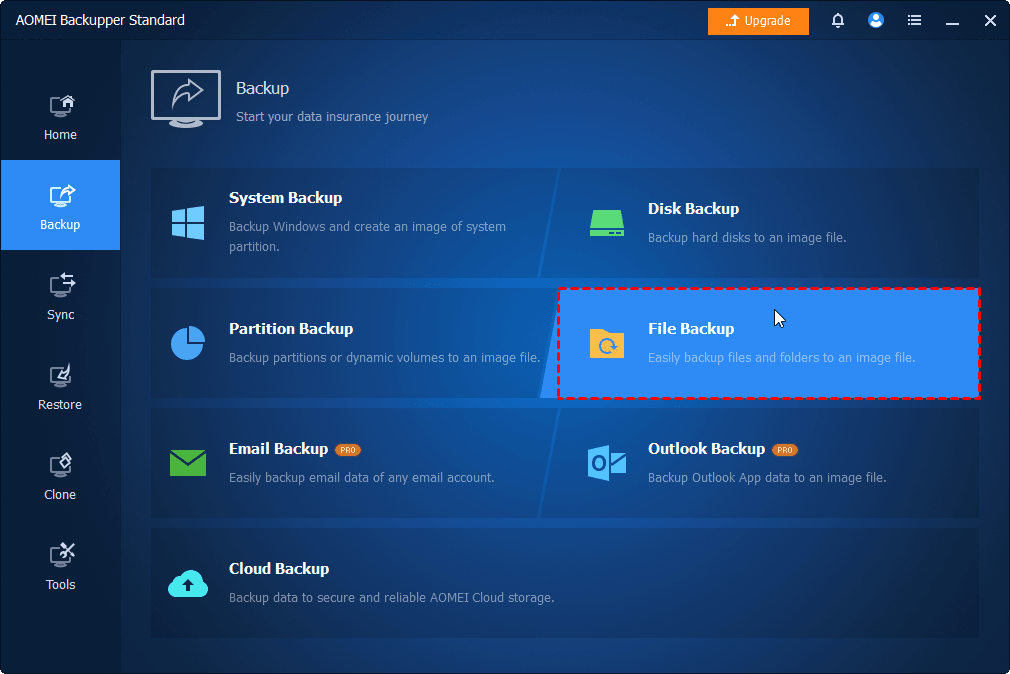
Step 1. Launch AOMEI Backupper on your Windows PC and select the File Backup option
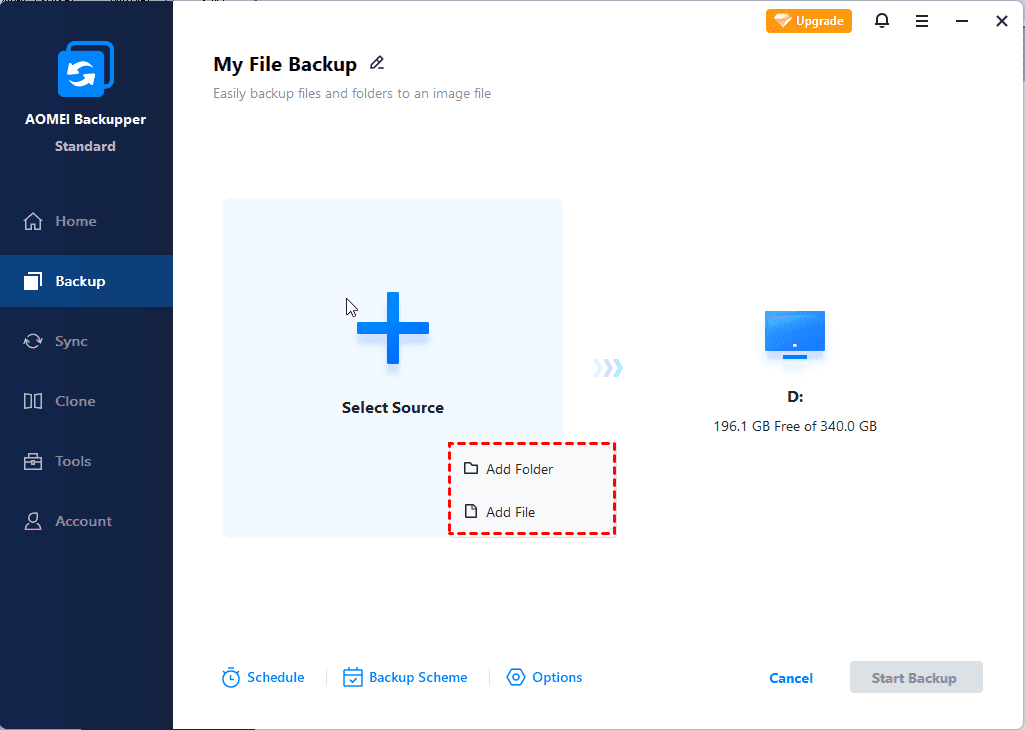
Step 2. Click Select Source > Add Folder/Add File to add the folder or wedding videos you want to back up.
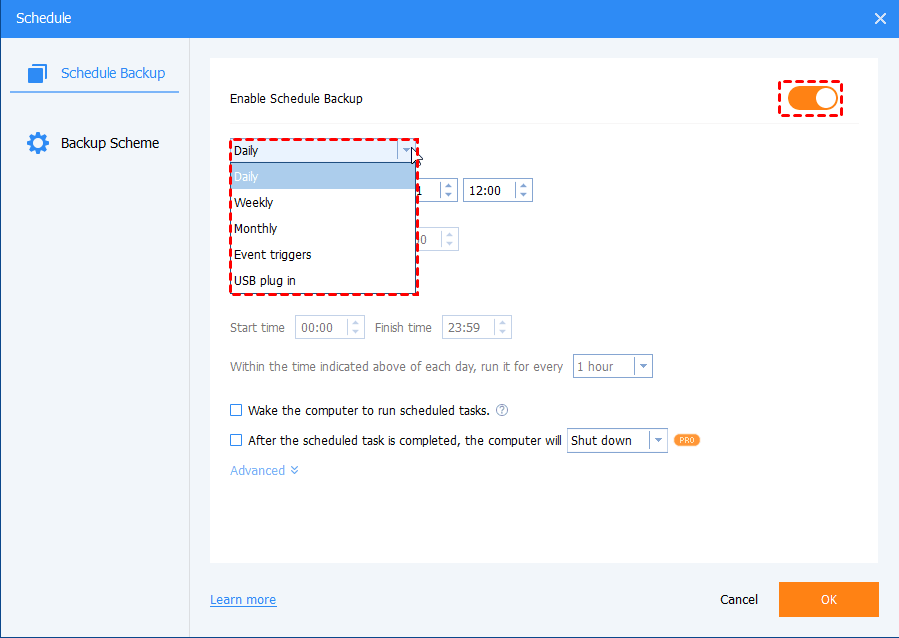
Step 3. Click Schedule Backup to enable Daily, Weekly, or Monthly(By Date) as you prefer. Then, click the Start Backup button.
Conclusion
You can easilyrecover deleted wedding videos from Windows, SD cards, USB drives, or other devicesutilizing reliabledata recovery softwarelike AOMEI FastRecovery. It integrates advanced scanning technologies to scan your device and find all recoverable data.
However, you cannot ignore the fact that you need to back up your wedding video to keep it safe. We recommend using free backup software - AOMEI Backupper Standard. It allows you to automatically back up files daily, weekly, or monthly.

 as a preferred
source on Google
as a preferred
source on Google