




How to Recover Deleted Photos from Hangouts Messages
Read this post to get 4 effective ways to recover deleted photos from Hangouts messages. Learn about the risks of losing data and explore AOMEI FastRecovery to retrieve lost Hangouts photos.

By Ivy Updated on April 29, 2026


In today's digital age, our smartphones and messaging platforms serve as gateways to a treasure trove of memories. Hangouts, a popular messaging app, allows users to share photos, videos, and messages seamlessly. However, the accidental deletion of photos from Hangouts messages can be a heart-wrenching experience for users.
Don't panic, in this post, we'll show you 5 simple and effective methods to recover deleted photos from Hangouts messages! Scroll down to learn more.
Reasons to Recover Deleted Photos from Hangouts Messages
The reasons behind users' desire to retrieve lost Hangouts photos are as varied as the memories captured in those images.
- Firstly, these photos often hold sentimental value, encapsulating moments of joy, laughter, and shared experiences with loved ones.
- Whether it's a candid snapshot with friends or a cherished family vacation memory, these photos evoke powerful emotions that users long to preserve.
- Moreover, photos shared via Hangouts messages may also serve practical purposes, such as documentation, collaboration, or professional communication.
From business presentations to project updates, photos play a crucial role in conveying information effectively within the context of Hangouts conversations.
4 Ways to Recover Deleted Photos from Hangouts Messages
Here are 4 simple and effective methods to recover deleted photos from Hangouts Messages.
1. Check Hangouts Archive
Hangouts Archive serves as a repository for conversations that users may have archived intentionally or unintentionally. When users archive a conversation, it removes it from the main conversation list but retains all messages, including photos.
Users can access the Archive section in Hangouts settings and review archived conversations to locate and restore deleted photos.
Step 1. Navigate to Hangouts settings and access the Archived Hangouts section to check for deleted photos.
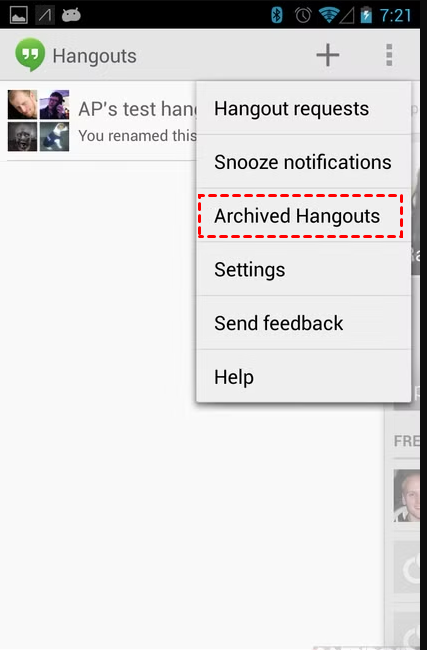
Step 2. Select the conversation containing the deleted photos and restore them to the main conversation.
2. Retrieve from Google Photos
Shared photos in Hangouts messages are synced to Google Photos automatically, allowing users to access them across multiple devices. You can recover deleted photos from Google Photos. Usually, deleted photos are saved inthe "Trash" folder if they were deleted recently.
Step 1. Open Google Photos.
Step 2. Click Trash to look for deleted photos. Right-click them and select Restore.

Or search for the deleted photos using relevant keywords or date filters. Select deleted photos and download them.
3. Utilize Photo Recovery Software
If you have accidentally deleted or lost your Hangout photos (JPEG / JPG, PNG, GIF, BMP, HEIC, WBMP) from your hard drive, then you can use comprehensive photo recovery software- AOMEI FastRecovery to recover deleted photos in Windows 11, 10, 8, 7, and Windows Server.
AOMEI FastRecovery- Handle data loss scenarios such as deletion, disk formatting, system crashes, virus attacks, and more.
- Recover deleted photos, including JPG/JPEG/JPE, PNG, TIF/TIFF, HEVC/HEIC/HEIF, GIF, PSD, BMP, SVG, ARW, X3F, WBMP, etc.
- Integrate Quick & Deep Scan to scan your drive thoroughly and find all recoverable data.
- Organize data by type and path for easier navigation, providing options to sort, search, filter, and preview files.
- Compatible with Windows 11, 10, 8, 7, Windows Server, and NTFS, FAT32, exFAT, and ReFS file systems.
 100% Secure
You can use FastRecovery to recover files up to 500MB at no cost. Just download the software and follow the simple steps to recover deleted photos from Hangouts messages easily.
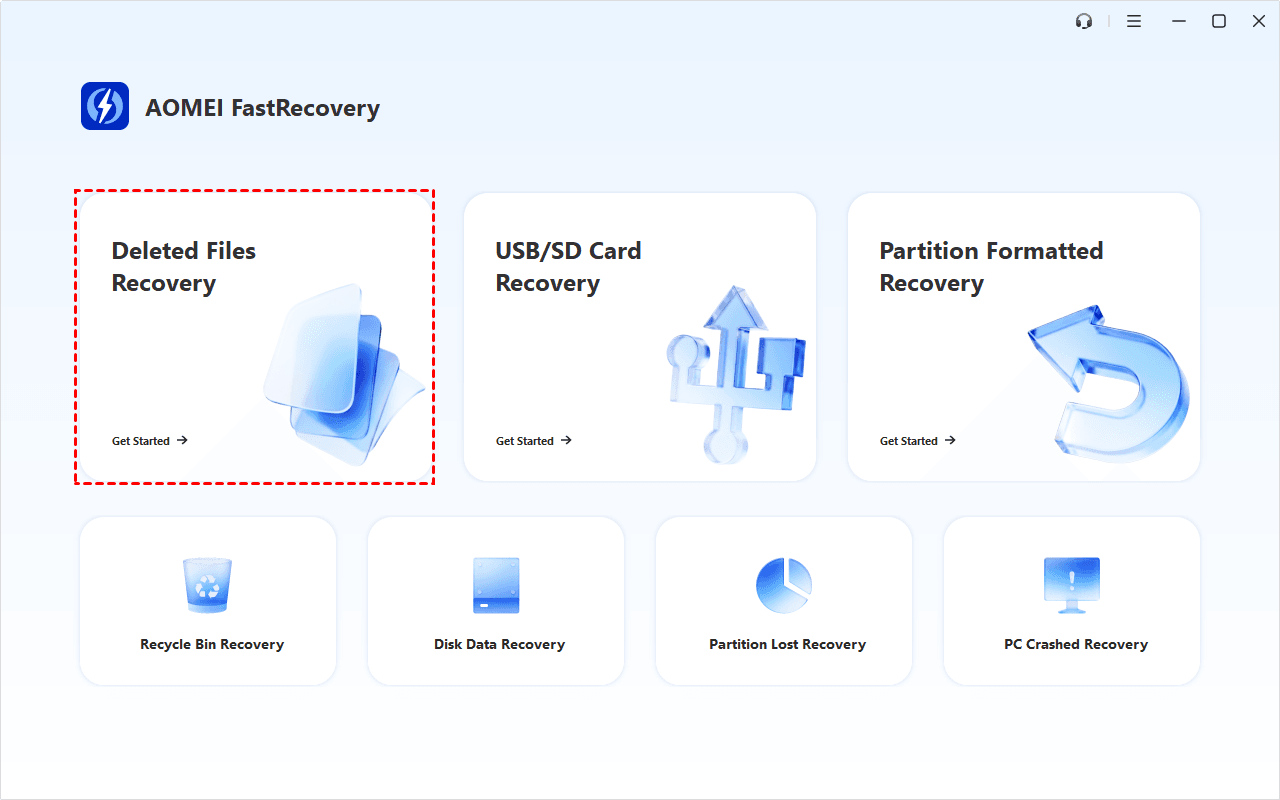
Step 1. Download and install AOMEI FastRecovery on your Windows computer. On the main page, click Deleted Files Recovery.
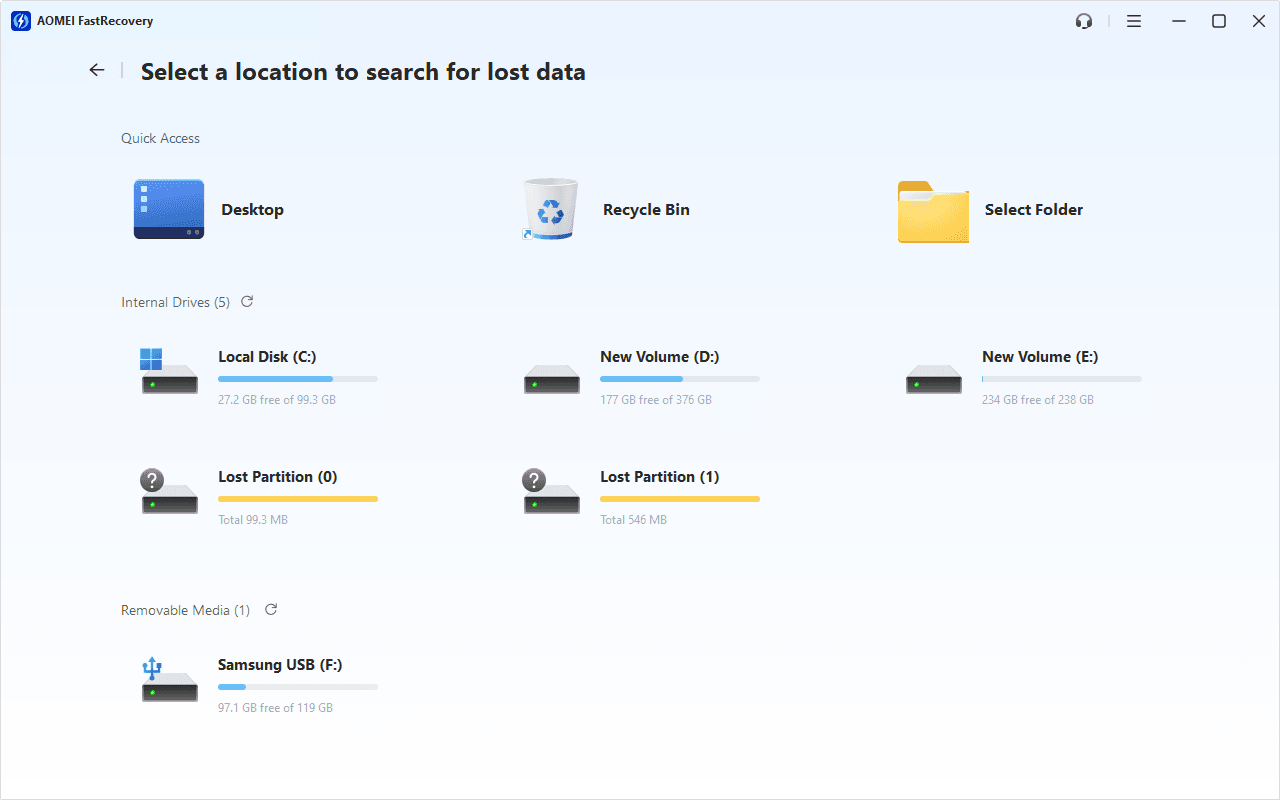
Step 2. Hover the mouse over the drive containing deleted photos, and click Scan to start the quick scanning process and display all recoverable data.
Step 3. Under the Type section, specify the Image data type and expand it to see all data formats. Sort name, date modified, type, etc., on the right panel.
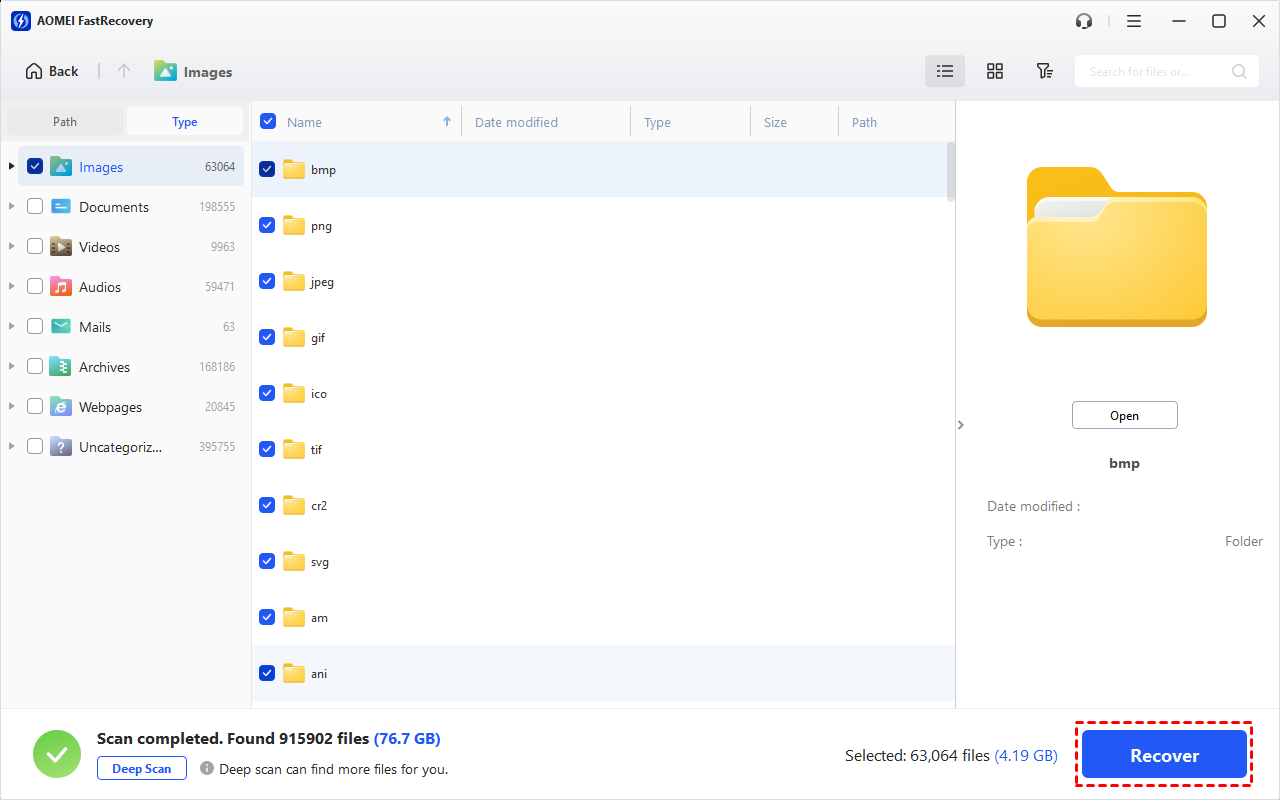
To locate files quickly, you can try the following two options. Then, double-click the file to preview and confirm it's exactly what you want.
- Search by name or file extension. Then, use the "Sort" feature.
- For specific file sizes or large files, combine the “Filter” & "Sort" features.
-
You can also locate deleted files by Path if you remember this.
-
Click the Deep Scan button if the Quick Scan fails. Deep Scan searches every sector of the disk to find more files.
Step 4. Select the deleted photos you want and then click Recover to get them back quickly.
-
Please select a new location to save them, as restoring to the original location may result in data overwriting.
-
You will be asked to upgrade to the advanced edition of AOMEI FastRecovery to enjoy unlimited data recovery. The free edition supports data recovery up to 500MB.
4. Contact Google Support
In cases where other recovery methods prove ineffective or challenging, users can seek assistance from Google Support. They offer dedicated channels for users to report issues, seek guidance, and request assistance with recovering deleted photos from Hangouts messages.
They may provide additional troubleshooting steps or escalate the issue if necessary. Or offer alternative solutions based on the specific circumstances.
In Conclusion
In conclusion, the loss of photos from Hangouts messages can be a distressing experience, but with the right tools and methods, recovery is entirely feasible.
Recovering deleted photos from Hangouts messages with AOMEI FastRecovery ensures that the recovered photos remain intact and retain their original quality. You can try the free version first to enjoy 500MB recovery size.
FAQs
1. Can I recover deleted photos from Hangouts messages if I accidentally deleted them?
Yes, it is possible to recover deleted photos from Hangouts messages using various methods, such as checking Hangouts Archive, retrieving from Google Photos, using data recovery tools like AOMEI FastRecovery, and exploring device backups.
Each method offers different approaches to recovering deleted photos, so it's recommended to try multiple options to maximize the chances of successful recovery.
2. Where are my Hangouts photos stored?
All photos from your Hangouts chats are automatically saved in a private web album. Photos in your Hangouts album are organized into sub-albums based on conversations for easy browsing.
3. How can I access Hangouts Archive to retrieve deleted photos?
To access Hangouts Archive, open the Hangouts app or website, click on the three horizontal lines (menu icon) in the top left corner, select "Settings," then choose the "Archive conversations" option. Here, you can view archived conversations and locate deleted photos within them.

 as a preferred
source on Google
as a preferred
source on Google