




4 Ways to Recover 4K/8K/HD/UHD Video for Free
How to recover 4K, 8K, HD and UHD videos for free? Read this post to learn 4 possible ways to recover this video. Contains useful information about 4K/8K/HD/UHD video.

By Ivy Updated on June 30, 2026


You just spent a weekend shooting that perfect 4K video. The lighting was right. The location was perfect. You were sure you got the shot. Then, accidental deletion. Or the card says it needs formatting. And just like that, your footage is gone.
It's frustrating. It's stressful. But it's not hopeless.
High‑resolution videos like 4K, 8K, and UHD are larger and more complex than standard videos, which means recovering them requires the right approach. The good news is that there are 4 proven ways to get them back. So you can restore your work and move forward.
About 4K, 8K, HD, and UHD video
Video quality has become a key aspect of our viewing experience. The main difference between SD and 4K/8K/HD/Ultra HD video is the quality. Terms like HD, UHD, 4K, and 8K are often used to describe video resolutions, but what do they really mean? Let’s take a look at these terms to understand what each one represents and how they differ from each other.
- 4K video: It specifically refers to a resolution of 3840x2160. It is commonly used in many contexts including: TV and streaming, cinematography, and gaming.
- 8K video: It is the latest development in video resolution with a resolution of 7680x4320 pixels. Although still in its infancy, it offers several advantages: medical imaging, digital signage, and high-quality production.
- HD (High Definition): It refers to a higher video resolution than Standard Definition (SD). There are two main types of HD resolutions: 720p (HD Ready) and 1080p (Full HD) resolutions, which provide good video quality for most purposes.
- UHD (Ultra High Definition): This is an upgrade from Full HD. It offers higher resolution and better image quality. UHD usually refers to two main resolutions: 4K (2160p) and 8K (4320p), which provide stunning detail and detail.
How to recover deleted INSV videos effectively
Before starting UHD video recovery, you need to determine the following issues.
- Stop using the recording device: Never recover a 4K video (or any other video) from where you lost it.
- Run through the backup.
- Return the video as soon as possible and do not keep it for more than a day. This increases the possibility of 4K/8K/UHD/HD video recovery.
Method 1. Recover 4K/8K/HD/UHD video from Recycle Bin
If you accidentally delete a 4K/8K/HD/UHD video from your computer, it may still be in the Recycle Bin (Windows) or Trash (Mac). This is often the easiest and fastest way to recover deleted files.
Steps to recover 4K/8K/HD/UHD video from Recycle Bin
Step 1. Double-click the Recycle Bin icon on the desktop. Browse the deleted files to find your video.
Step 2. Right-click on the video file and select "Restore". The file is restored to its original location.

Method 2. Recover lost 4K/8K/HD/UHD videos using software
So how to recover 4K video and 8K/HD/UHD video? Using a third-party video recovery software, AOMEI FastRecovery, can help you restore lost and deleted HD videos effectively. It is a powerful and simple file recovery tool that allows you to recover a video with a high success rate and preserve its original quality.
-
Support more than 1000 file types: Recover deleted videos (MP4, MKV, FLV, MOV, WMV, etc) as well as Word documents, Excel files, photos, emails, etc
-
Advanced scanning methods - Quick & Deep Scan can thoroughly scan all recoverable data.
-
Filter and preview deleted or lost videos before recovery.
-
Recover data in 3 clicks, regardless of whether the video was lost due to accidental deletion, disk formatting, virus infection or a crashed computer recovery.
The free version of this video recovery software - AOMEI FastRecovery, supports up to 500MB of free data recovery. Download and install it now on your Windows PC to try it out.
Steps to recover 4K/8K/HD/UHD video from Recycle Bin
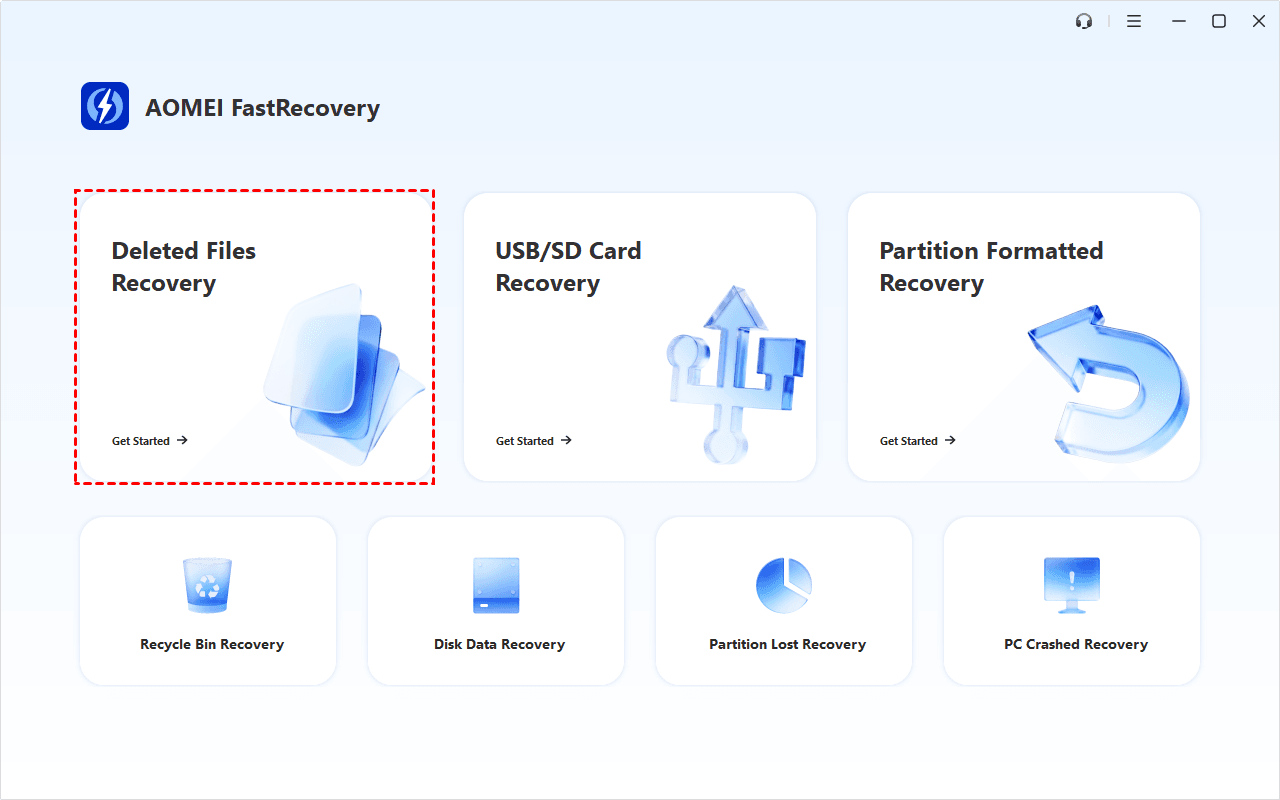
Step 1. Run AOMEI FastRecovery and click Deleted Files Recovery.
Step 2. Hover over the drive where the deleted video is stored and click Scan. To recover deleted 4K/8K/HD/UHD video from an external hard drive, connect the drive to your computer.
Step 3. It will start a quick scanning process automatically. Wait, and in the scanning result window, check Videos data type and click Recover to get all deleted or lost videos back quickly
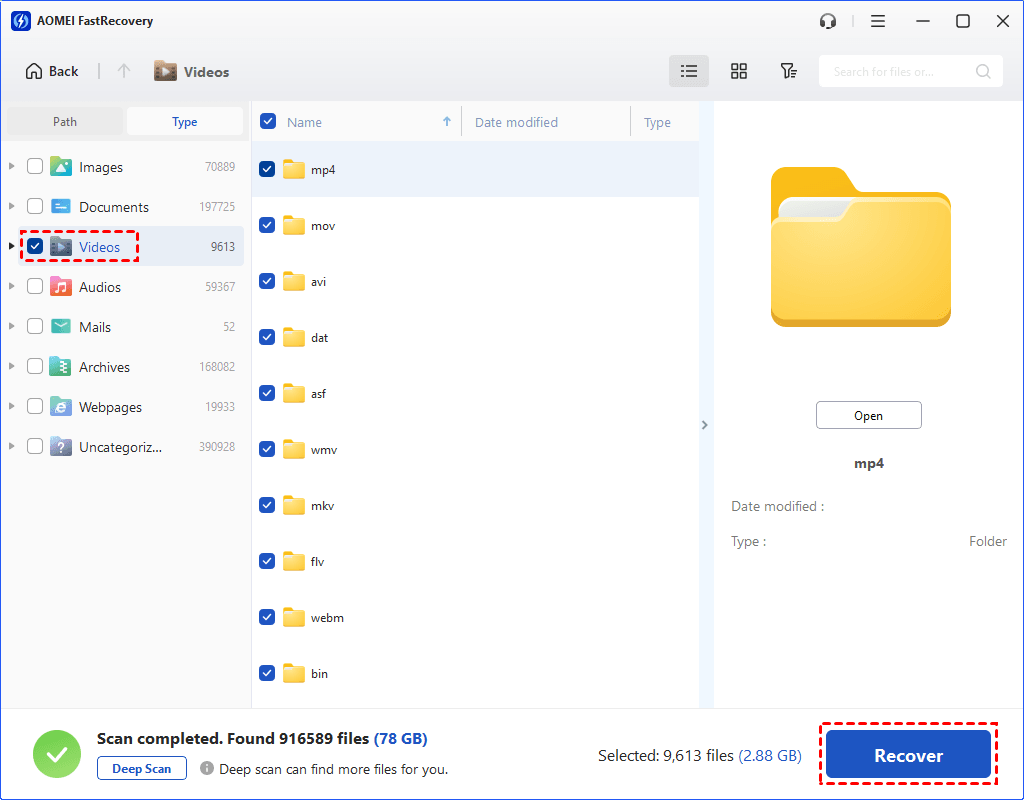
You can also expand to check Deleted Files, Recycle Bin, or Existing Files for specific video files. To find files quickly, combine the following options:
-
Sort files by name, date modified, type, etc., using the column headers.
-
For faster searching, type the file name or extension (e.g., .mp4) in the search box.
- Or click the funnel-shaped button to narrow your search by type or size, especially useful for large deleted files.
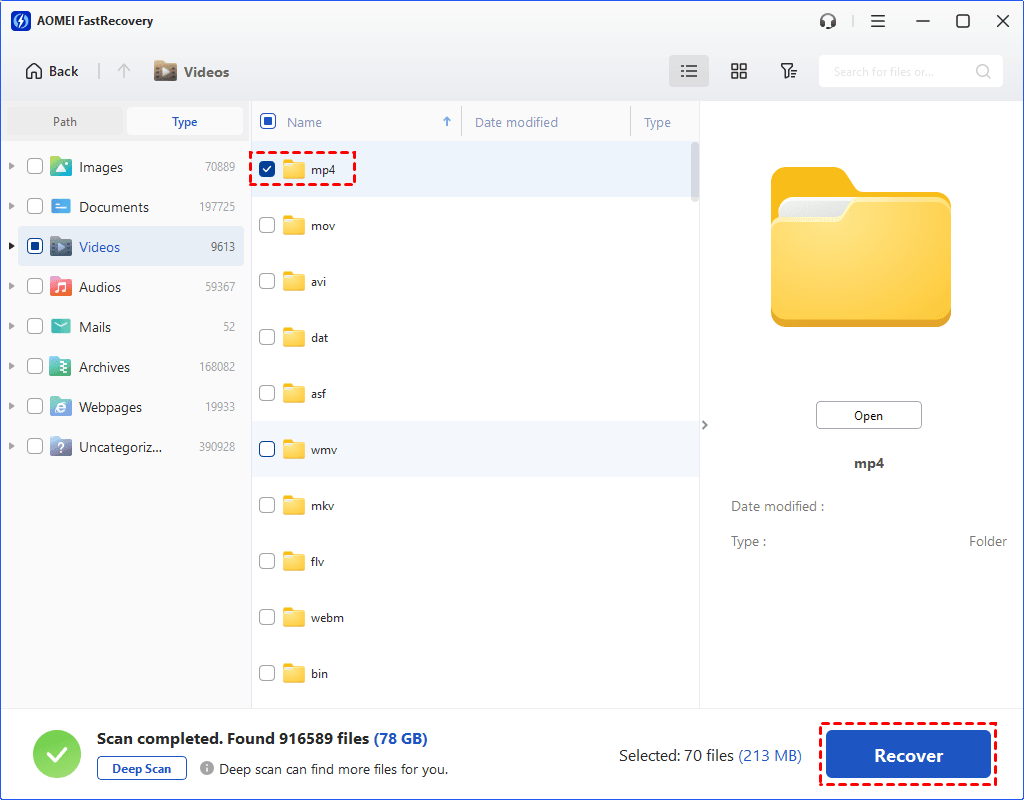
- Please select a new location to save the recovered data. Otherwise, your data may be overwriten.
- The free version allows you to recover deleted videos up to 500MB. To recover all data, consider upgrading to advanced editions.
Method 3. Recover deleted 4K/8K/HD/UHD video using CMD
Command Line is a powerful built-in utility that allows users to recover 4k videos/files from hard drive due to malware attack or accidental deletion. In addition, Command Prompt can also repair damaged sectors on the hard drive and convert the RAW file system to NTFS for free. So you can use it to recover deleted 4K/8K/HD/UHD video.
Step 1. Type "cmd" in the search box and click "Run as administrator" at the command prompt.
Step 2. Type attrib -h -r -s /s /d F:\*filename.length* and press Enter. Replace F with your drive letter.
Method 4. Seek expert help
If a software solution doesn’t work, a professional data recovery service may be your last resort. This service can recover data from storage devices that are severely damaged or corrupted.
When to use a professional service?
- Severe Damage: When the video is severely damaged.
- Physical damage: If the recording device is physically damaged.
- Important Information: The missing video is critical and all other methods have failed.
Choose a professional service: Look for a reputable data recovery service like Geek Squad that has good reviews and a high success rate. Make sure they have experience in restoring 4K Ultra HD video.
Conclusion
Losing high-resolution video can be a terrifying experience, but with the right approach and tools, you can effectively recover 4K, 8K, HD, and UHD video. We recommend you try FastRecovery to recover the video. It is also very effective for easily recovering data from a formatted hard drive. Take action now and use FastRecovery to recover videos up to 500MB for free!
Make sure you take preventative measures to avoid future losses, and you’ll be well on your way to protecting your precious video files.

 as a preferred
source on Google
as a preferred
source on Google