




Best WD SmartWare Alternative for Windows 11/10
What is WD SmartWare and do I need it? Does it still work? This article will answer all your queries about WD SmartWare and introduce the best WD SmartWare alternative for Windows 11/10 for free and automatic data backup.

By Jonna Updated on June 1, 2026


What is WD SmartWare?
WD SmartWare is a backup software application developed by Western Digital for users of WD external hard drives and storage devices. The software was designed to simplify data protection through automatic and continuous backups. When connected to a compatible WD drive, SmartWare could monitor files and automatically back them up whenever changes were detected.
The software was commonly used to backup documents, photos, videos, music collections, personal archives, business files, user profiles, etc. One common topic in WD SmartWare reviews is that its continuous backup functionality makes it simple to automatically detect modifications and copy updated files to the selected storage device.
However, several limitations have made it less practical, and many users are looking for a WD SmartWare alternative. Some of its common limitations include:
- Focus mainly on file and folder backup, lack of comprehensive system backup options.
- Lack of advanced backup customization.
- Dependency on specific WD hardware.
- Limited support for newer Windows versions, like Windows 11 and Windows 10.
- No support for file backup that is in use.
Best Free WD SmartWare Alternative for Windows 11/10
For a free & reliable backup alternative to WD SmartWare app, you may try AOMEI Backupper Standard. This software offers a wide range of backup, recovery, synchronization, and cloning tools designed to protect data across various scenarios.
For data backup, rather than focusing solely on file backups, it also supports complete system protection like System Backup for creating a complete image of the operating system, installed applications, settings, and personal files and Disk Backup for creating a backup image for the entire system drive. So in the event of system failure, you can restore Windows quickly without reinstalling. It also comes with other advantages like:
 AOMEI Backupper
- Flexible Scheduling Options: It offers specific time backup, daily backup, weekly backup, monthly backup, event triggers backup, etc.
- Multiple Destinations: Except for data backup to WD hard drives, backup WD hard drives, it also supports data backup to USB drives, SD cards, Network drives, NAS, cloud storage, and so on.
- Wide Support: Widely supported on Windows 11/10/8/7, it works for disks from all popular brands, including WD, Samsung, Intel, Kingston, etc.
- Simple Recovery: Quick and simple restore, and you are allowed to restore system images to different hardware configurations with Universal Restore (available in Pro version).
- Other Features: Besides data backup, it is capable of performing disk cloning, file sync, bootable USB creation, and so forth.
 100% Secure
How to run AOMEI Backupper as a WD SmartWare alternative:
Step 1. Attach the WD hard drive, and run AOMEI Backupper, which will automatically detect available storage devices.
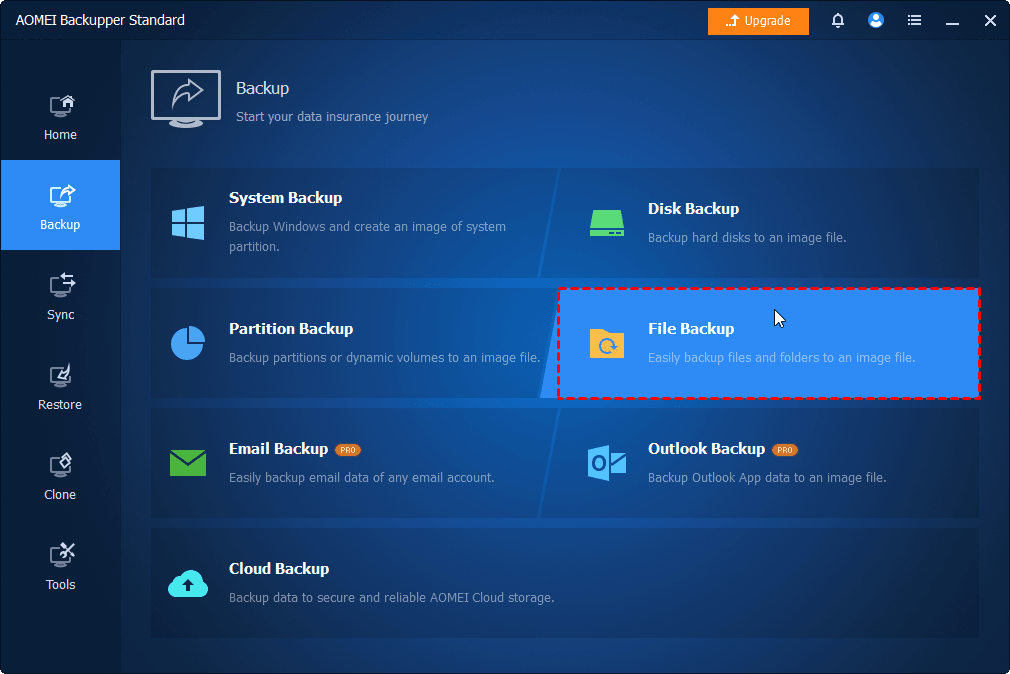
Step 2. Select the appropriate backup mode, like File Backup, and click Select Source to choose individual files or folders for backup.
Step 3. Then, click on the PC icon and select the WD hard drive as your target path.

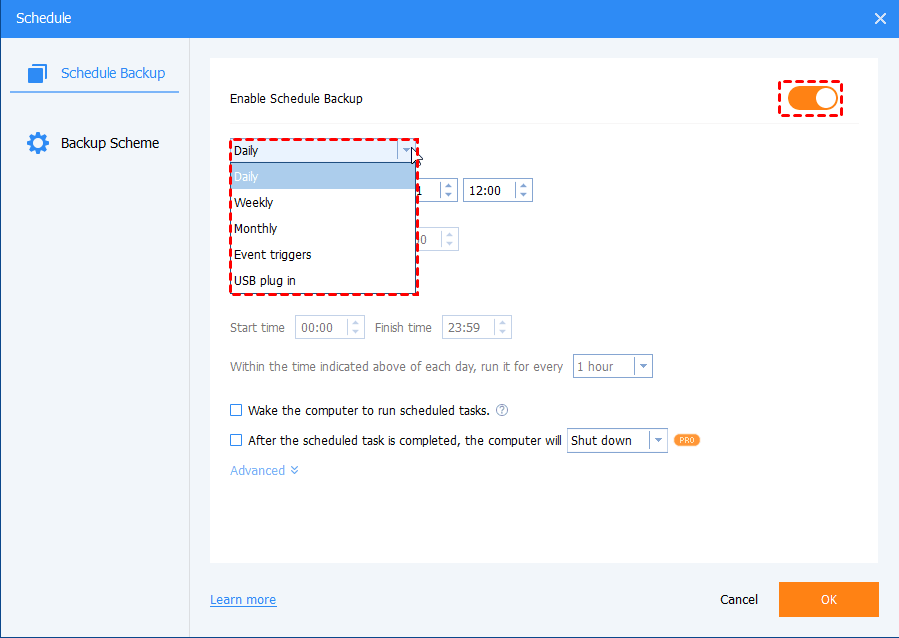
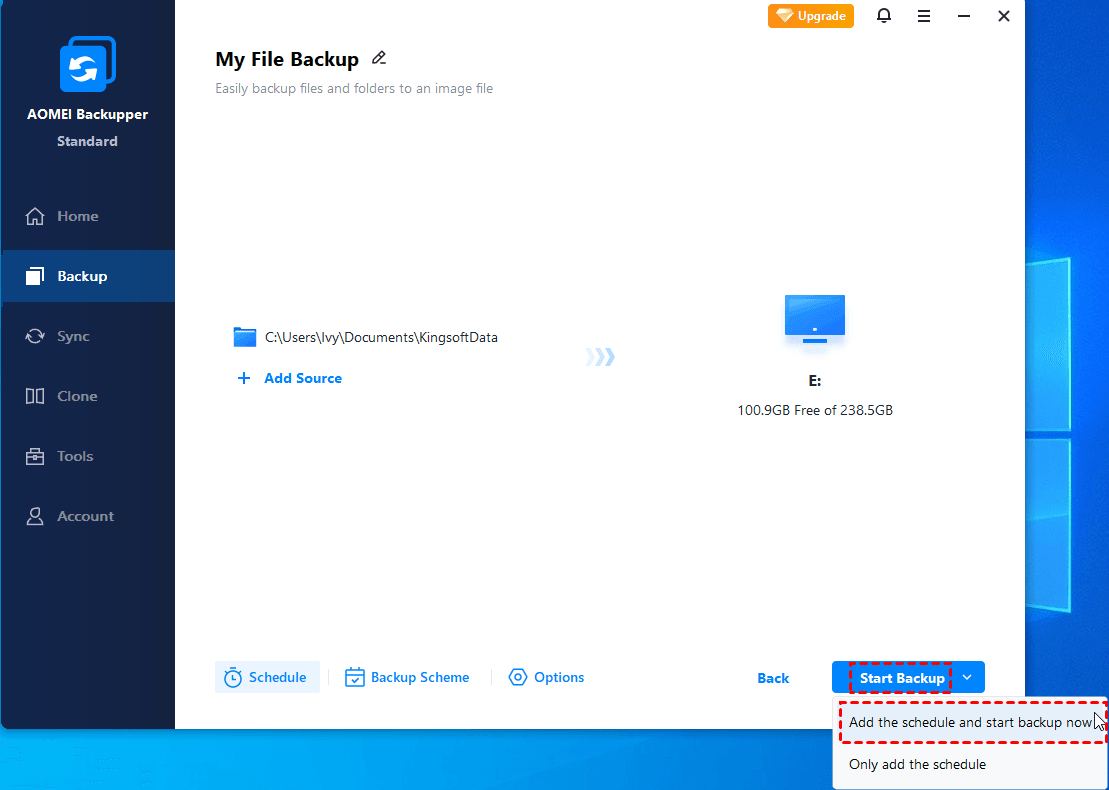
Step 4. Click on Schedule, toggle the switch next to Enable Scheduled Backup, and pick an auto backup option.
👉Notes:
- Backup Scheme: It allows to use differential backup as well as deleting old backup images automatically.
- Options: You are able to comment on the task here and do backup encryption. (available after upgrading to Pro or higher versions)
Step 5. Finally, click on Start Backup > Add the schedule and start backup now to use this WD SmartWare replacement for file backup in Windows 10 or 11 for free.
When comparing the features of WD SmartWare alternative directly, the advantages become clear:
|
Feature |
WD SmartWare |
AOMEI Backupper |
|
File Backup |
Yes |
Yes |
|
System Backup/Disk Backup |
Yes |
Yes |
|
Cloud Integration |
Limited |
Yes |
|
Flexible Scheduling |
Basic |
Advanced |
|
Windows 11 Support |
No |
Full |
|
Differential Backup |
No |
Yes |
|
Universal Restore |
No |
Yes |
FAQs on WD SmartWare
#1. Does WD SmartWare still work?
Yes, technically speaking, WD SmartWare is still "usable" for basic operations, but it is no longer supported by Western Digital.
Many users now prefer a WD SmartWare alternative in order to access a wider range of features and better Windows compatibility.
#2. Can WD SmartWare work with Windows 11?
No, WD SmartWare is an older version of the software that has been discontinued and is not officially supported on Windows 11.
#3. Can a WD SmartWare alternative back up external drives?
Absolutely. AOMEI Backupper supports backup operations involving:
- External hard drives
- USB flash drives
- SSDs
- NAS devices
- Network shares
In fact, its drive support is far more flexible than the original WD SmartWare software.
Conclusion
WD SmartWare played an important role in protecting important files and folders, but today's backup requirements demand far more than simple file synchronization and automatic folder backups. That's why many users are actively searching for a reliable WD SmartWare alternative.
Among the available options, AOMEI Backupper stands out for its comprehensive feature set, intuitive interface, and powerful backup capabilities. Whether you need file backup, complete system imaging, or disk migration, it provides everything necessary to safeguard your data in today's computing environment.

 as a preferred
source on Google
as a preferred
source on Google