




4 Best Server Antivirus for Ransomware [2026]
Kaspersky, Avast, Bitdefender, and McAfee all provide the best server antivirus for ransomware. We'll break down their pros and cons, target scenarios, pricing, and more. Scroll down to learn more!

By Ivy Updated on April 27, 2026


Ransomware is one of the biggest threats to modern servers. Today’s attacks don’t just lock files, they target databases, shared storage, and critical server systems, causing downtime and major financial losses. They often try to disable security software, erase backups, or delay encryption to avoid detection.
As ransomware attack methods continue to evolve, choosing a strong antivirus with dedicated ransomware protection is essential. It is best to build a layered cybersecurity defense system. Relying solely on traditional antivirus tools is no longer sufficient. Server security now requires real-time monitoring, behavior-based detection, and fast response to stop threats before they spread.
What to Look for in the Best Server Antivirus for Ransomware?
Choosing the right protection for your servers is critical. Unlike standard endpoint security, server-focused ransomware defense must balance robust, specialized threat prevention with system stability and operational efficiency.
The following criteria will help you evaluate solutions to ensure they defend your critical data and applications without disrupting your business.
|
Core Areas |
Key Points |
|
Core Security Features |
|
|
Performance & Efficiency |
|
|
Support |
|
|
Pricing & Licensing |
|
Top Server Ransomware Antivirus Solutions (4 Options)
In this section, we take an in-depth look at the leading ransomware antivirus solutions designed for server environments. You’ll find clear overviews, pros and cons, target scenarios, etc., helping you identify the best fit for your servers.
1. Kaspersky Endpoint Security for Business
Kaspersky Endpoint Security for Business is an enterprise-grade antivirus suite designed to deliver layered protection across server environments. Its robust anti-ransomware engine safeguards critical data while providing centralized management for IT administrators.

✅ Pros:
- Excellent detection rates
- Centralized management console for multiple servers
- Frequent signature and definition updates
❌ Cons:
- Be resource-intensive on older or lower-spec servers
- Premium pricing compared to entry-level antivirus products
💻 Target Scenarios:
- Mid-sized to large enterprises
- Regulated industries requiring compliance (e.g., finance, healthcare)
👍 Ideal Users:
- IT teams managing hybrid or large-scale server estates
- Organizations needing granular control over security policies
💰 Pricing:
- Select: $45 per device per year
- Advanced: $77 per device per year
- Total Security: $77 per device per year
⭐Ratings:
|
Dimension |
Rating (★/5) |
|
Configuration & Usage Guides |
★★★★☆ |
|
Technical Support |
★★★★☆ |
|
Core Functionality |
★★★★★ |
|
Security Performance |
★★★★★ |
2. Bitdefender GravityZone
Bitdefender GravityZone is a business-focused security platform that provides enterprise-grade ransomware and malware protection for servers and other endpoints. It uses layered defenses, including machine learning, behavioral analysis, and continuous monitoring to block threats and remediate suspicious activity across physical and virtual servers. GravityZone also offers centralized management and flexible deployment options.
✅ Pros:
- Strong multi-layer protection with advanced ransomware mitigation and threat analytics
- Centralized management for multiple servers
- Scales from small businesses to enterprise environments
❌ Cons:
- Licensing structure and add-ons are confusing for smallerteams
- Some advanced features (like sandbox analysis or EDR-style tools) are only in higher tiers
- Require careful setup to optimize server performance
💻 Target Scenarios:
- SMBs and enterprises with mixed server and endpoint environments
- Organizations needing scalable ransomware defenses
👍 Ideal Users:
- IT teams managing hybrid or virtual servers
- Organizations needing centralized control and advanced threat protection
💰 Pricing:
- Business Security: ~$81/year for 5devices
- Business Security Premium: ~$311/year for 5 devices
⭐ Ratings:
|
Dimension |
Rating (★/5) |
|
Configuration & Usage Guides |
★★★★☆ |
|
Technical Support |
★★★★☆ |
|
Core Functionality |
★★★★☆ |
|
Security Performance |
★★★★☆ |
3. Avast Business Security
Avast Business Security offers a practical and well-balanced approach to protecting servers against ransomware. Rather than overwhelming administrators with complex controls, it focuses on reliable threat detection, behavioral monitoring, and ransomware-specific protection that works quietly in the background. This makes it especially effective in real-world server environments where stability and simplicity matter as much as security.
✅ Pros:
- Real-time and behavior-based protection
- Built-in ransomware shields for critical files
- Lightweight with minimal impact on server performance
- Simple centralized management
❌ Cons:
- Fewer advanced policy controls thanenterprise suites
- Some advanced features requirehigher-tierplan
💻 Target Scenarios:
- Servers running core business services require dependable, always-on protection
- Organizations need strong ransomware defense without complex configuration
👍 Ideal Users:
- Small and mid-sized teams
- Businesses looking for a stable, cost-effective securitysolution
💰 Pricing:
- Essential: ~$39/year per device
- Premium: ~$49/year per device
- Ultimate: ~$60/year per device
⭐Ratings:
|
Dimension |
Rating (★/5) |
|
Configuration & Usage Guides |
★★★★☆ |
|
Technical Support |
★★★★☆ |
|
Core Functionality |
★★★★☆ |
|
Security Performance |
★★★★☆ |
4. McAfee Server Security Suites
McAfee Server Security Suites deliver robust, server-optimized protectionthat defends against ransomware while integrating seamlessly with enterprise security systems. Centralized management and policy enforcement make it ideal for complex server environments, ensuring both on-premises and cloud servers stay secure.
✅ Pros:
- Strong reputation and trusted enterprise integrations
- Dedicated server modules with policy enforcement
❌ Cons:
- Complex for IT teams to configure
- Pricing is geared toward larger organizations
💻 Target Scenarios:
- Large enterprises and data centers
- Organizations with hybrid cloud or on-premises server environments
👍 Ideal Users:
- Security teams need advanced policy controls
- Compliance-focused industries requiring strict security standards
💰 Pricing:
- Tiered enterprise pricing based on server count and features
- Annual contracts are standard
⭐Ratings:
|
Dimension |
Rating (★/5) |
|
Configuration & Usage Guides |
★★★☆☆ |
|
Technical Support |
★★★★☆ |
|
Core Functionality |
★★★★★ |
|
Security Performance |
★★★★★ |
Integrate AOMEI Ransomware Protection into Your Security System
AOMEI Backupper Server integrates the Ransomware Protection feature to work alongside core antivirus tools, providing recovery redundancy in case malware bypasses primary defenses. It continuously monitors system behaviour and blocks suspicious activities, typically attempting to delete backup images, encrypt files, etc.
 AOMEI Backupper
- Data Center Protection: Protect backup images created by AOMEI Backupper and specific file types, files, and folders.
- Unauthorized Access Restrictions: Add trusted or blocked apps or folders to decide if they can modify or delete protected data.
- Flexible Backup Solutions: Support system backup, disk backup, file backup, etc., to backup what matters to you.
- Complete Backup Feature Suite: Include schedule backup, incremental backup, backup cleanup, encryption, compression, etc., to enhance security or optimize disk space.
- RapidRecovery: Quickly restores files or system after an attack, minimizing downtime.
 100% Secure
⚠️IMPORTANT: According to 3-2-1-1 backup rules, it’s suggested to use offline storage devices, such as external hard drives,USB drives, etc., to add extra layer of data security.
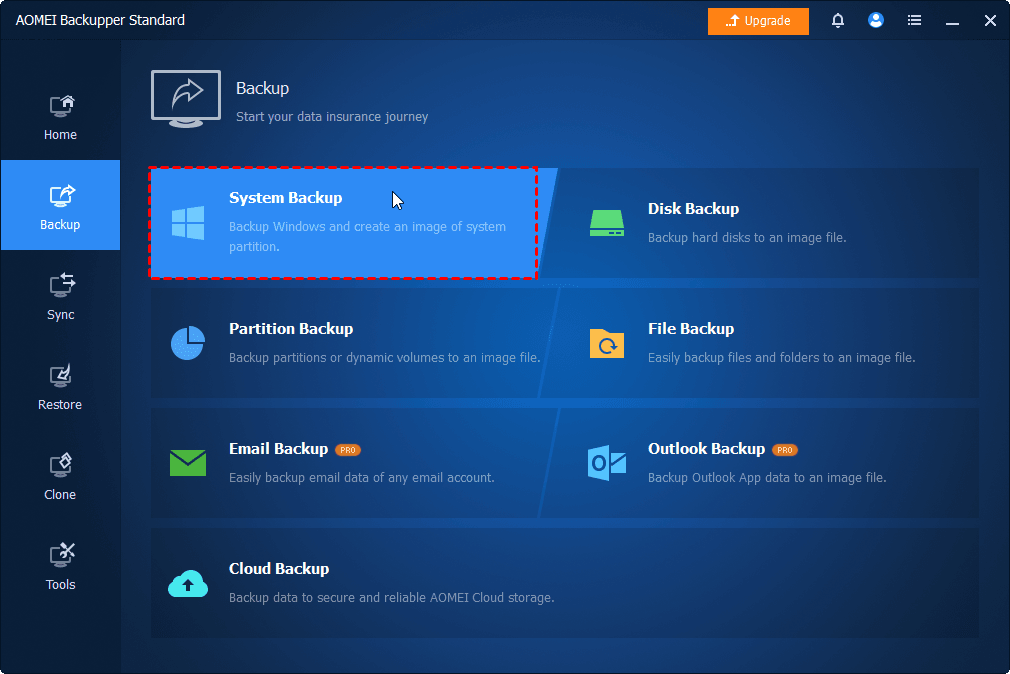
Step 1. Open AOMEI Backupper after installing. Click Backup and select the desired backup solution, preferably system backup or disk backup. Be sure to select the prepared external hard drive, USB drive, etc., as destination.
📍📍📍Notes:
✅ To set up or change backup settings, click Options, Backup Scheme, Schedule.
✅ The incremental backup is the default option in a scheduled task.
✅ You can change the backup settings in the Home tab. Locate the backup task, click the three-dot icons, and select the corresponding options.
Step 2. Switch to the Tools tab, click Ransomware Protection.
Step 3. Toggle the Enable Ransomware Protection tab to enable it. Then, specify file type, files, folders to enhance data security.
- The backup images created by AOMEI Backupper is protected automatically.
- Enter the file extensions you frequently use to protect specific file types.
- Enter specific folder paths, such as C:\Program Files (x86), C:\ProgramData, etc., to protect important files and folders.
Step 4. Check the specific app and click Add to Trust List or Add to Block List. Or simply click Ignore.
Step 5. Switch to Trust List, Block List, and Block History and manually configure them.
📍📍📍Notes:
✅ Adding trusted or blocked apps or folders decides if they can modify or delete protected files or folders.
✅ In the Block History window, you have 3 options, including Clear Block History, Add to Trust List, or Add to Block List.
Conclusion
Ransomware threats targeting servers continue to evolve, making layered securityessential rather than optional. Relying on a single antivirus solution, no matter how advanced, leaves gaps that modern ransomware can exploit through zero-day attacks, credential abuse, or backup targeting.
Combining the best server antivirus for ransomwarewith ransomware-aware backup and recovery tools like AOMEIBackupperdelivers far stronger resilience. While antivirus solutions focus on detection and prevention, AOMEI safeguards backupsand ensures rapid recovery when prevention fails. Together, they reduce downtime, data loss, and operational risk.

 as a preferred
source on Google
as a preferred
source on Google