



Avast vs Windows Defender - Which is Better?
Avast and Windows Defender are two popular antivirus software programs. Avast vs Windows Defender: What are the differences, and which is better? Here is a full comparison.

By Jonna Updated on May 13, 2026


While most websites are not inherently malicious, many still attempt to install malware, implant Trojan horses, or inject other malicious code to compromise the system and steal critical data. Fortunately, platforms like Windows Defender and Avast are designed to keep you safe. If you're unsure Avast vs Windows Defender, which antivirus for Windows suits your needs best, this detailed comparison guide is perfect for you. Let's begin now.
Overview of Avast and Windows Defender
Avast is a third-party cybersecurity company with decades of experience. It offers both free and paid antivirus products for Windows, macOS, Android, and iOS. Avast focuses heavily on layered protection, offering tools beyond basic malware scanning, such as behavior monitoring, web protection, and network security features.
Windows Defender (now called Microsoft Defender Antivirus), on the other hand, is Windows' built-in antivirus solution. It comes preinstalled with Windows 10 and Windows 11, and runs quietly in the background. Defender is deeply integrated into the operating system, working alongside Windows Security, SmartScreen, and system-level protections.
At a glance, the main difference in Avast vs Microsoft Defender is: Avast aims to offer a feature-rich security suite, while Defender prioritizes seamless integration and simplicity.
Deep Comparison: Avast vs Microsoft Defender, Which is Better?
This section breaks down the most important aspects of Avast Antivirus vs Windows Defender, so as to answer the question: Is Avast better than Windows Defender?
Features
Avast is known for packing its antivirus with additional tools. Even the free version includes multiple layers of protection, while paid plans expand into privacy and performance utilities. It offers a broad suite of tools: real-time malware scanning, web and email protection, Wi-Fi network scanning, sandboxing, firewall enhancements, webcam protection, and even VPN access. It is designed to meet the needs of users who desire more customization options.
Microsoft Defender keeps things more streamlined. Its features are built around Windows Security rather than a standalone suite. It covers essential antivirus protection, ransomware safeguards through Controlled Folder Access, firewall integration, and cloud-based threat intelligence. What it lacks in extras, it makes up for in seamless integration with Windows.
|
Feature |
Avast |
Microsoft Defender |
|
Real-time malware protection |
Yes |
Yes |
|
Web & email protection |
Yes |
Limited |
|
Firewall |
Advanced (paid) |
Built-in Windows Firewall |
|
VPN |
Yes (paid) |
No |
|
Sandbox |
Yes |
No |
|
Cross-platform support |
Yes |
Windows only |
Malware Protection
Both Avast and Microsoft Defender rely on signature-based detection combined with behavior analysis and cloud intelligence.
Avast has a strong reputation for catching known and emerging malware. Its behavior shield monitors apps in real time and flags suspicious activity, even when a threat hasn’t been identified before. Avast also benefits from its large global threat database, which updates frequently.
Microsoft Defender has improved significantly over the years. It now uses cloud-based machine learning to identify threats quickly and reacts faster than older versions ever did. Defender is particularly effective at stopping common malware and widespread threats.
|
Aspect |
Avast |
Microsoft Defender |
|
Signature-based detection |
Excellent |
Very good |
|
Heuristic analysis |
Strong |
Moderate |
|
Zero-day threat handling |
Strong |
Improving |
|
False positives |
Occasional |
Rare |
Web Protection/Anti-phishing
Browser-level protection matters more than people realize, because many modern attacks begin with malicious links, fake downloads, or phishing websites.
Avast includes dedicated web and email shields that scan URLs before pages load. It actively blocks known phishing sites and warns users about suspicious web behavior. Browser extensions further enhance this protection by flagging unsafe links in search results.
Microsoft Defender relies on SmartScreen for web and app reputation checks. SmartScreen works across Microsoft Edge and system-level downloads, warning users when a file or website has a poor reputation.
|
Web Protection Feature |
Avast |
Microsoft Defender |
|
Real-time URL scanning |
Yes |
Limited |
|
Anti-phishing |
Yes |
Yes (Edge-focused) |
|
Browser compatibility |
Broad |
Best with Edge |
Ease of Use & Impact on PC Performance
An antivirus that slows your PC or bombards you with pop-ups can quickly become frustrating. Here is Avast vs Windows Defenderin terms of interface and performance.
Avast has a modern interface with detailed dashboards and alerts. While informative, it can feel busy at times, especially in the free version, where upgrade prompts are common. Performance impact is generally low, but background scans may be noticeable on older systems.
Microsoft Defender is deeply integrated into Windows, making it almost invisible during normal use. There’s no separate installation, no ads, and no constant notifications. It runs efficiently in the background and is optimized for Windows hardware.
|
Usability Factor |
Avast |
Microsoft Defender |
|
Installation required |
Yes |
No |
|
System resource usage |
Moderate |
Low |
|
Ads/upgrade prompts |
Yes (free) |
No |
|
Learning curve |
Moderate |
Very low |
Pricing
Microsoft Defender is completely free. It comes bundled with Windows and does not require a separate subscription. All core protection features are available by default- no subscriptions, no upsells.
Avast offers a free tier, but many advanced features are locked behind paid plans. While these plans can be good value for users who want VPNs and advanced privacy tools, they’re unnecessary for everyone.
|
Pricing |
Avast |
Microsoft Defender |
|
Free version |
Yes |
Yes |
|
Paid plans |
Optional |
No |
|
Subscription required |
For advanced features |
Never |
In conclusion, Windows Defender Antivirus vs Avast, Avast offers a broader range of features, stronger customization, and more aggressive web and behavior-based protection, making it suitable for users who want layered security and greater control. Microsoft Defender, in contrast, emphasizes seamless Windows integration, quiet operation, and low impact on system performance while still delivering reliable malware and phishing protection at no extra cost.
Best Ransomware Protection Software for Windows PCs
Windows Defender or Avastantivirus software plays a critical role in prevention, but no solution can guarantee 100% protection against ransomware. Once files are encrypted, recovery becomes the real challenge. This is where backup-based protection becomes essential. Rather than focusing only on stopping attacks, a reliable backup strategy ensures data can be restored even after the worst scenario.
AOMEI Backupper is a professional Windows backup software designed with data protection functions. It doesn’t replace antivirus software; it complements it. Its key features include:
 AOMEI Backupper
- File, folder, system, and disk backups with incremental and differential backup options.
- Offline and external storage support, like backing up Windows 11 to NAS.
- Fast recovery after ransomware or system failure and support system restore to different computer.
- Ransomware protection to always protect backup images or specific files and folders from virus attacks.
 100% Secure
You can run the AOMEI Backupper software on your computer, and use it for ransomware defense with the following steps:
Step 1. Head to Tools > Ransomware Protection.
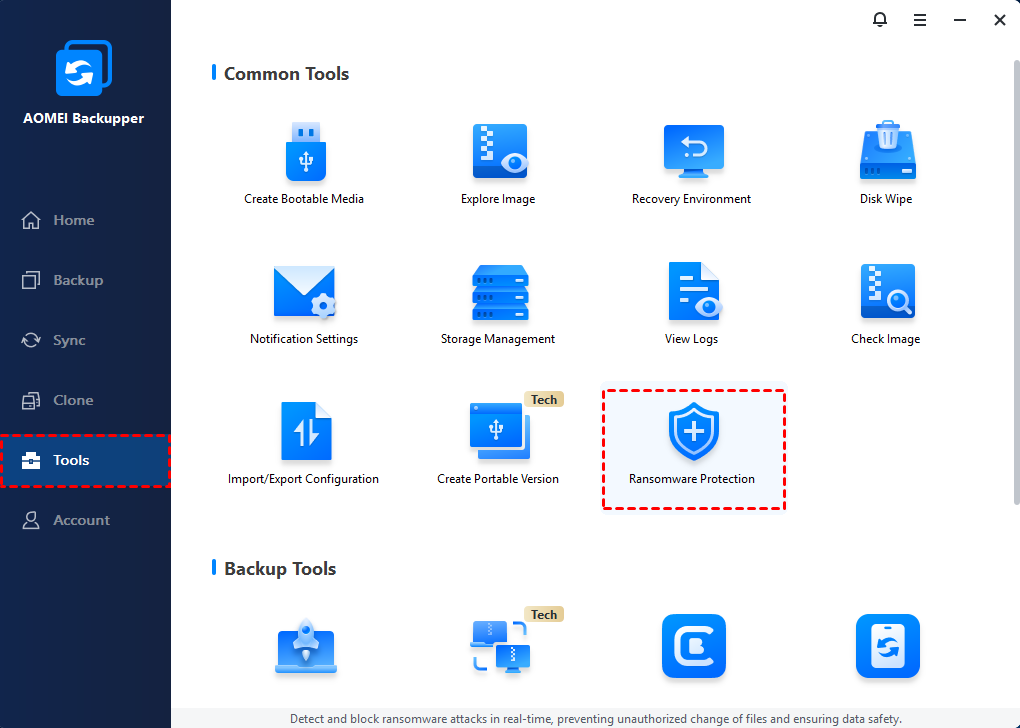
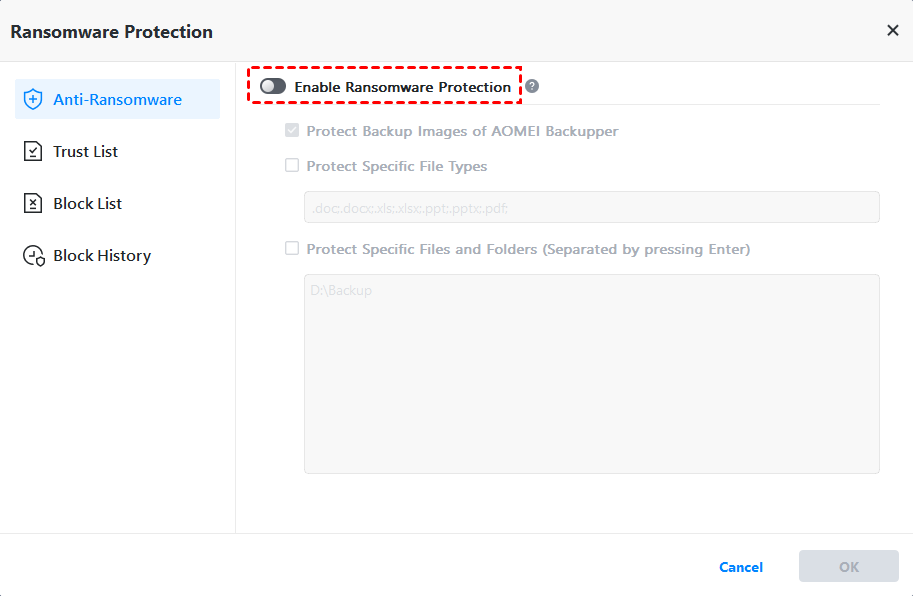
Step 2. Then, toggle the switch for Enable Ransomware Protection to turn it on.
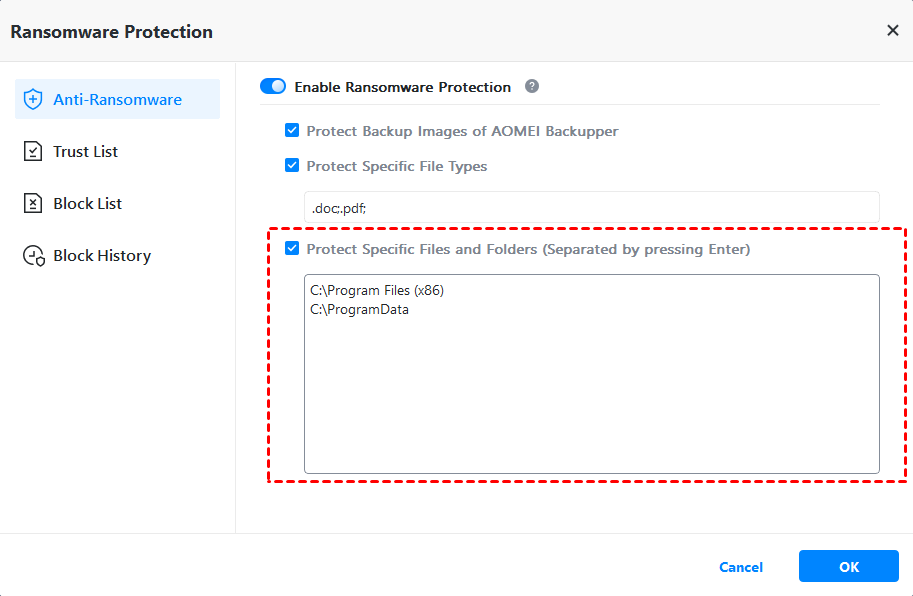
Step 3. There are three sub-options. You can confirm your settings and then click OK.
- Protect Backup Images of AOMEI Backupper: Checked by default to protect image files created by AOMEI Backupper.
- Protect Specific File Types: Protect specifiedfile types by adding file extensionslike .doc, .ppt, and so on.
- Protect Specific Files and Folders: Protect specific files or folders by adding their paths, like C:\Users, etc.
The Verdict
So, when it comes to Avast vs Microsoft Defender, which one is better? The answer depends on what you value most. Microsoft Defender is ideal for users who want reliable, built-in protection with minimal effort. It’s free, efficient, and tightly integrated with Windows.
Avast, on the other hand, is better suited for users who want advanced features, detailed control, and additional layers of protection. It shines in web security, behavior analysis, and customization, especially in its paid versions.
But regardless of whether you choose Avast or Defender, pairing your antivirus with a reliable backup solution like AOMEI Backupper ensures your system and data stay protected.

 as a preferred
source on Google
as a preferred
source on Google