


Fixed: Windows Cannot Be Installed on Drive 0 Partition 1
Why Windows cannot be installed on drive 0 partition 1? Learn the most common reasons on this post and know how to fix it with different ways.

By Hedy Updated on May 29, 2026


Why Windows cannot be installed on drive 0 partition 1?
Encountering errors like “Windows can't be installed on Drive 0 Partition 1” or “Windows is unable to install to the selected location” during installation can be frustrating. However, deleting Partition 1 is not a safe solution. This partition is reserved for essential system data, and removing it may prevent Windows from functioning properly or lead to data loss.
✍ Common causes of the error:
1. Incompatible Boot Mode (BIOS/UEFI)
This issue often arises when the boot mode in BIOS is set to UEFI while the disk configuration is not compatible—especially if the drive exceeds 2TB. In such cases, the system may block the installation process. Converting the disk between MBR and GPT can resolve this mismatch and allow installation to proceed.
2. SAS driver issues or corrupted MFT
Problems with SAS drivers or a damaged Master File Table (MFT) can interrupt communication between the system and the disk. As a result, Windows may fail to install on the selected partition.
To successfully install Windows on Disk 0 Partition 1, apply the appropriate fixes based on the cause. Follow the solutions provided in the next sections to resolve the issue effectively.
How to fix "Windows cannot be installed on drive 0 partition 1" error
When the “Windows cannot be installed to disk 0 partition 1” error appears, it can be resolved using either DiskPart or third-party partition software. Both methods are straightforward and effective when applied correctly.
However, it’s important to note that using DiskPart through Command Prompt may erase all data on the disk. Because of this risk, a safer alternative is recommended as the first option.
AOMEI Partition Software provides a more secure approach, allowing you to resolve the issue without data loss. It simplifies the process while protecting your existing files, making it a reliable choice for most users.
Method 1. Convert disk to MBR or GPT using AOMEI Partition Software
-
Applies to: Resolving the “Windows cannot be installed on drive 0” error by converting the target disk to MBR or GPT on Windows 11/10/8.1/7—without data loss.
#1. Convert Disk 0 to GPT
If you encounter the message:
“Windows can't be installed on drive 0. The selected disk has an MBR partition table. On EFI systems, Windows can only be installed to GPT disks”,
it indicates a mismatch between the disk format and the system’s boot mode.
This issue is common when the target disk exceeds 2TB, as MBR cannot fully support larger drives. Converting the disk to GPT resolves the limitation and enables a smooth installation process.
To proceed, exit the Windows setup and restart your computer using your existing operating system. Then, install AOMEI Partition Software and use it to convert the disk from MBR to GPT safely. This method avoids data loss while preparing the disk for successful Windows installation.
 AOMEI Partition Software
A safe and reliable disk partition management tool that helps you migrate OS to SSD or HDD, reorganize disk space, and improve overall PC performance.
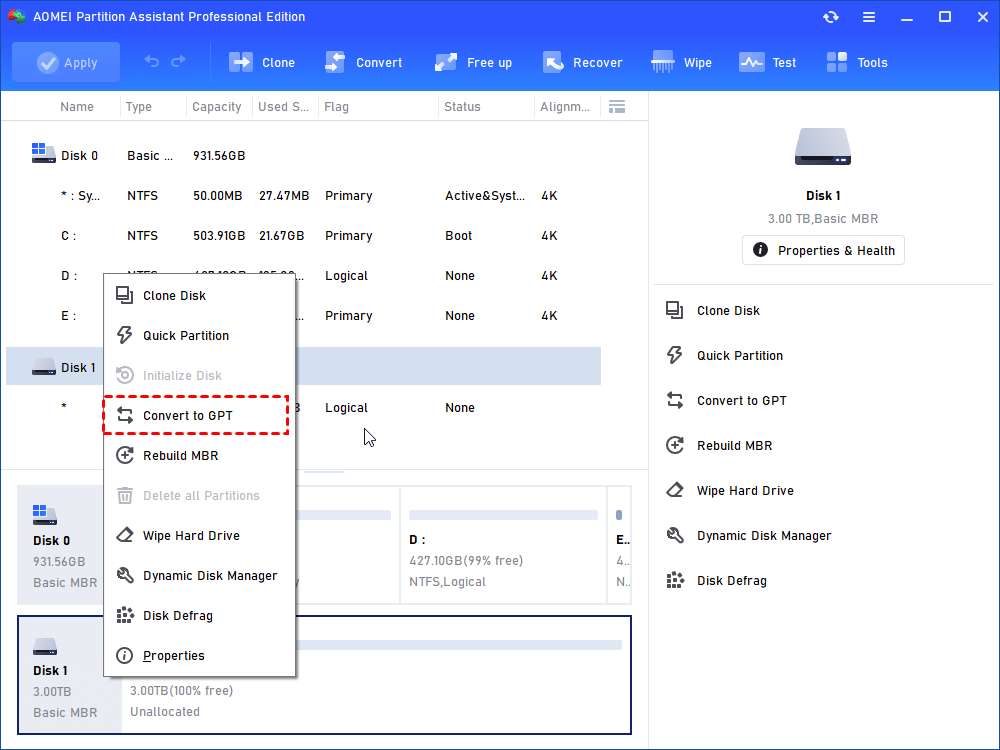
Step 1. Install and launch this AOMEI Partition Software. Right-click the disk you want to switch and hit Convert to GPT in the drop-down menu.
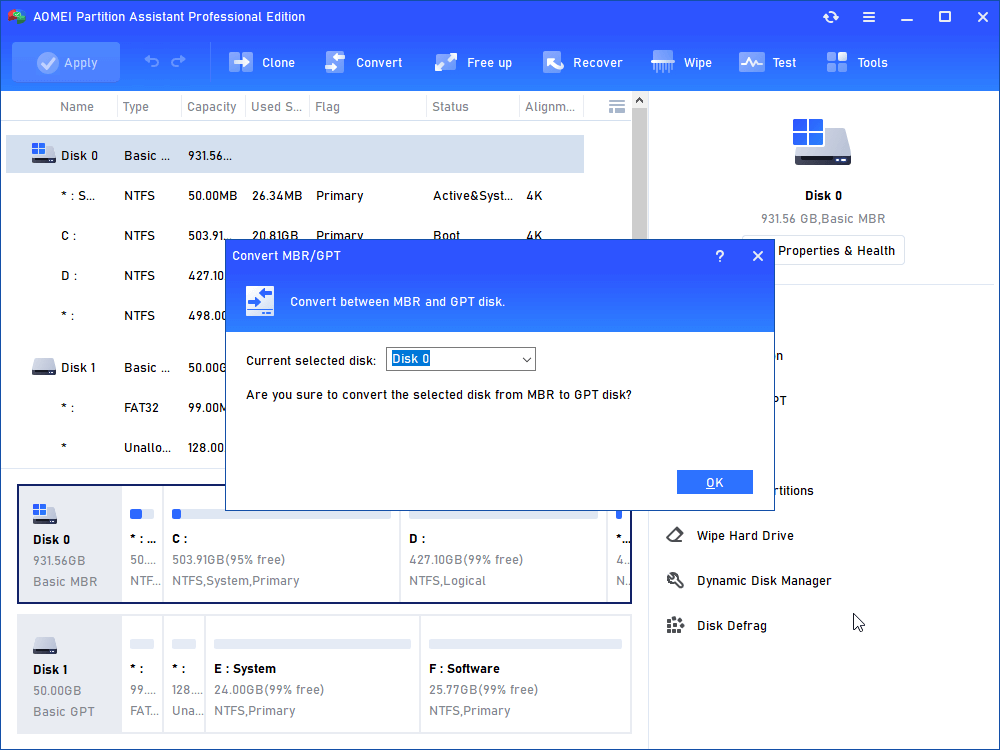
Step 2. Click OK to confirm the operation.
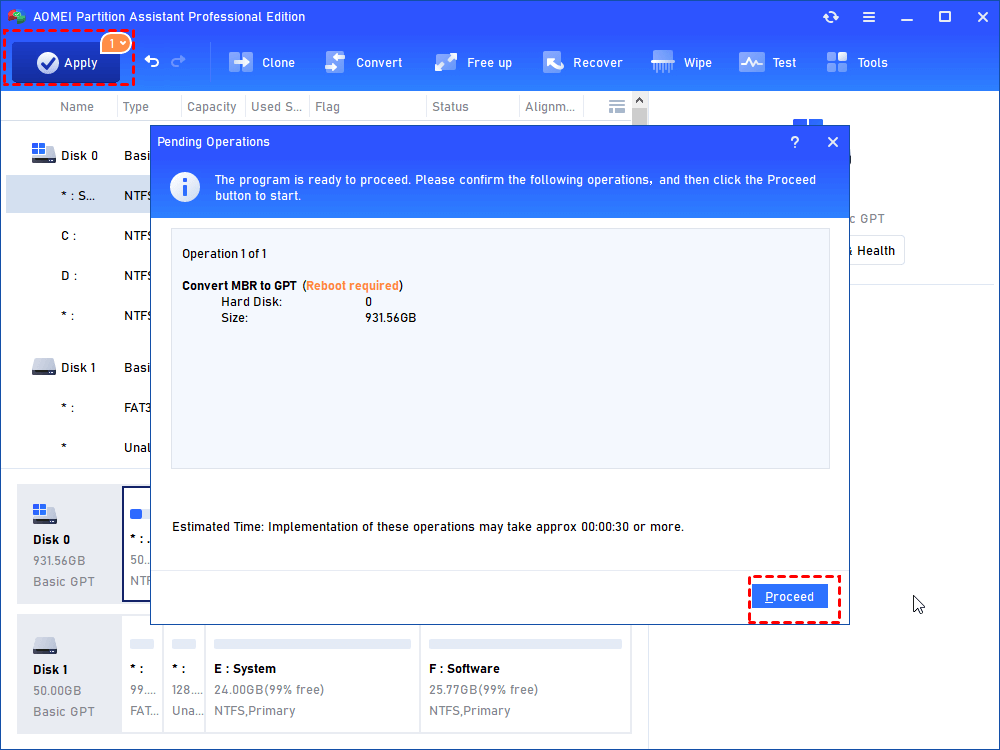
Step 3. Click Apply button to proceed the changes.
#2. Convert the target Disk (0) to MBR
If you see the message:
“Windows cannot be installed to this disk. The selected disk is of the GPT partition style… The partition is an EFI system partition (ESP)”,
there’s no need to panic. This error usually points to a mismatch between the disk format and the system’s boot configuration.
Start by exiting the Windows installation process. Once back in your existing system, use AOMEI Partition Software to convert the disk from GPT to MBR.
This approach allows you to quickly eliminate the compatibility issue and proceed with the Windows installation without unnecessary complications.
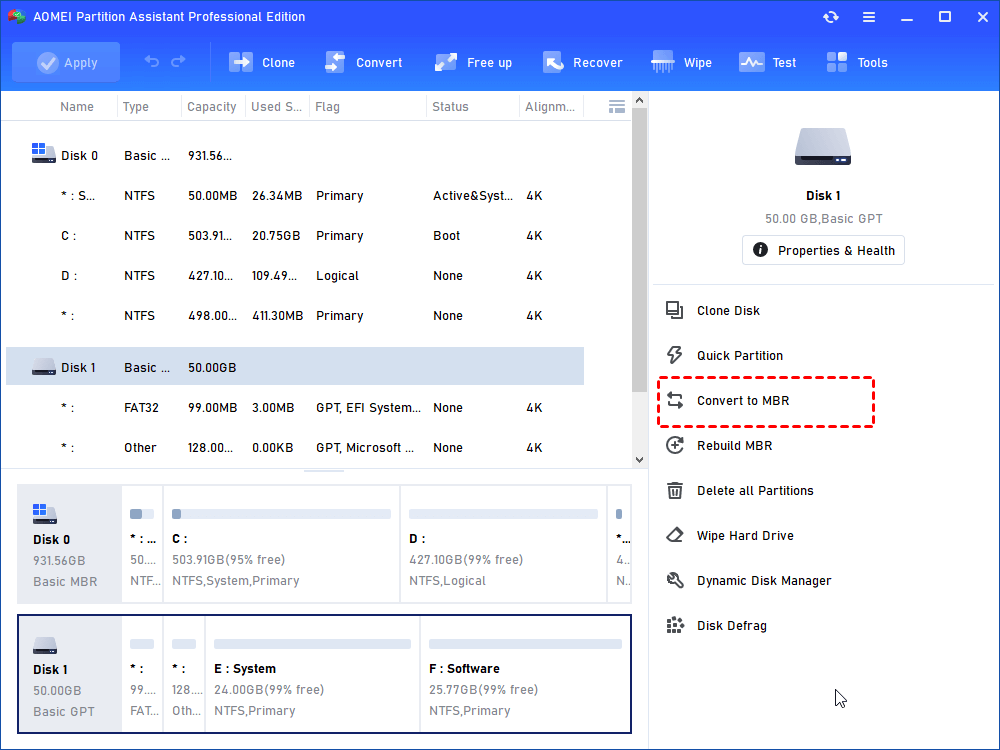
Step 1. Install it, and launch the program. In the main window, you should right-click on the disk that you want to convert and choose the "Convert to MBR" option.
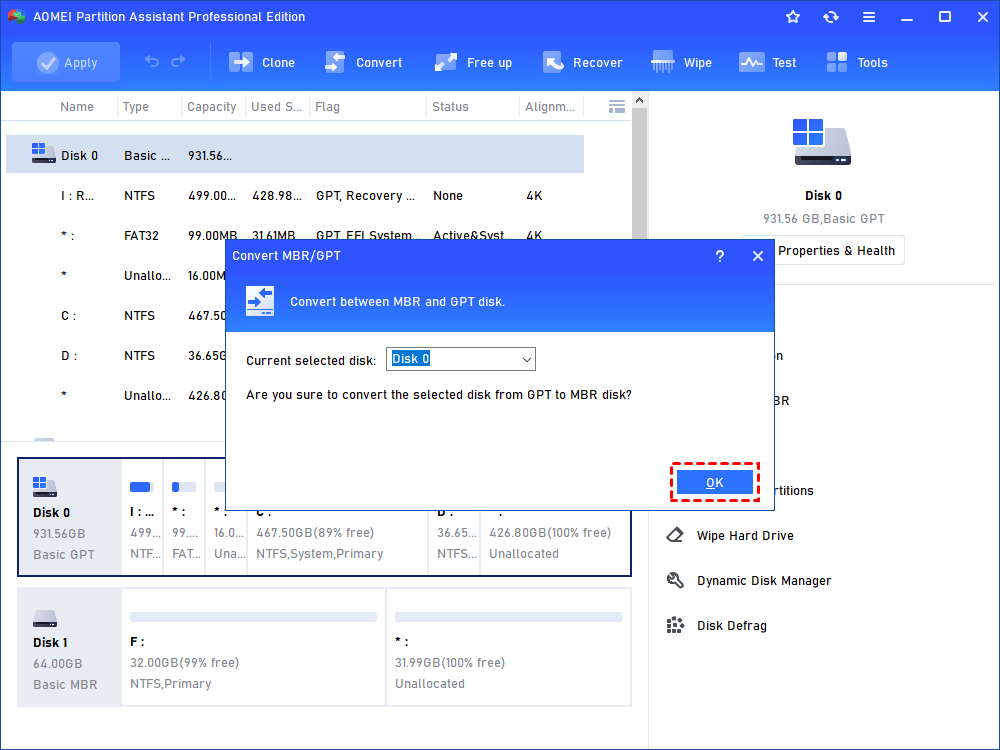
Step 2. Click "OK" to continue.
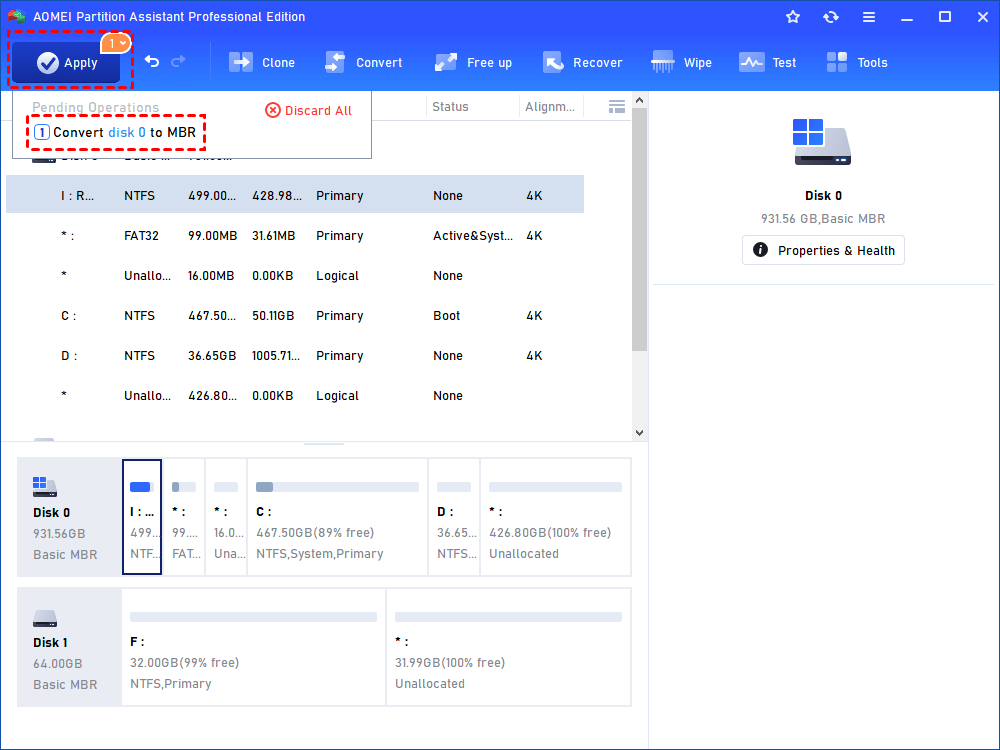
Step 3. Click "Apply" to perform the pending operations.
Method 2. Clean target disk partitions via DiskPart clean command
-
Applies to: Fixing SAS driver issues or a corrupted MFT by wiping the target disk and preparing it for a fresh Windows installation.
-
Note: This process permanently deletes all data.
When the error “Windows can’t be installed on drive 0 partition 1” appears, you can resolve it by clearing all existing partitions using DiskPart.
Step 1. Close the Windows Setup window.
Step 2. Press Shift + F10 to open the Command Prompt.
Step 3. Enter the following commands one by one, pressing Enter after each:
diskpart
list disk
select disk 2 (replace 2 with your target disk number)
clean all

Step 4. Type exit to close DiskPart.
Once completed, return to the Windows installation process and proceed with setting up the system on the cleaned disk.
FAQs
➤ Can I delete Drive 0 Partition 1?
No, you generally shouldn’t delete Drive 0 Partition 1 because it often contains essential system or reserved files required for booting. Removing it may cause system instability or prevent Windows from starting properly.
➤ Why is Drive 0 Partition 1 so small?
Drive 0 Partition 1 is usually a system-reserved or EFI partition. It is intentionally small because it only stores boot files and critical system data, not user files or applications.
➤ Should I install Windows on unallocated space?
Yes, installing Windows on unallocated space is recommended. The installer will automatically create the required partitions, ensuring proper system configuration and reducing the risk of installation errors or misconfigured partitions.
➤ Is GPT better than MBR?
GPT is generally better than MBR because it supports larger disks, more partitions, and improved data integrity. It also works with modern UEFI systems, offering better performance and compatibility compared to the older MBR format.
➤ Will DiskPart clean delete everything?
Yes, the DiskPart clean command removes all partitions and data from the selected disk. It erases the partition table, making all data inaccessible, so ensure you back up important files before using it.
Conclusion
In summary, the “Windows can't be installed on drive 0 partition 1” error is usually caused by boot mode conflicts, partition style mismatches, or disk-related issues like corrupted MFT or driver problems. Instead of deleting critical partitions, users should apply proper fixes such as converting between MBR and GPT or cleaning the disk when necessary. Choosing safe and suitable methods ensures a smooth installation process while minimizing the risk of data loss.

 as a preferred
source on Google
as a preferred
source on Google