




How to Recover Deleted TikTok Videos on Windows/iPhone/Android
How to recover deleted TikTok videos? This post is ready to help you recover deleted TikTok videos on Windows, iPhone, or other storage devices via corresponding methods.

By Ivy Updated on May 6, 2026


Are deleted TikTok videos gone forever?
TikTok, known in China as Douyin, is a popular social media platform. This app allows users to create, watch, and share 15-second videos taken via mobile devices or webcams.
But have you ever accidentally deleted TikTok videos during editing or managing files? Or want to recover permanently deleted TikTok videos? Some of you might raise questions like these:
Are deleted TikTok videos gone forever? Where do deleted files go? Moreover, how to recover deleted TikTok videos?

In fact, it’s easy to recover your linked videos on TikTok videos, and this article provides you with several methods. Your TikTok videos might not display before you wipe the disk or overwrite the data itself.
- For Windows PCs, deleted TikTok videos are first moved to the Recycle Bin, where they also take up disk space.
- For permanently deleted TikTok videos or when the Recycle Bin is emptied, they are still on the computer as long as you add new data to overwrite them.
How to recover deleted TikTok videos on Windows
How to recover deleted TikTok videos on Windows? Usually, if you have any backup, try to restore deleted files from backup. If not, seek help from professional data recovery tools.
Method 1. Recover deleted TikTok videos with a reliable software
Without backups, you can recover deleted TikTok videos using trustworthy video recovery software like FastRecovery. Please get an overview of its exciting features below.
 AOMEI FastRecovery
- Recover deleted or lost images, videos, audio, documents, etc., with up to 1000+formats, such as CR3, X3F, HEIF, MP4, WMV, MXF, AIFF, etc.
- Quick & Deep scan - find as many files as possible and recover them with a high success rate.
- Display all recoverable data by Type or Path, allowing you to sort, search, filter, or preview files.
- Support HDDs/SSDs, external drives, USB drives, SD cards, etc., and NTFS, exFAT, FAT32, and ReFS file systems.
- 👍Recover deleted files for free, up to 500MB.
 100% Secure
Download FastRecovery on your Windows 11, 10, 8, 7, or Windows Server computers to recover deleted TikTok videos easily!
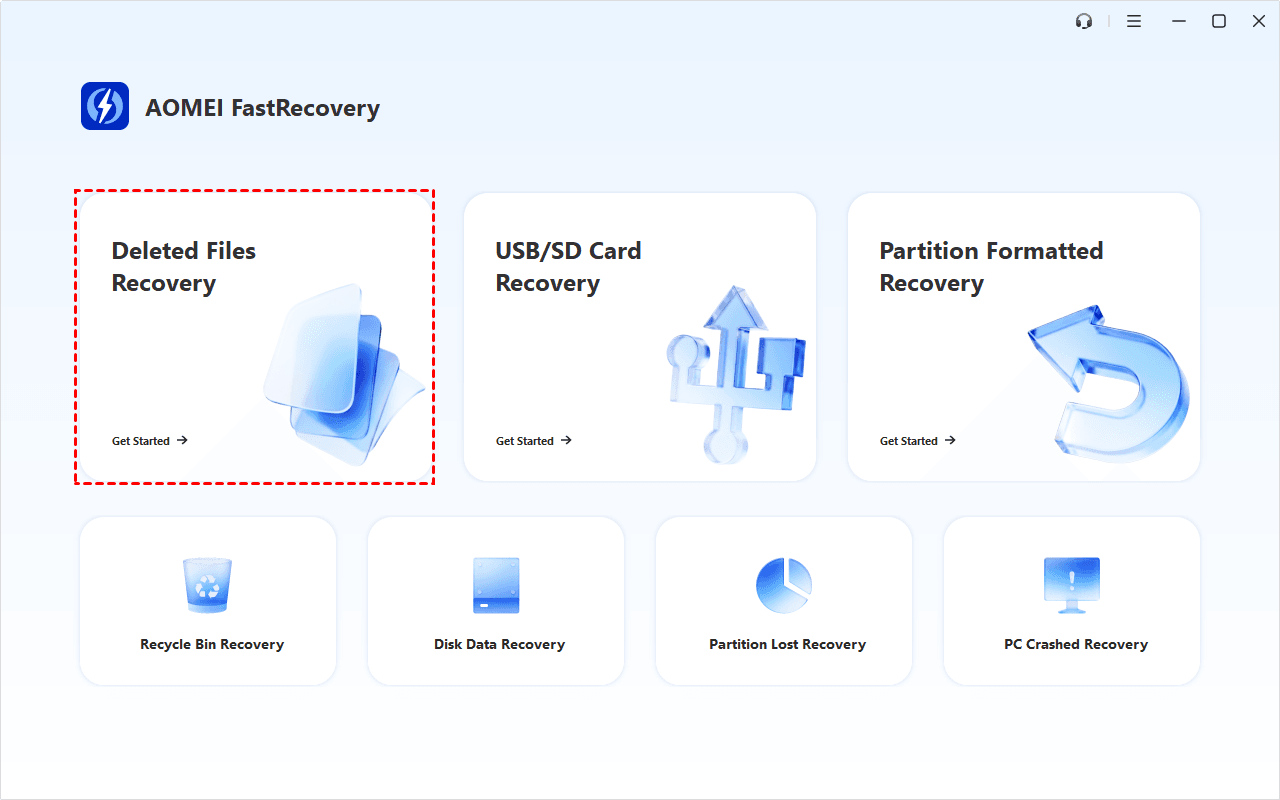
Step 1. Run AOMEI FastRecovery after installing it. Then, click Deleted Files Recovery to get started.
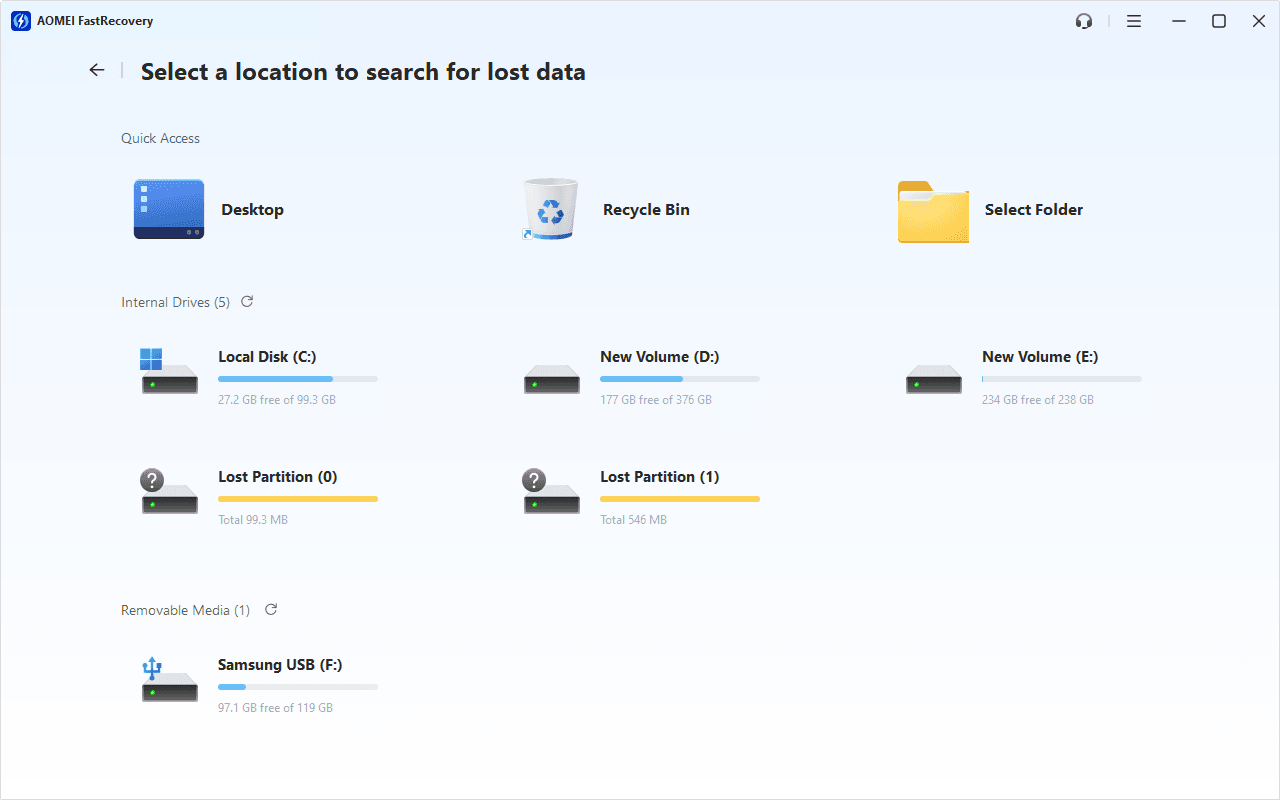
Step 2. You'll see a list of devices. Hover the mouse over the SD card containing deleted files, and click Scan to start the quick scanning process and display all recoverable data.
Step 3. Under the Type section, check Videos and expand it to see all data formats. You can sort deleted TikTok videos, usually with the .mp4 extension, or search the name for quick recovery.
-
You can also locate deleted files by Path if you remember this.
-
Click the Deep Scan button if the Quick Scan fails. Deep Scan searches every sector of the disk to find more files.
Step 4. Once found, double-click the files to preview and select them by ticking the checkbox or leaving them blank. At last, click Recover and select a new location to save the recovered files.
You will be asked to upgrade to the advanced edition of AOMEI FastRecovery to enjoy unlimited data recovery. The free edition supports up to 500MB.
Method 2. Recover deleted TikTok videos from File History
File History is a built-in backup software that can save copies of your files in the Documents, Music, Pictures, Videos, Desktop folders, and offline OneDrive files, and allows you to restore deleted, lost, or damaged original files. So you can use it to get back deleted TikTok videos if there are.
Step 1. Type Control Panel in the search bar and open it. Then, go to System and Security.
Step 2. Under the File History tab, click Restore your files with File History.
Step 3. Click Restore personal files.
Step 4. Find deleted TikTok videos and click the green restore button to get your deleted TikTok videos back to the original location. To set another saved path, click the Settings icon and select Restore to.
How to recover deleted TikTok videos on iPhone
If you accidentally deleted TikTok videos on iPhone, you can go to the Recently Deleted folder to restore them. Unlike the Recycle Bin, this temporary folder can only keep your deleted items for 30 days.
After 30 days or emptying this folder, you’ll be prompted to restore your iPhone from iCloud or iTunes backup. Or you can use iPhone data recovery software to get videos back.
Method 1. Recover deleted TikTok videos using iPhone recovery software
Can you recover permanently deleted TikTok videos after 30 days without backups? In a short answer, yes, you can. A reliable iPhone data recovery software, like AOMEI FastRecovery for iOS, could exempt users from several restrictions and try to recover deleted TikTok videos as many as possible.
- The recovery process won't delete all existing data on the iPhone.
- Preview all the deleted TikTok videos before recovery.
- Recover deleted or lost Photos, Videos, Contacts, Notes, Reminders, WeChat History, Call History, Calendars, Voice memos, etc.
- Support different types of iPhones, iPads, and iPod Touches, and are compatible with iOS 10.0 and later.
With a bootable iPhone and Windows PC, you’re prepared to start the iPhone data recovery process. Let's get started.
Step 1. Download AOMEI FastRecovery for iOS and install it on your PC. Meanwhile, connect your iPhone to this computer and click “Trust This Computer” on your iOS device when prompted.
Step 2. On the computer, click Scan Now to find all deleted or lost data on the iPhone.
Step 3. Under the Videos section, select the deleted TikTok videos. Then, click Recover to get them back.
Method 2. Recover deleted TikTok videos from iCloud/iTunes backup
Apple released two useful backup services (iCloud and iTunes) for iPhone users to prevent data loss. Thus, if you’ve enabled iCloud/iTunes backup, you can restore deleted videos from backup containing your desired TikTok videos.
- If you’ve activated iCloud Videos, your iCloud/iTunes backup will not include the same videos.
- All existing data on your iPhone will be replaced with data from your iCloud or iTunes backup.
Step 1. Run the latest iTunes and connect your iOS device to the computer. Then click the iPhone icon.
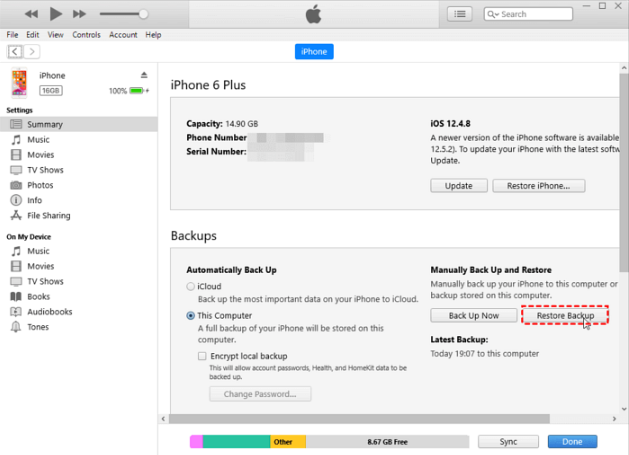
Step 2. Click Summary > Restore Backup.
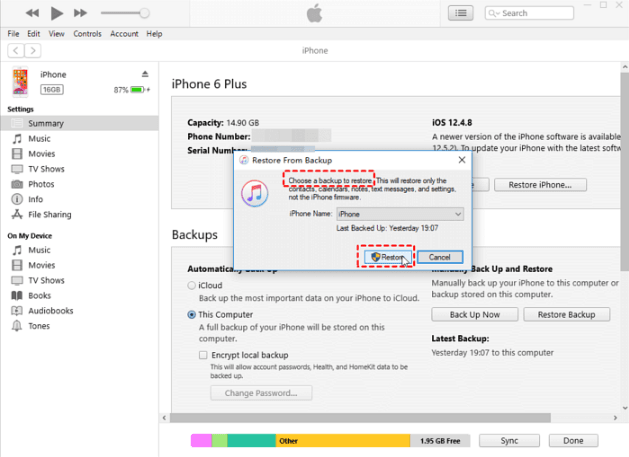
Step 3. Select an iTunes backup among the listed backups and click Restore. Please wait patiently because the size of your chosen backup can influence the speed of restoration.
How to recover deleted TikTok videos on Android
Google Drive makes it possible for you to recover deleted TikTok videos on Android if you’ve synced TikTok videos to Google Photos. Note that deleted photos and videos are stored here for up to 30 days (or 60 days if backup is enabled)
Step 1. Launch the Google Photos app on your Android phone. Make sure you are signed in with the correct Google account.
Step 2. Click Trash at the left panel.
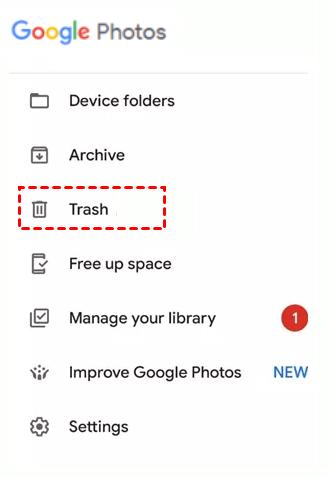
Step 3. Browse through the Trash folder and look for deleted TikTok videos, usually with the .mp4 extension. Once found, select them and click Restore to get your TikTok videos back.

 as a preferred
source on Google
as a preferred
source on Google