




How to Recover Clip Studio Paint Files (Unsaved or Deleted)
To recover Clip Studio Paint files, first identify whether you lost a saved drawing or unsaved progress. Choose the appropriate recovery source, find available copies, and check that the restored project contains the work you need.

By Ivy Updated on September 8, 2026


Your drawing disappears from its folder, or Clip Studio Paint closes before you save the latest changes. Both situations interrupt your work, but they need different recovery methods.
To recover Clip Studio Paint files that were deleted, AOMEI FastRecovery can scan the original drive for recoverable project files. For unsaved progress, check CSP’s canvas recovery. Existing backups and cloud versions may also contain a usable copy.
First, determine whether the saved project is gone, recent edits are missing, or only the works-list entry has disappeared.
If only the entry is missing, check the original folder and try File > Open before assuming deletion. For .csp files stored externally, refers to files disappearing from an external hard drive.
| ❓ What happened? | 🛠️ Recovery method | 🔑 What it needs |
|---|---|---|
| A saved file was deleted | AOMEI FastRecovery | Deleted file data that remains recoverable |
| The deleted file is still in the bin | Recycle Bin | The original deleted entry |
| CSP crashed before you saved recent edits | Canvas recovery | Previously recorded recovery information |
| The file opens without recent progress | CSP backup folders | An existing saved backup |
| A synchronized project changed unexpectedly | OneDrive version history | An earlier uploaded version |
Method 1: Recover Deleted Clip Studio Paint Files with AOMEI FastRecovery
👍 Best for: Scanning a detected, stable drive for deleted projects whose file data may still be recoverable.
AOMEI FastRecovery is a reliable Windows data recovery tool designed for Windows. With a straightforward interface, you can quickly find the drive and recover deleted CSP files on Windows 11, 10, 8/8.1, 7, and Windows Server, even without a backup.
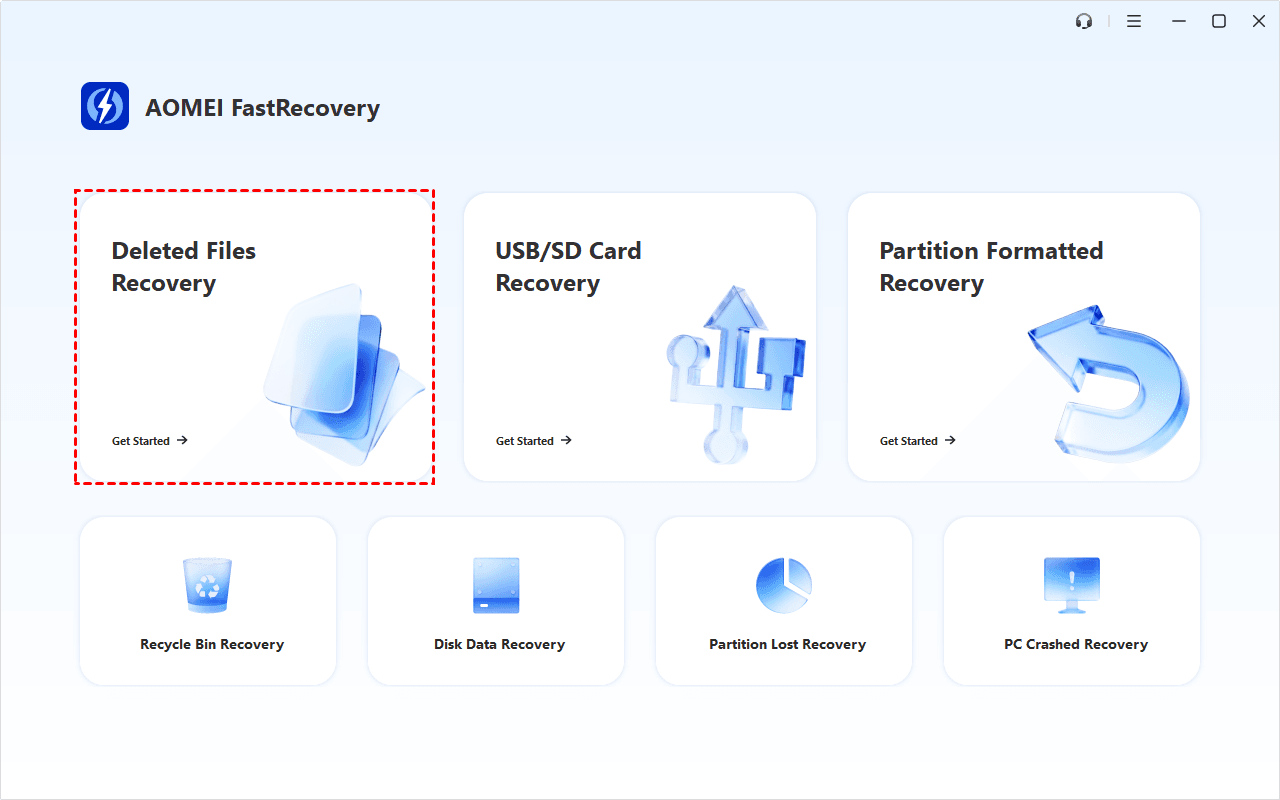
Deleted Files Recovery starts with a Quick Scan. If your drawing project is not found, Deep Scan offers a more thorough search. You can also sort, search, or apply filters to narrow down the results.
 AOMEI FastRecovery
A free and reliable Windows data recovery software
- The free edition can recover data up to 500MB. Recovery more requires an upgraded edition.
- Prepare another drive available for recovered files. Don't save them back to the originals.
Step 1. If the drawing file was stored on an external drive, connect it to your PC. Then, download and install AOMEI FastRecovery on a different drive, not the one containing .csp files. Select Deleted Files Recovery to get started.
Step 2. Choose the drive where the project was saved, which may differ from the drive where CSP is installed. Then, click Scan. The Quick Scan will start automatically.

Step 3. Browse Path or Type, or search for the project’s filename or .clip extension. Compare available names, modification dates, and sizes.
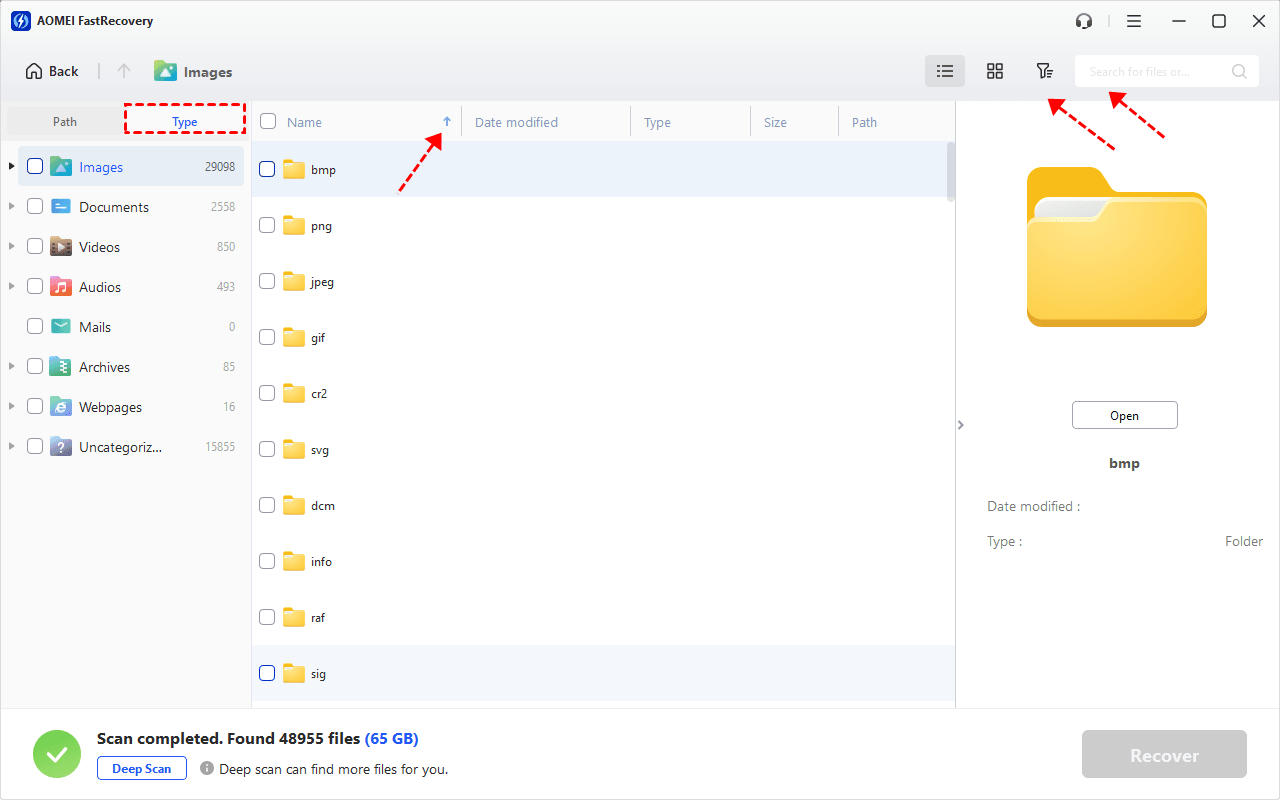
- Also search for .lip if your project used the older Clip Studio Paint format.
- If the search yields no results, navigate the folder paths or filter by data types rather than relying on the original file name alone.
Step 4. After Quick Scan finishes, choose Deep Scan if the required project is missing. Allow additional time for the extended search.
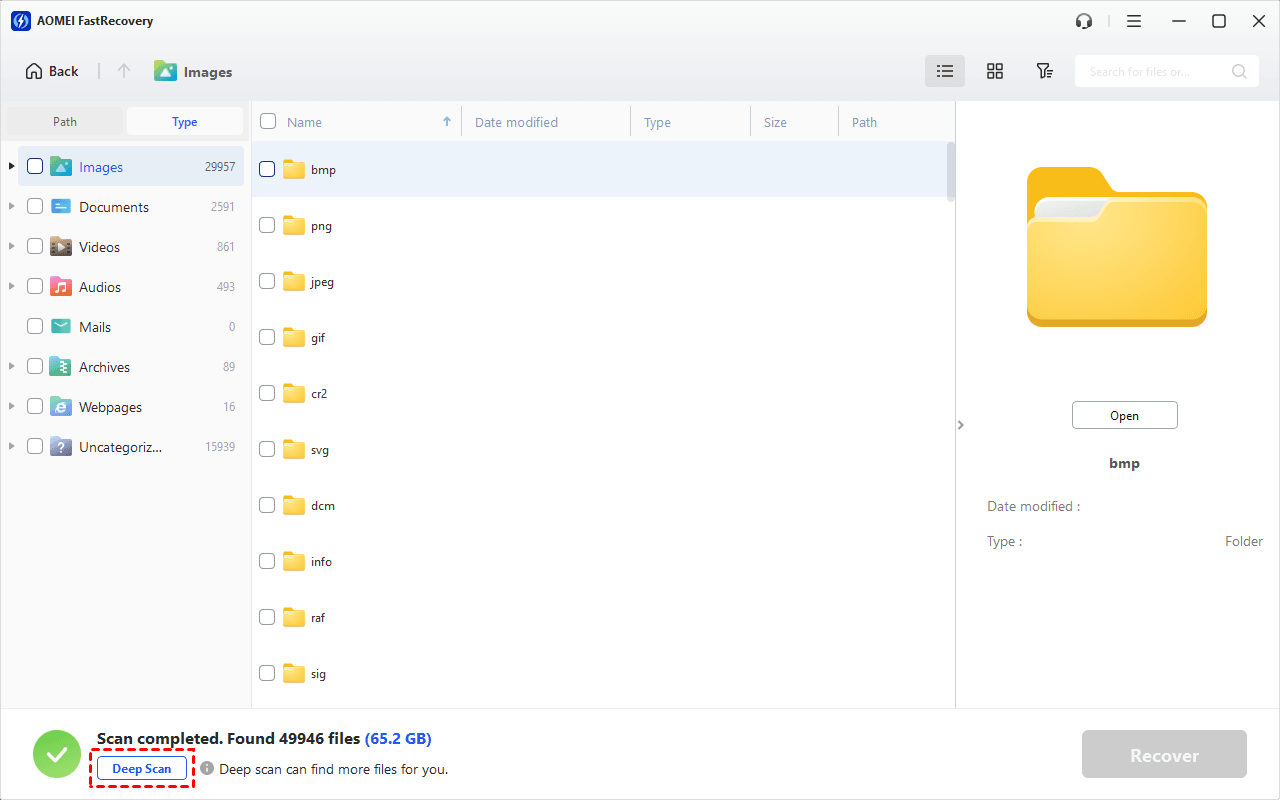
Step 5. Select the .csp files, and click Recover. Remember to save them to a different drive.
- Another folder on the same drive is not a new destination. Saving there can overwrite deleted data.
- After recovery,open the recovered projects in CSP to check the canvas, layers, and latest edits.
Method 2: Restore Deleted Clip Studio Paint files from Recycle Bin
👍 Best for: Returning a saved project to its original folder when it remains in the Recycle Bin.
This is a quick option for ordinary deletions. It restores the saved file, not changes that were never included in it. Files deleted with Shift + Delete bypass Recycle Bin, as do deleted files too big for Recycle Bin.
Step 1. Open the Recycle Bin from your desktop and look for the project's filename.
Step 2. Check its original location and deletion date to distinguish it from similarly file versions.
Step 3. Right-click the Clip Studio Paint files and choose Restore.
Method 3: Recover Unsaved Drawings with Canvas Recovery
👍 Best for: Retrieving recorded progress after an unexpected shutdown.
Canvas recovery stores info that CSP can use after an abnormal exit. Unlike saving a permanent project file, it may omit any changes made after the last recovery point was recorded.
Step 1. Reopen Clip Studio Paint. Look at the top of the canvas window (or in the Works list) for a tab marked "Recovered" or "Recovery". Do not start a new file, or it may disappear.
Step 2. Check the layers and zoom into your recent edits; compare them against your last saved version to determine exactly how much progress was recovered.
Step 3. Immediately choose File > Save As, save it under a new name (e.g., portrait-recovered.clip) to avoid overwriting.
Enabling recovery after losing a canvas cannot recreate information that was never recorded. If nothing returns, check the saved backups in Method 4.
Method 4: Restore Earlier Work from CSP Backup Folders
👍 Best for: Finding an existing saved copy when the original project file is missing or recent progress has disappeared.
CSP backups may contain earlier project data. InitialBackup holds backup data saved when a file is opened; DocumentBackup holds backup data saved when a file is overwritten.
Step 1. Launch Clip Studio Paint, select its gear icon, and choose Maintenance Menu > Open folder with Clip Studio Paint backup data.
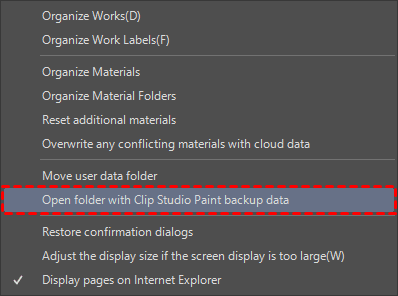
Step 2. Check InitialBackup and DocumentBackup for relevant filenames and modification times.
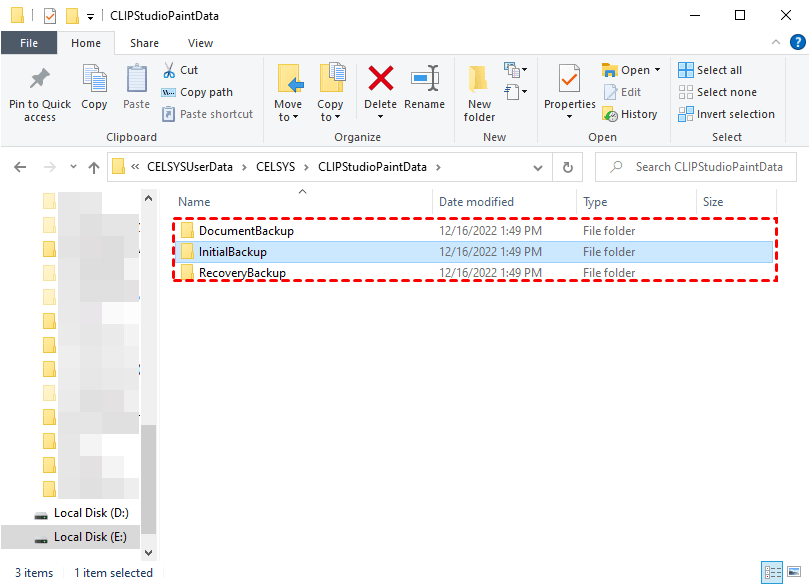
Step 3. Copy a promising backup into a separate folder and open that copy in CSP. Compare its canvas and layers with the version you already have. Save it with a descriptive filename.
Method 5: Restore Saved Changes with OneDrive Version History
👍 Best for: Retrieving an earlier uploaded version when the project file still exists.
OneDrive version history can help you recover Clip Studio Paint files containing earlier progress. Microsoft confirms that version history supports all file types, not just Office documents.
Step 1. Open OneDrive in your browser and sign in to the account containing the project file. Preserve a separate copy of the current file before replacing it.
Step 2. Find the .csp file, right-click it, and choose Version history.
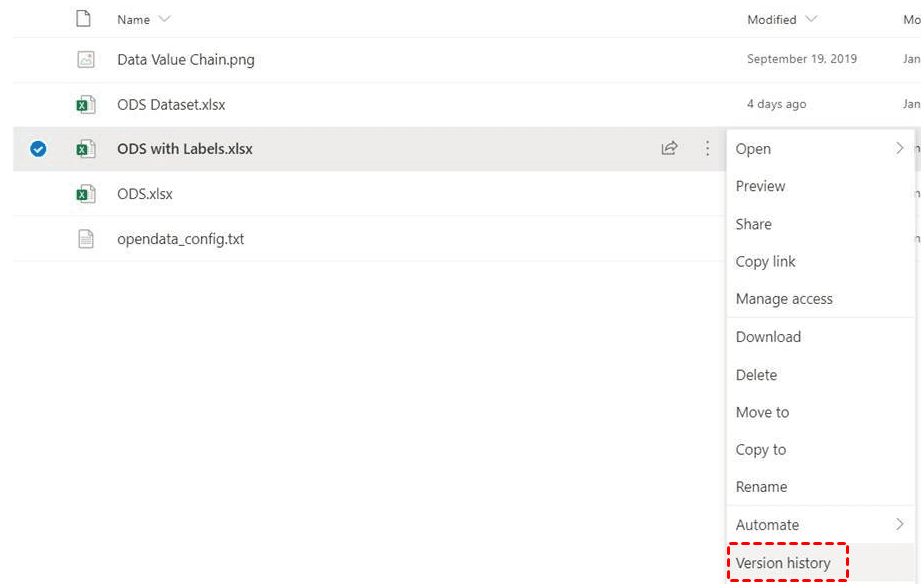
Step 3. Locate a version from before the unwanted change, open its menu, and choose Restore.
- After recovery, open the restored file in CSP and check the layers and edits before continuing work.
- If the entire file was deleted, check the OneDrive recycle bin instead.
FAQs
1. Can I recover a project file I never saved?
Possibly, if CSP recorded usable recovery information before a crash. Reopen the application first. Without recovery information or a saved copy, software cannot reconstruct canvas data that was never written to storage.
2. Why is my CSP backup folder empty?
A backup may not exist for that project file, or you may be checking the wrong location. Use the launcher’s backup-folder command. Turning recovery on now does not create historical backups.
3. Can I recover changes after clicking Don’t Save?
Check existing backups or version history, but do not assume crash recovery will restore deliberately discarded changes. Available copies may predate the edits you lost.
4. Why won’t a recovered .clip file open?
Its contents may be damaged or incomplete even if the filename looks correct. Preserve the recovered copy and test other available versions. Changing a filename extension does not repair missing project data.
To recover Clip Studio Paint files, match the method to what disappeared. Existing copies may restore earlier progress, while AOMEI FastRecovery can scan for deleted projects. Once you find a working project file, save a separate backup before continuing your next editing session.

 as a preferred
source on Google
as a preferred
source on Google