




How to Recover Agfa Camera Card Photos: Full Guide
Lost photos from an Agfa camera SD card can often be recovered if the card has not been overwritten. This guide explains common causes of photo loss and shows how to use AOMEI FastRecovery to recover deleted photos from camera SD card.

By Lily Updated on September 20, 2026


Why Are Photos Deleted or Lost from an Agfa Camera Card?
Agfa has a long history in photography, and modern AgfaPhoto cameras (like the Realishot series) store photos on SD, SDHC, SDXC, or microSD cards. If you've lost important pictures, don't panic. Before recovering your photos, it helps to understand what may have caused the data loss. Some common situations include:
- Accidental deletion: You may accidentally select and delete photos while browsing pictures on the camera.
- Formatting: Formatting the SD card can remove the existing file system and make previously stored photos inaccessible.
- Virus or malware infection: Malicious software can hide, corrupt, or delete files stored on a memory card.
- Card corruption: File-system errors, improper removal, or repeatedly using the card in different devices can cause corruption.
- Full storage: When a memory card runs out of available space, you may be unable to save additional photos. If older photos appear to disappear, stop using the card and investigate rather than continuing to take pictures.
- Physical damage: A damaged SD card or camera may prevent the computer from reading the card correctly.
Regardless of the cause, stop using the card as soon as you notice that photos are missing. Continued use can overwrite recoverable data.
Can You Recover Photos from an Agfa Camera Card?
In many cases, yes. Whether you can recover deleted photos depends largely on what happened after the photos disappeared.
When you delete a photo from an SD card, the file's data may remain on the card even though the camera no longer displays it. The space previously occupied by the photo is typically marked as available for new data. If new files have not overwritten that space, recovery software may be able to find and reconstruct the deleted photo.
Situations Where Agfa Camera Card Recovery May Be Possible
|
Situation |
What It Means |
|
Deleted photos |
Photos were accidentally deleted, but their data may still remain on the card until overwritten. |
|
Formatted card |
The card was formatted accidentally or intentionally, making the previous file structure inaccessible. |
|
Corrupted card |
File-system errors may prevent normal access to photos, while some recovery software may still detect the data. |
|
Inaccessible card |
The card may show as RAW, 0 bytes, unallocated, or produce an access error in Windows. |
|
Write-protected card |
The card is read-only, but existing data may still be scanned and recovered. |
|
Physically damaged card |
Severe hardware damage can make recovery difficult or impossible. Professional data recovery services may be required in serious cases. |
How to Recover Agfa Camera Card Photos Easily
If your Agfa camera card is readable by a Windows computer, you can use data recovery software to scan it for deleted or lost photos. AOMEI FastRecovery is designed to scan storage devices without requiring you to manually search through folders. It can be useful for recovering photos from SD and microSD cards used with digital cameras.
 AOMEI FastRecovery
- It provides Quick Scan and Deep Scan to search for recoverable files.
- It supports many common file types, including JPG, PNG, GIF, BMP, TIFF, MP4, MOV, AVI, PDF, DOCX, XLSX, and more.
- It allows you to search and filter results by file name, extension, type, and other information.
- You can select individual files instead of recovering everything.
- It supports SD, SDHC, SDXC, SDUC, and microSD cards from various manufacturers.
- It works with Windows 11, Windows 10, Windows 8, Windows 7, and Windows Server.
 100% Secure
Before you start scanning the Agfa camera card, keep these points in mind:
- Do not save recovered files back to the original SD card. Choose a different internal drive, external hard drive, USB drive, or another safe storage location.
- Also, avoid formatting the card or adding new data. Every new write operation can potentially overwrite deleted photo data.
Now learn how to recover deleted photos from camera SD card using AOMEI FastRecovery below:
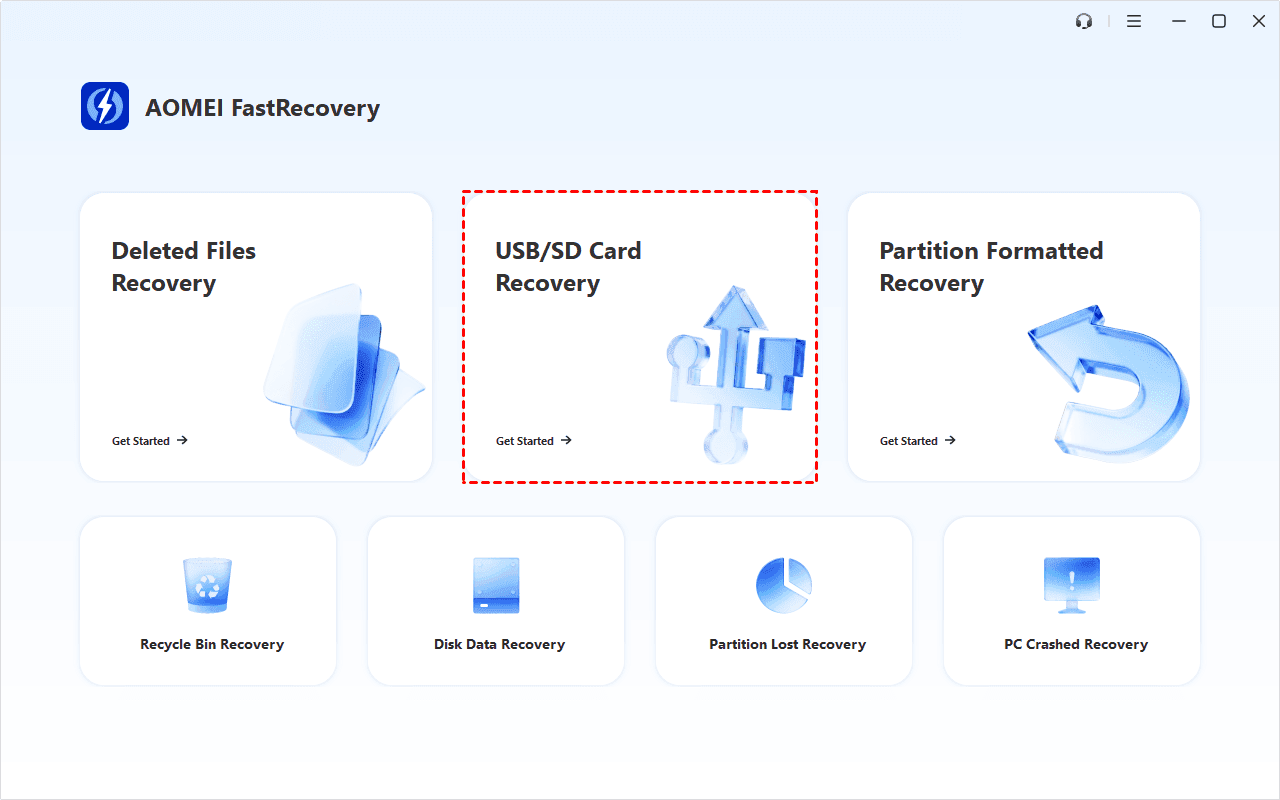
Step 1. Remove the SD or microSD card from your Agfa camera and connect it to a working Windows computer using a compatible card reader. Then launch AOMEI FastRecovery and choose USB/SD Card Recovery.
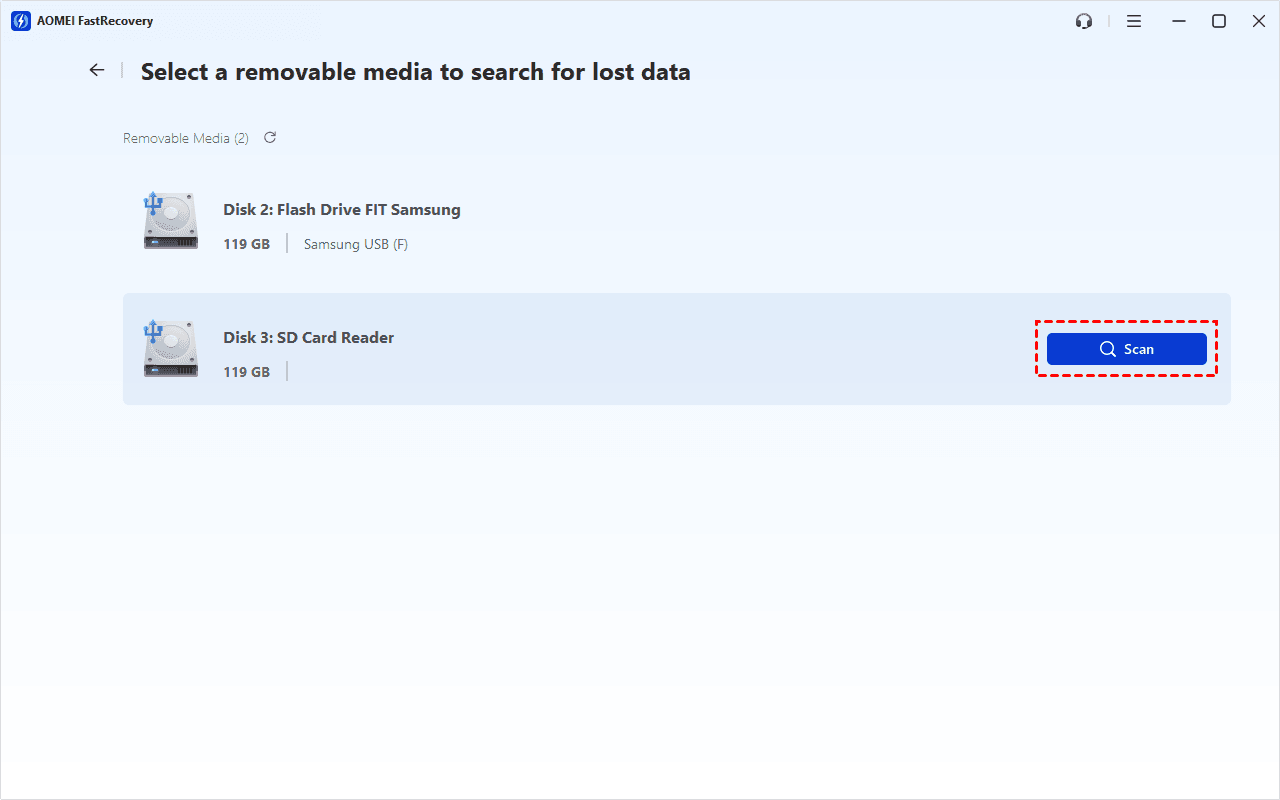
Step 2. Find the SD card used by your Agfa camera in the list of available storage devices. Hover over the card and click Scan. AOMEI FastRecovery will begin searching the card for recoverable data with Deep Scan.
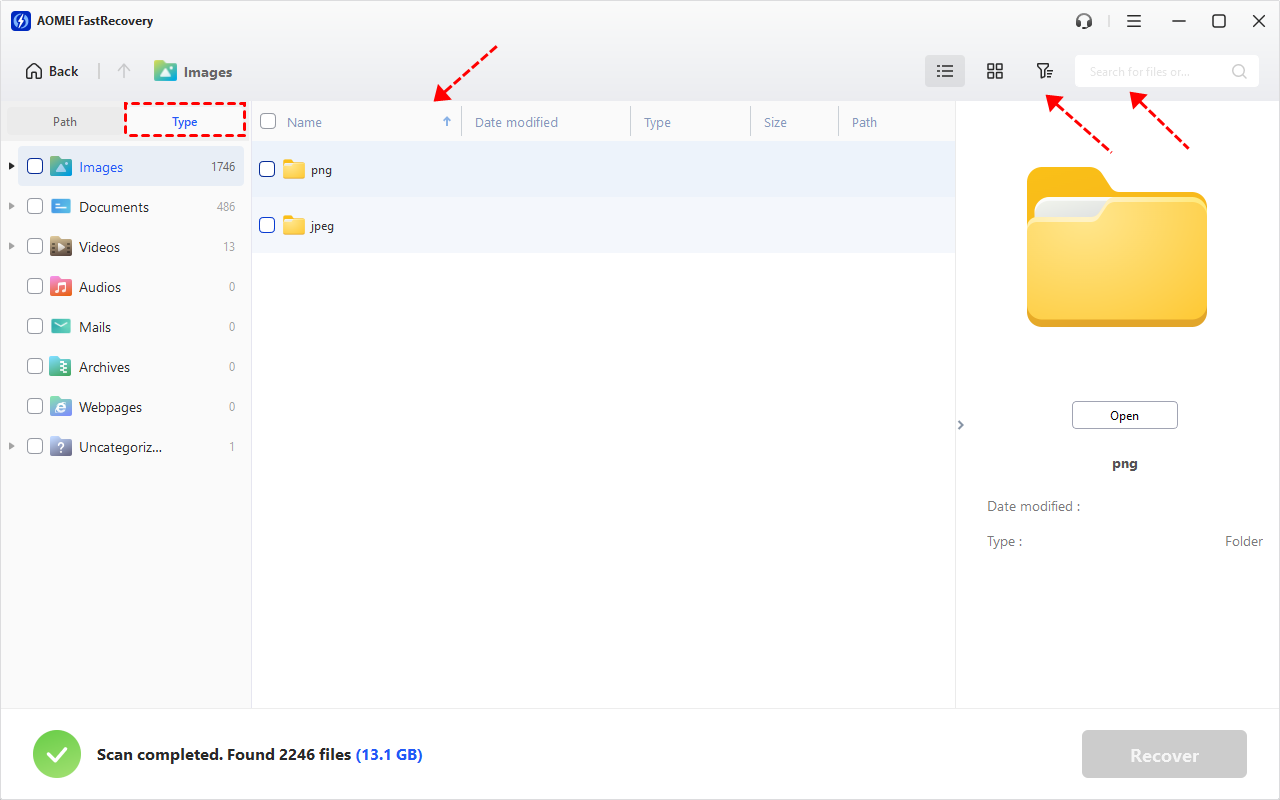
Step 3. After scanning finishes, use Type, Search, and Filter to narrow down the results. For example, you can:
- Select Images to display picture files.
- Search for a specific file name or extension, such as JPG or PNG.
- Use Filter to narrow files by size or other available criteria.
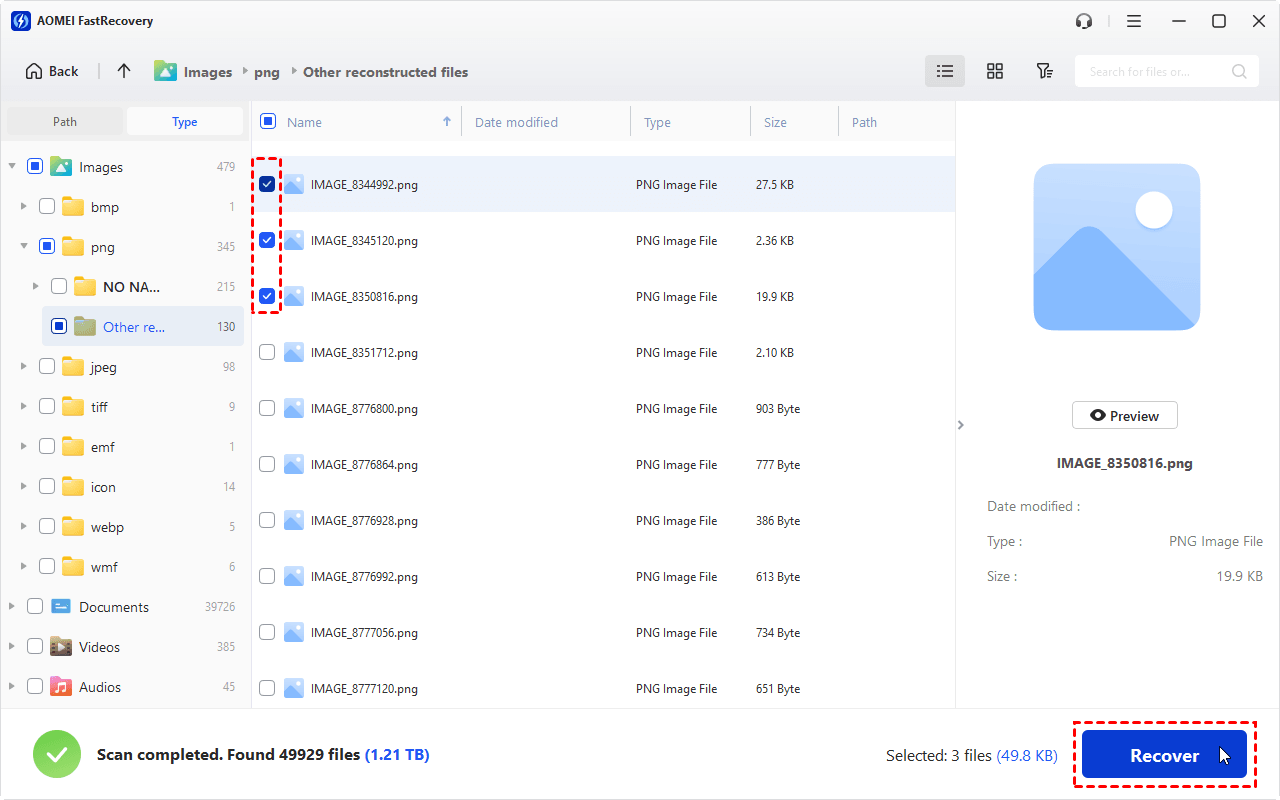
Step 4. Check the boxes beside the photos you want to retrieve. Once you have made your selection, click Recover.
💡 Notes:
- The free edition of AOMEI FastRecovery can recover up to 500 MB of data. If the amount of recoverable data exceeds the free limit, you may need to upgrade to a paid edition.
- Previewing the files is especially useful when file names have changed or when you are unsure whether a particular result is the photo you need. This is available in paid editions.
Step 5. When prompted to choose a destination, select your computer's internal drive or an external hard drive to save the recovered photos and click Select Folder.
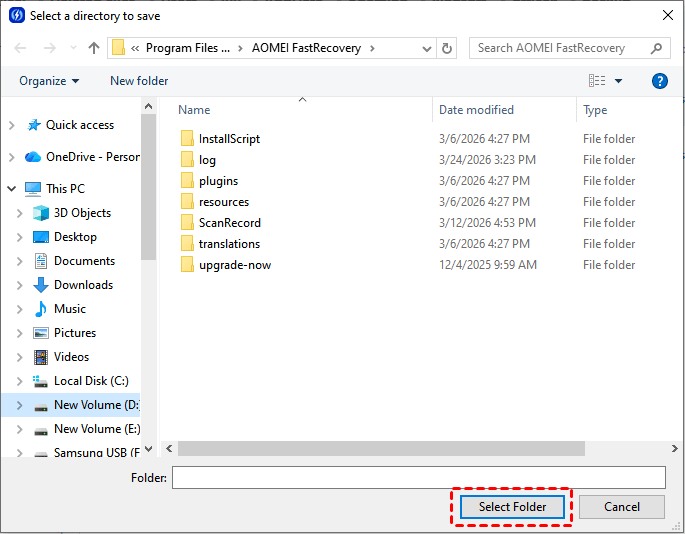
Step 6. Wait for the recovery process to finish. The required time to recover photos from a camera SD card depends on the amount of data being recovered and the speed of the storage devices.
Bonus Tips to Improve Agfa Camera Card Recovery
Using reliable recovery software is only part of the recovery process. Your actions immediately after discovering data loss can also affect the result.
✅ Stop Using the Camera
Don't continue taking pictures after discovering that photos are missing. New photos can occupy the same storage space previously used by deleted files.
✅ Remove the Memory Card
Take the card out of the Agfa camera and keep it somewhere safe until you're ready to perform recovery.
✅ Don't Format the Card
If Windows or the camera says that the SD card needs to be formatted, don't immediately accept the prompt. Formatting can change the card's file system and complicate recovery.
✅ Don't Save Recovered Files to the Same Card
Always choose another storage device as the recovery destination. This prevents recovered data from overwriting other potentially recoverable files.
✅ Keep Backup Copies of Important Photos
The safest way to avoid permanent photo loss is to maintain backup copies. You can periodically copy your camera photos to an external hard drive, USB drive, NAS, or cloud storage.
For photos that are especially important, keeping multiple copies in different locations provides additional protection if one storage device fails.
FAQs About Agfa Camera Card Photo Recovery
1. Can I recover deleted photos from an Agfa camera?
Yes, deleted photos may be recoverable if their storage space has not been overwritten. Stop using the camera card immediately and scan it with reliable data recovery software.
2. Where are deleted Agfa camera photos stored?
Deleted photos usually don't appear in the Windows Recycle Bin when they are deleted directly from a camera's memory card. The file data may remain on the card until the space is reused by new data.
3. Can I recover photos from a formatted Agfa SD card?
Recovery may be possible after accidental formatting, particularly if you stop using the card immediately. Avoid saving new files to the formatted card and scan it with data recovery software.
4. What should I do if my Agfa SD card says it needs to be formatted?
Don't format the card immediately if you need the photos on it. First, try to recover the data using appropriate recovery software. If the card is physically failing, consider professional data recovery.
5. Can I recover photos from a damaged SD card?
If the damage is limited to file-system problems, software recovery may still work. However, severe physical damage may require a professional data recovery service.
To Sum Up
If you accidentally delete or lose photos from your Agfa camera card, act quickly and avoid using the card further. Deleted data may remain recoverable until new files overwrite the storage space.
To recover Agfa camera card photos, connect the card to a Windows computer and scan it with AOMEI FastRecovery. You can search the scan results, select the files you need, and save them to another storage location. What’s more, you can use AOMEI FastRecovery to perform USB bootable data recovery on Windows 10. Don’t hesitate to try it out!

 as a preferred
source on Google
as a preferred
source on Google