



SmartDisk FAT32 Format Utility & Alternative Formatter Download
SmartDisk FAT32 Format Utility is a tool designed to format internal and external hard drive. On this page, you can also get a powerful FAT32 format alternative tool to complete the process more effectively.

By Hedy Updated on May 29, 2026


Overview of SmartDisk FAT32 format utility
SmartDisk FAT32 Format Utility is a free formatting program developed by Verbatim to help users erase external storage devices and convert them to the FAT32 file system. It is mainly designed for removable devices such as external hard drives, USB flash drives, and memory cards.
Once the formatting process starts, every file stored on the selected device will be permanently removed. After completion, the storage device will be reset and configured with the FAT32 file system.
✔️ Advantages
◾ Free tool for formatting SD cards, USB drives, and external hard drives to FAT32
◾ Allows users to rename or modify the volume label without extra cost
◾ Compatible with nearly all Windows operating systems
◾ Completely free with no paid upgrade required
❌ Limitations
◾ The software has not received updates since its initial release
◾ Unable to recognize or format internal hard drives and SSDs
◾ Does not support other file systems such as NTFS, exFAT, EXT2, EXT3, or EXT4
◾ Limited to FAT32 formatting only
SmartDisk FAT32 format utility free download and format to FAT32
If you want to convert an external storage device to the FAT32 file system, SmartDisk FAT32 Format Utility offers a simple and free solution. The software was originally released by Verbatim and is mainly intended for formatting removable storage devices.
Step 1. Since the utility was developed by Verbatim, the safest way to obtain it is through the official Verbatim website. Download the installation package, then install the program on your Windows computer.
Step 2. Connect the external storage device to your computer and open SmartDisk FAT32 Format Utility.
Step 3. Choose the target drive you want to format.
Step 4. If needed, enter a new name for the device in the Volume Label field.
Step 5. Click “Format Drive” to begin the formatting process.
Once the procedure finishes, the device will be cleaned and ready to use with the FAT32 file system.
Keep in mind that this utility only supports FAT32 formatting for external storage devices. It cannot format internal hard drives or SSDs, nor can it convert drives to NTFS, exFAT, EXT2, EXT3, or EXT4. Users needing broader disk management features may need a more advanced formatting tool.
Best SmartDisk FAT32 format utility alternative free download
Many users also rely on Windows built-in tools such as File Explorer and Disk Management to format storage devices because both utilities are free and easy to access. They can handle basic formatting tasks without requiring additional software.
However, these native Windows tools come with limitations. One major drawback is the lack of support for Linux file systems like EXT2, EXT3, and EXT4. In addition, they provide fewer advanced partition management features compared to professional disk utilities.
For users who need a more flexible and powerful solution, AOMEI Partition Software is a practical alternative. This free partition management tool allows users to format various storage devices into different file systems quickly and efficiently.
With AOMEI Partition Software, users can easily manage hard drives, SSDs, USB drives, SD cards, and other storage devices while accessing more advanced disk management functions.
🔹 Format internal HDDs, SSDs, M.2 SSDs, external hard drives, USB drives, and SD cards to FAT32 for free
🔹 Supports formatting large-capacity devices, including 128GB USB flash drives and SD cards
🔹 Allows users to rename partitions, resize or move partitions, extend volumes, and create new partitions at no cost
🔹 Compatible with FAT32,NTFS, exFAT, EXT2, EXT3, EXT4, and more
🔹 Works smoothly across all major Windows operating systems
🔹 Free, secure, and frequently updated throughout the year
 AOMEI Partition Software
A safe and reliable disk partition management tool that helps you migrate OS to SSD or HDD, reorganize disk space, and improve overall PC performance.
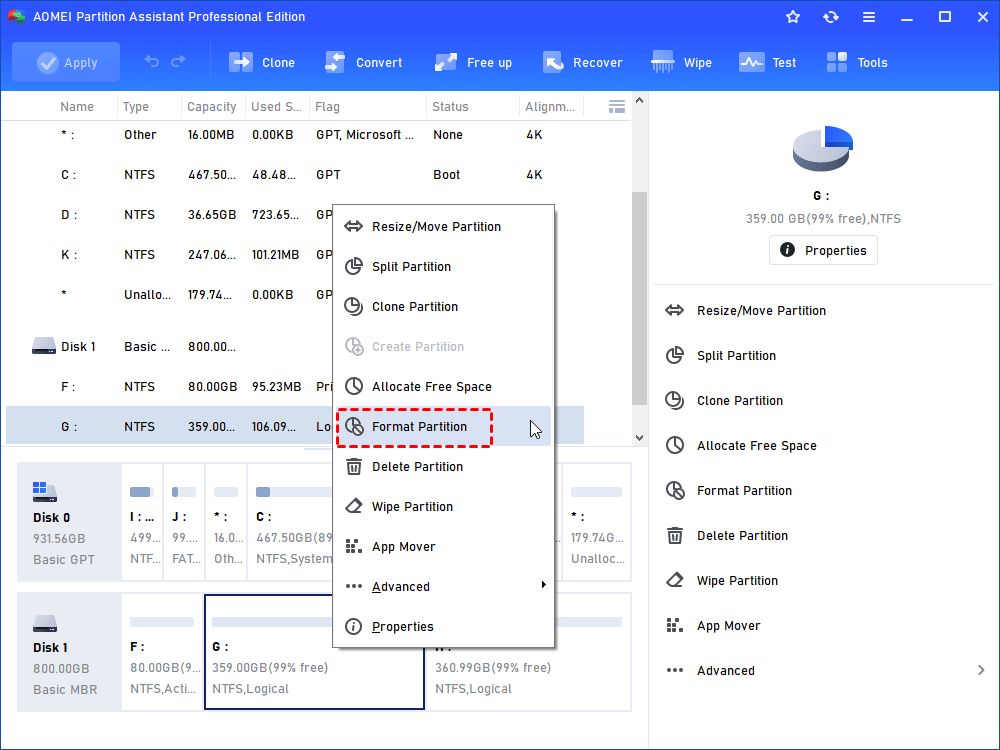
Step 1. Launch AOMEI Partition Software, right-click on the target partition on the main interface and choose Format Partition.
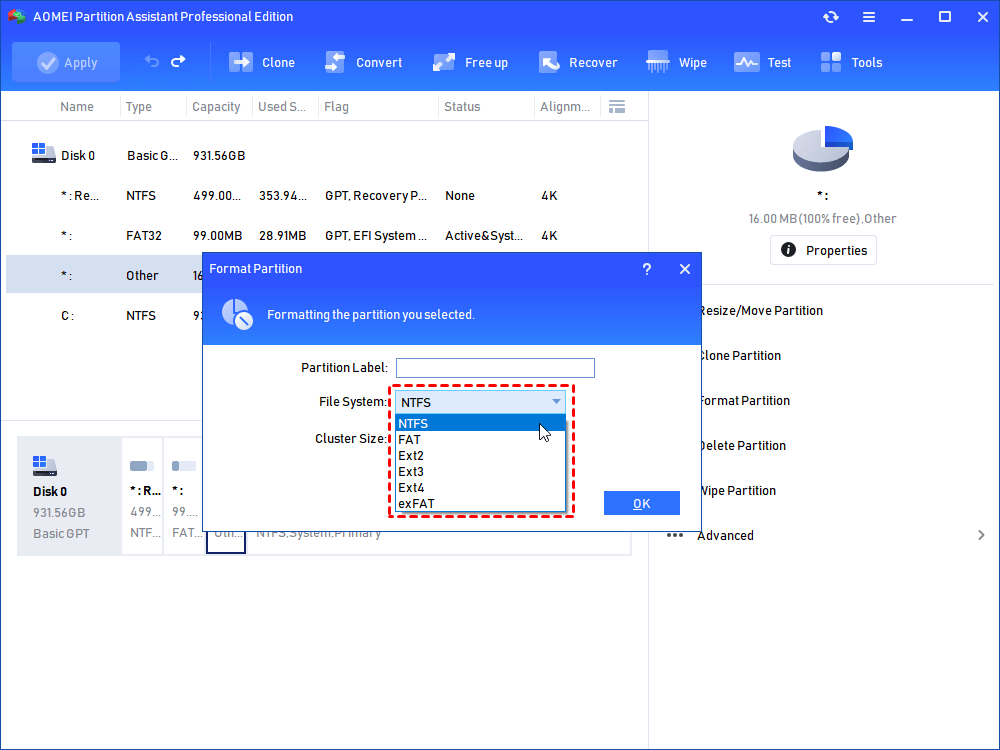
Step 2. Choose the file system as needed from the drop-down menu and click OK.
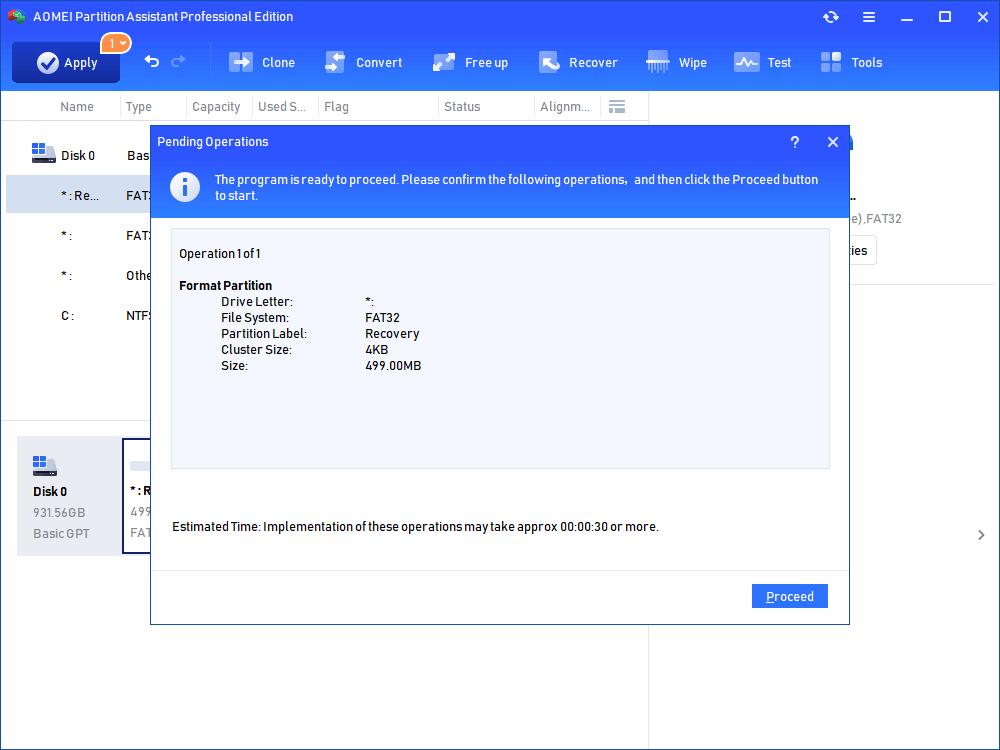
Step 3. Click Apply on the top of the main interface to execute the operation. Once the partition is formatted, all data will be cleared. And you can plug it into other devices for new use.
Format device via SmartDisk FAT32 format utility alternative
To simplify the formatting process, you can use AOMEI Partition Software instead. This free utility supports formatting a wide range of storage devices, including drives from Verbatim, SanDisk, Samsung, Kingston, and Toshiba. It can quickly format disks to file systems such as FAT32, NTFS, and EXT4, making it a convenient solution for all major Windows platforms.
Bonus tip: Convert FAT32 to NTFS without formatting
If you want to convert a storage device from FAT32 to NTFS without formatting or losing data, AOMEI Partition Software can make the process much easier. Its built-in Convert to NTFS feature allows users to switch file systems directly without reformatting the drive.
You can use this feature to convert external USB drives, SD cards, and other storage devices from FAT32 to NTFS safely and efficiently. Follow the steps below to begin the conversion process:
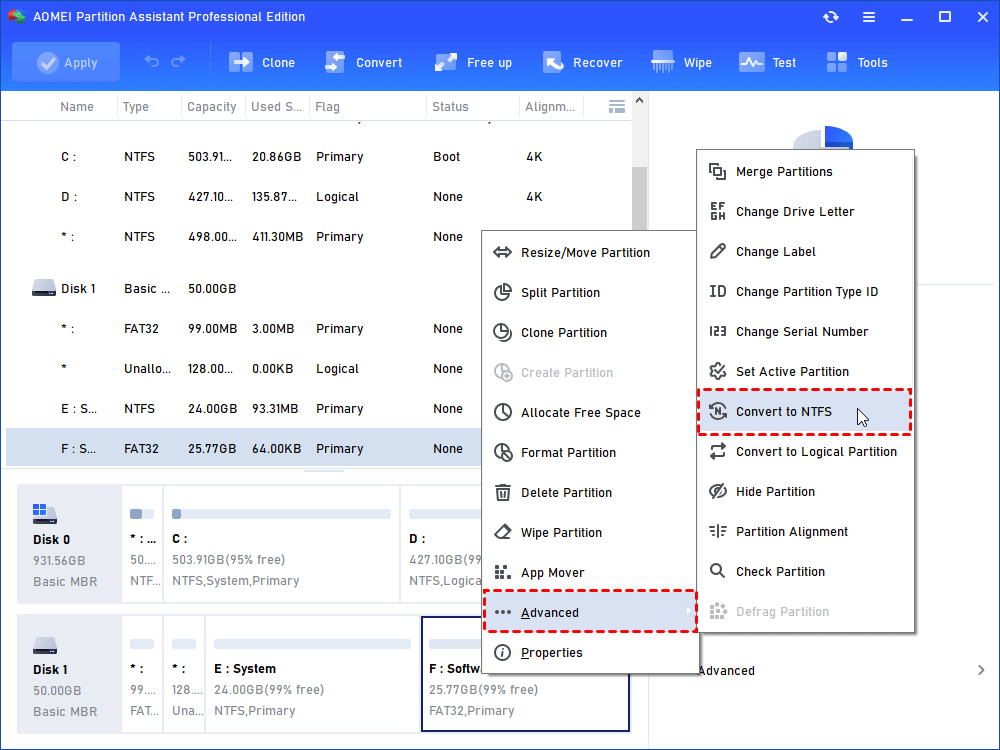
Step 1. Install and run AOMEI Partition Software. Right-click the drive you need to convert. Select “Advanced”> “Convert to NTFS”.
Step 2. In the pop-up window, NTFS is selected by default. Click “OK”.

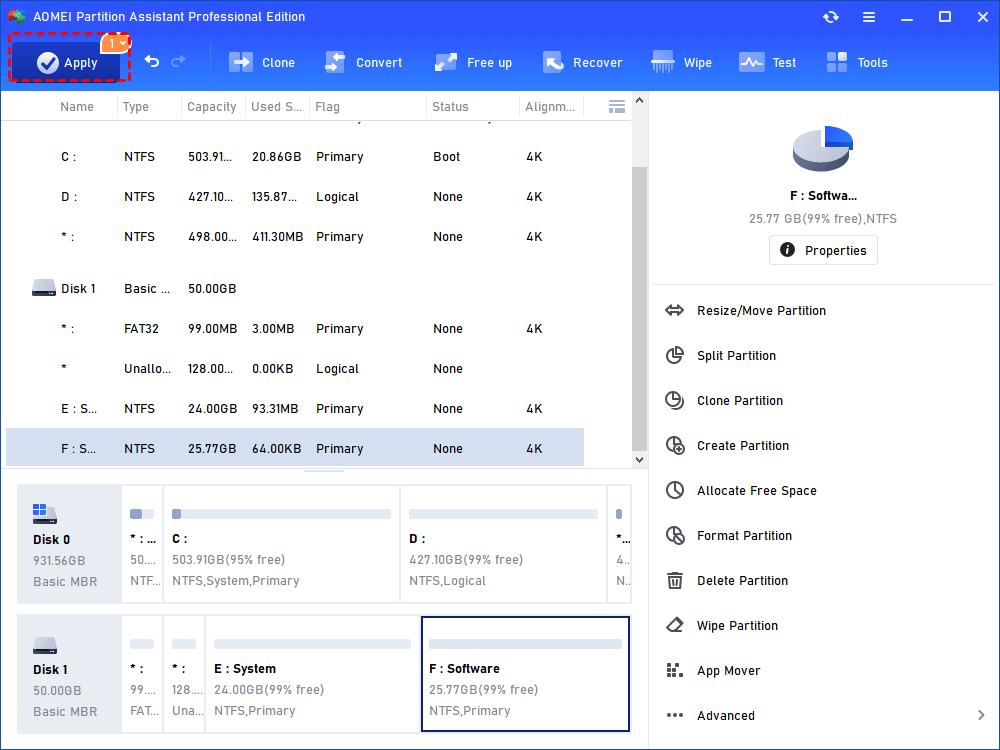
Step 3. Now the target drive is with NTFS file system. Click “Apply” to execute it.
FAQs
📍 What is SmartDisk FAT32 Format Utility used for?
SmartDisk FAT32 Format Utility is a free tool developed by Verbatim that helps users format external storage devices such as USB flash drives, SD cards, and external hard drives to the FAT32 file system. It also allows users to rename the device volume label during the formatting process.
📍 Can SmartDisk FAT32 Format Utility format internal hard drives or SSDs?
No. SmartDisk FAT32 Format Utility only supports removable storage devices. It cannot recognize or format internal hard drives, SSDs, or M.2 SSDs.
📍 Does SmartDisk FAT32 Format Utility support NTFS or exFAT formatting?
No. The utility is limited to FAT32 formatting only. It does not support other file systems such as NTFS, exFAT, EXT2, EXT3, or EXT4.
📍 Is there an alternative to SmartDisk FAT32 Format Utility?
Yes. AOMEI Partition Software is a popular alternative that supports formatting internal and external storage devices to FAT32, NTFS, exFAT, EXT2, EXT3, and EXT4. It also provides advanced features such as resizing partitions, extending volumes, and converting FAT32 to NTFS without formatting.
Conclusion
In conclusion, SmartDisk FAT32 Format Utility is a simple free tool for formatting removable storage devices to FAT32. While it works well for basic tasks, its limited file system support and lack of updates may not meet advanced needs. For users seeking broader compatibility, advanced partition management, and flexible formatting options, AOMEI Partition Software offers a more powerful and versatile alternative for Windows storage management.

 as a preferred
source on Google
as a preferred
source on Google