




How to Perform a DoD Wipe on a Hard Drive Safely?
This article explains DoD wipe methods, how DoD erase works, and why many users choose disk wipe DoD standards for secure data removal on HDDs and SSDs before selling or reusing drives.

By Irene Updated on June 3, 2026


📢 Quick Summary:
Performing a DoD wipe is a secure method for permanently erasing data from a hard disk drive (HDD) by overwriting every sector with multiple passes of binary patterns. Unlike a standard format that only hides file paths, the DoD 5220.22 M standard ensures that data cannot be retrieved by forensic tools or recovery software.
AOMEI Partition Software simplifies this technical process through a user-friendly interface compatible with Windows 11, 10, 8, and 7. Users can execute a secure 3-pass or 7-pass wipe by selecting the target drive and choosing the DoD method, which balances high-level security with efficient processing time. While this method is highly effective for traditional magnetic HDDs, it is important to note that modern SSDs may be better suited for alternative sanitization methods like Secure Erase to prevent unnecessary wear on flash memory.
How to Perform DoD Wipe for HDDs?
If you want to securely erase a hard disk drive before selling, donating, or reusing it, performing a DoD wipe is a reliable choice. A professional tool like AOMEI Partition Software can make the process much easier, especially for users who are not familiar with command lines or advanced disk management.
Unlike a quick format that only removes file references, the DoD 5220.22 M method overwrites the entire HDD several times with different data patterns. This helps prevent deleted files from being recovered by recovery software or forensic tools. AOMEI Partition Software provides a simple interface that guides users through the wiping process step by step, making secure disk erasure more convenient and safer to perform.
The software supports Windows 11, 10, 8, and 7, and can wipe the whole drive, including hidden areas and old data traces. It is especially useful when you need to protect personal files, business documents, or financial information before transferring the drive to someone else.
 AOMEI Partition Software
- Advanced Partition Management: Go beyond basic disk tools with more flexible partition operations. Resize, move, split, merge, and align partitions with greater flexibility.
- OS Migration & Disk Cloning: Migrate Windows OS to SSD or HDD without reinstalling, or clone entire disks and partitions for seamless system upgrades.
- Flexible Disk Converter: Convert disks between MBR and GPT without deleting partitions, switch between basic and dynamic disks, and convert NTFS and FAT32 file systems.
- Smart Space Allocation: Allocate free space directly from one partition to another and extend system drives without creating unallocated space.
- Partition Recovery & Dynamic Disk Support: Recover lost or deleted partitions and manage dynamic volumes with advanced disk management tools.
 100% Secure
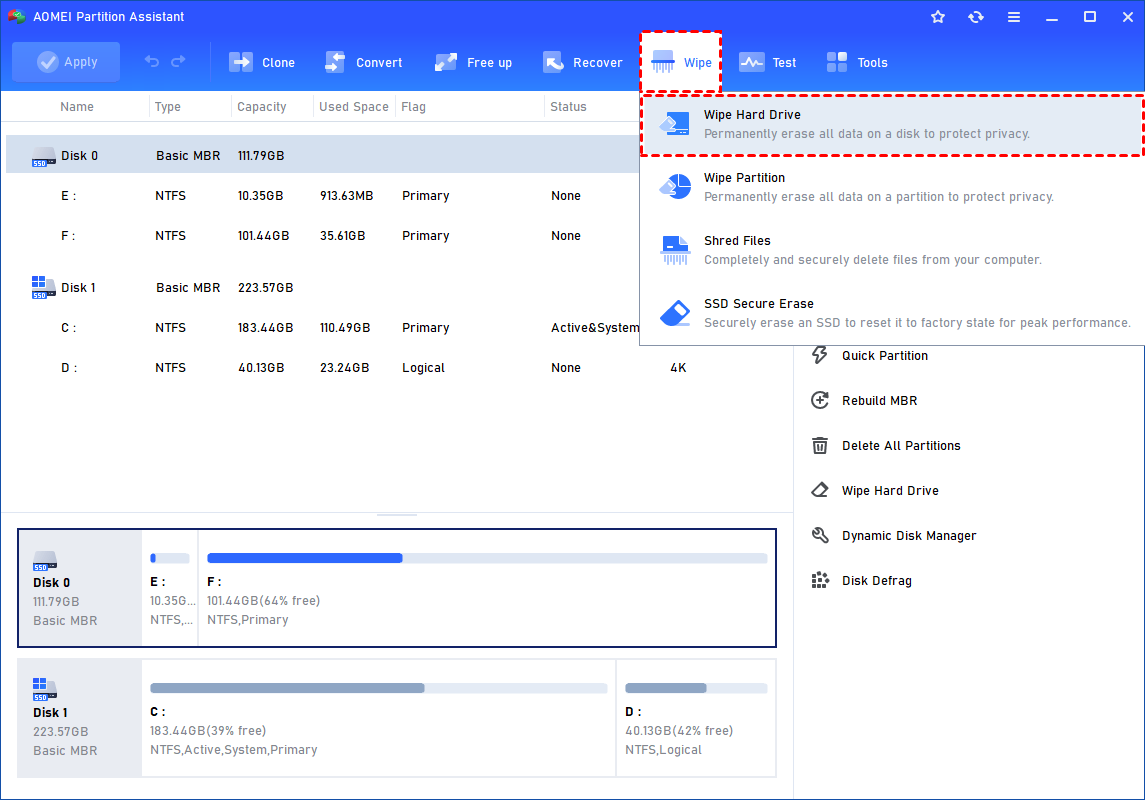
Step 1. Open AOMEI Partition Software and go to the “Wipe” tab on the main interface. Then choose the “Wipe Hard Drive” feature. You can also directly right click the target disk and select “Wipe Hard Drive” from the menu to start the process.
Step 2. Select the disk you want to wipe and click "OK" to continue.
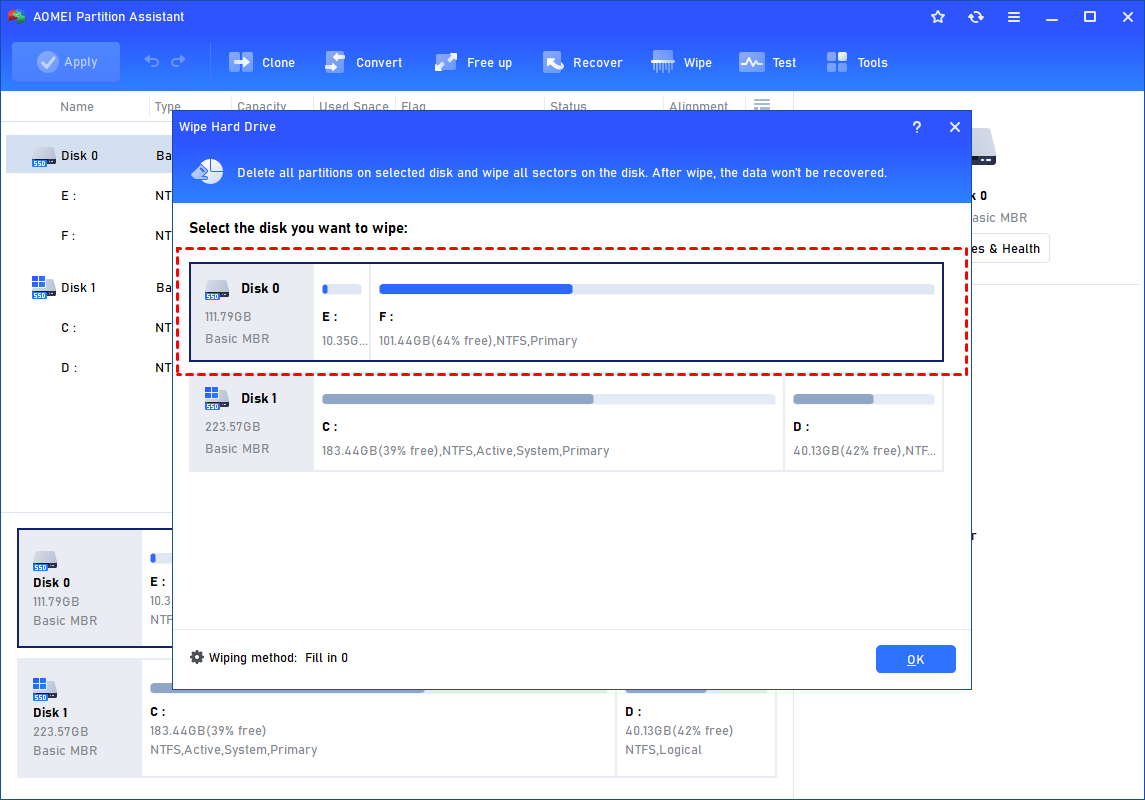
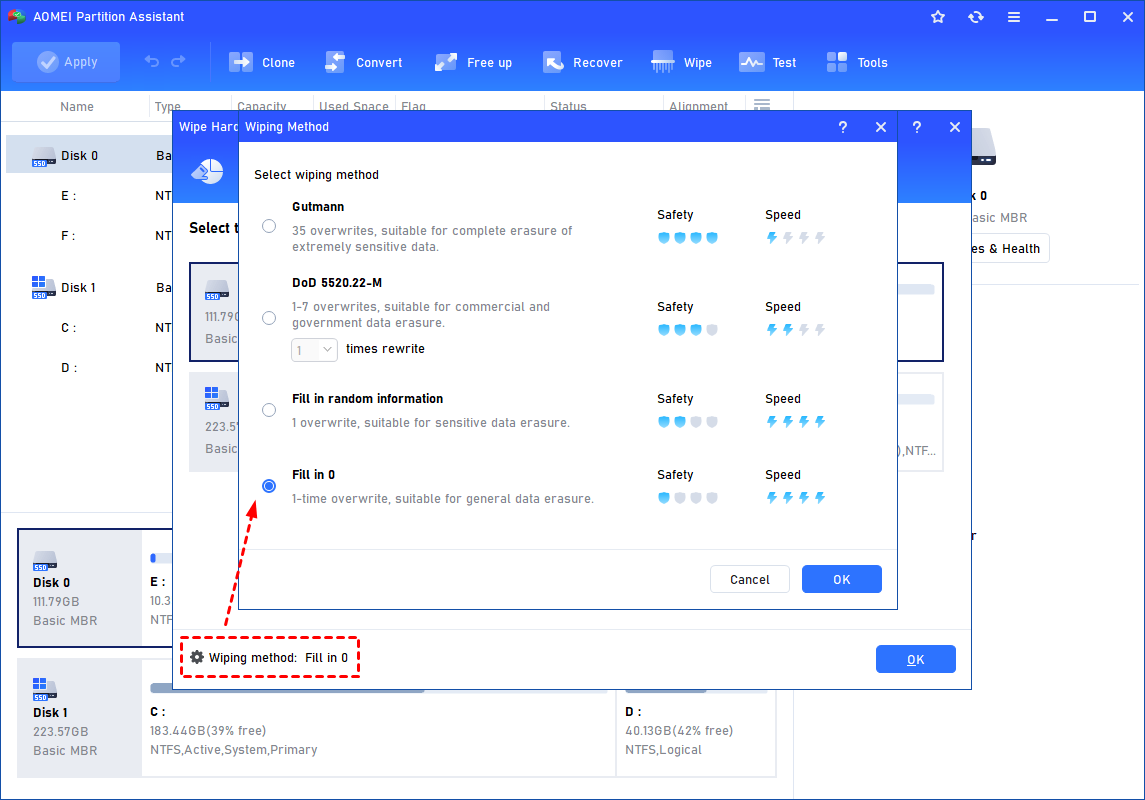
In this stage, you can also select a wiping method like DoD wipe to wipe the selected hard drive according to your requirements and click "OK".
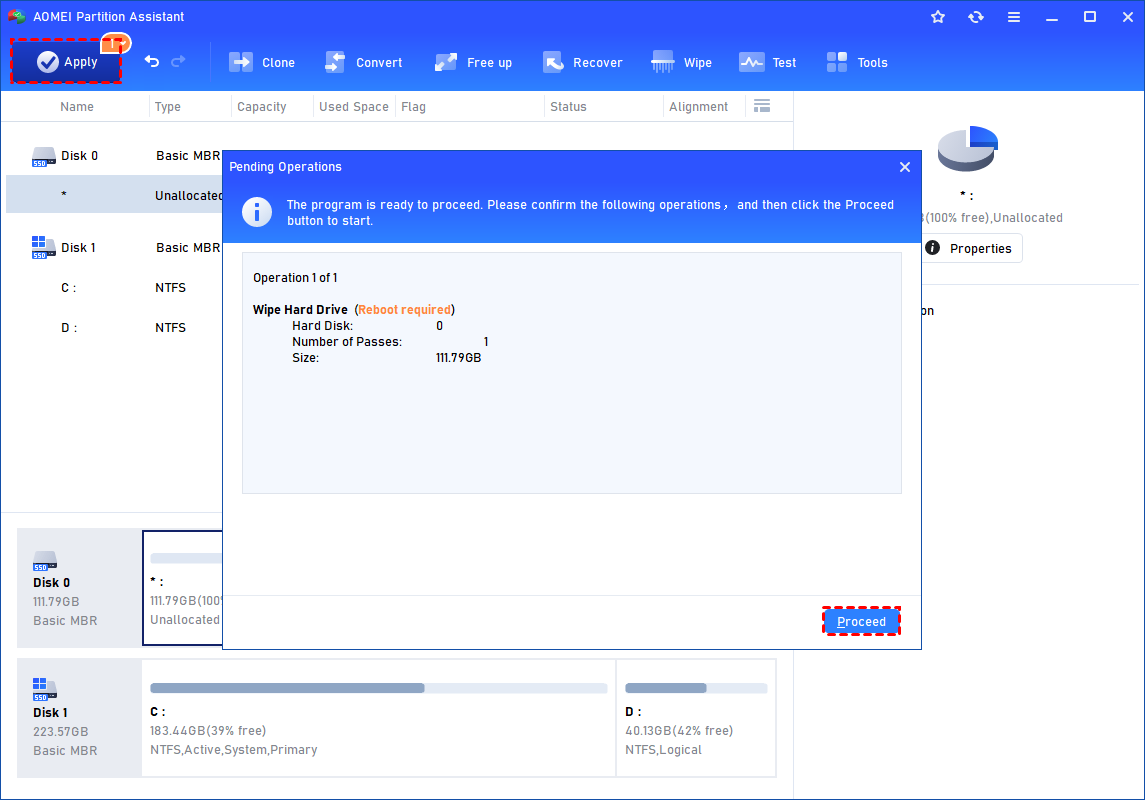
Step 3. You can preview the shrink operation by viewing the "Pending Operations". To commit the "Pending Operations", please click "Apply" and "Proceed".
What Is the DoD 5220.22 M Wipe Method?
The DoD 5220.22 M standard was created by the U.S. Department of Defense as a secure data wiping method. It uses a software based process to overwrite stored data so it cannot be recovered by normal recovery tools or advanced forensic methods.
Unlike a standard delete or quick format, which only marks storage space as available, the DoD wipe method rewrites every sector of the drive with meaningless data patterns. This process helps permanently remove sensitive files from the storage device and greatly reduces the risk of data recovery.
There are several hard drive wiping methods available today, and each one offers a different balance between speed and security. The DoD 5220.22 M method is one of the most widely used because it provides strong security without taking as much time as some advanced methods.
| Wipe Method | How It Works | Security Level | Speed | Best For |
|---|---|---|---|---|
| Fill in 0 | Overwrites all sectors with zeros | Basic | Fast | Personal hard drives and simple data removal |
| Random Data Filling | Overwrites the drive with random information | Medium | Moderate | Better privacy protection for home users |
| DoD 5220.22 M | Uses binary 0s, binary 1s, and random data for multiple overwrite passes | High | Moderate | Businesses, organizations, and sensitive data |
| Gutmann Method | Overwrites the drive 35 times using different patterns | Very High | Very Slow | Extremely sensitive information |
✔️ The Fill in 0 method is one of the fastest ways to wipe a drive. This commonly called “zero fill” or “zero hard drive.” It is usually used when users want to clear personal files before reinstalling Windows or reusing a computer. However, compared with advanced wiping methods, its protection level is lower.
✔️ Random data filling improves security by replacing old data with unpredictable information. This makes recovery more difficult than simple zero filling and is often enough for many home users.
✔️ The DoD 5220.22 M method is considered a balanced choice because it combines strong security with a reasonable wiping time. Depending on the software, you can overwrite the drive from one pass up to seven passes. In most situations, three to five passes provide enough protection for business and personal use. Because of its reliability, this method is widely adopted by companies, schools, and government related organizations.
✔️ The Gutmann method offers the highest level of overwriting in this group by performing 35 passes. While it provides very strong data protection, the process can take many hours or even days on large drives. For most users today, the DoD method is usually more practical and efficient.
How the DoD 3 Pass Wipe Works
The most common version of this standard is the DoD 3 pass wipe. It overwrites the drive multiple times to reduce the chance of any remaining data traces.
Steps of the DoD 3 Pass Method
| Pass | Action |
|---|---|
| Pass 1 | Overwrites all sectors with zeros or another binary value |
| Pass 2 | Overwrites all sectors with the opposite value, such as ones |
| Pass 3 | Overwrites all sectors with random data |
| Verification | Checks the drive to confirm the final overwrite completed successfully |
This multi pass process makes old data extremely difficult to recover.
DoD Wipe for HDDs and SSDs
The DoD wipe standard was originally designed for traditional Hard Disk Drives. It is also used on Solid State Drives, but SSD technology works differently and may require additional considerations.
| Feature | HDD | SSD |
|---|---|---|
| Storage Type | Magnetic platters | NAND flash memory |
| DoD Wipe Effectiveness | Very effective because sectors are directly overwritten | Effective but may increase SSD wear |
| Recommended Method | DoD 3 pass or 7 pass wipe | DoD wipe or NVMe Secure Erase |
| Main Concern | Residual magnetic traces | Wear leveling and hidden spare blocks |
For SSDs, many experts recommend SSD Secure Erase or modern sanitization standards because SSDs manage data differently than HDDs. The AOMEI software also gives the feature for wipe free space on SSD safely and completely.
Why Use the DoD Wipe Method Before Selling or Reusing a Drive?
When you sell, donate, recycle, or reuse a computer, simply deleting files or formatting the drive is not enough to protect your data. Many deleted files can still be recovered with professional recovery software. The DoD wipe method helps permanently remove sensitive information by overwriting the entire drive multiple times. This makes it a trusted choice for individuals, businesses, schools, and organizations that want to safely transfer ownership of a storage device without risking data leaks or privacy issues.
Main Benefits
• Prevents data recovery from deleted files
• Protects personal, financial, and business information
• Helps meet compliance requirements such as HIPAA and GDPR
• Keeps the drive usable after the wipe process
• Widely recognized in the IT asset disposal industry
Unlike physically destroying a drive, a DoD wipe allows the storage device to remain functional for future use.
Is the DoD Wipe Method Always the Best Choice?
The DoD 3 pass wipe method is a reliable choice for most personal and business data removal tasks, especially when preparing a drive for resale or reuse. However, it is not always the most suitable option for every storage device or security requirement. Modern SSDs often work better with Secure Erase or NIST 800 88 methods because they are designed for flash memory technology. For highly confidential or damaged drives, physical destruction may still be the safest way to ensure data can never be recovered.
Other Secure Erasure Options
| Method | Best For | Key Advantage |
|---|---|---|
| DoD 3 Pass Wipe | General secure data removal | Strong protection with reasonable wipe time |
| DoD 7 Pass Wipe | Highly sensitive information | Additional overwrite passes for stronger sanitization |
| NIST 800 88 | Modern SSDs and enterprise devices | More efficient for flash based storage |
| Physical Destruction | Damaged drives or classified data | Maximum data destruction assurance |
Important Considerations
• A 7 pass wipe takes much longer than a 3 pass wipe
• SSDs may benefit more from Secure Erase or NIST based methods
• Physical destruction is the safest option for top secret or damaged drives
Choosing the right method depends on the drive type, data sensitivity, and whether the storage device will be reused.
Conclusion
In conclusion, the DoD 5220.22 M wipe method is an effective way to securely erase data from HDDs before selling, donating, or reusing a drive. Compared with normal deletion or formatting, it provides stronger protection by overwriting the entire disk multiple times. With tools like AOMEI Partition Software, users can perform the wiping process more easily and safely without complex operations. Choosing the right wipe method based on your storage device and security needs can help better protect personal, financial, and business information.
FAQs
🗨️ What is a DoD wipe?
A DoD wipe is a data erasure method based on the DoD 5220.22 M standard. It overwrites the drive multiple times to make deleted files much harder to recover compared to normal formatting or deleting.
🗨️ Can a DoD wipe completely erase a hard drive?
Yes. A DoD wipe can securely erase most data stored on an HDD by overwriting existing information several times. After the process, common recovery tools usually cannot restore the files.
🗨️ Is DoD wipe safe for SSDs?
DoD wipe is mainly designed for HDDs. Using it on SSDs is not always recommended because SSDs work differently and repeated overwriting may reduce their lifespan. Secure Erase is usually a better choice for SSDs.
🗨️ How long does a DoD wipe take?
The time depends on the drive size, drive speed, and the number of overwrite passes. A large hard drive may take several hours to finish a complete DoD wipe process.
🗨️ What is the easiest way to perform a DoD wipe drive process?
Many users choose tools like AOMEI Partition Software because it provides a simple interface for disk wipe DoD operations without requiring command line knowledge.

 as a preferred
source on Google
as a preferred
source on Google