




How to Shut Down PC on Backup Completion
Learn how to shut down PC on backup completion in AOMEI Backupper from this page.

By Lily Updated on November 12, 2025


Introduction
To protect your PC and save power, you may need to shut down your PC once a backup is complete. In AOMEI Backupper, there are two ways to configure PC shutdown on backup completion.
How to configure PC shutdown on backup completion
Method 1
In AOMEI Backupper, you can configure to shut down your PC when a backup is running.
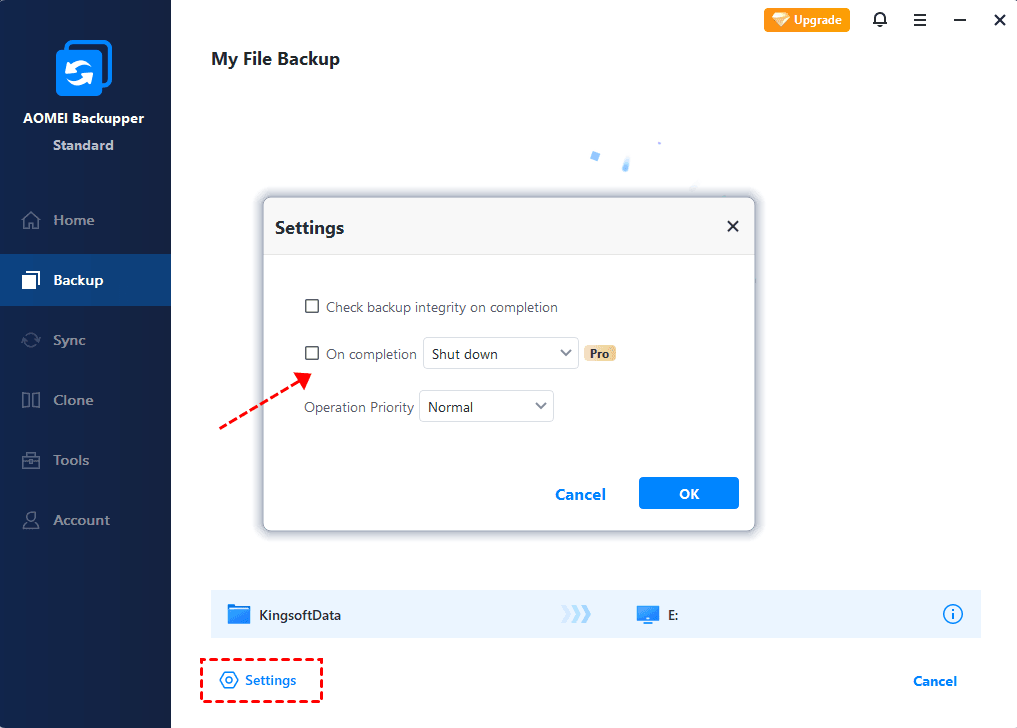
While a backup is running, you can click Settings in the lower-left corner. Check On completion and choose Shut down from the drop-down menu.
Method 2
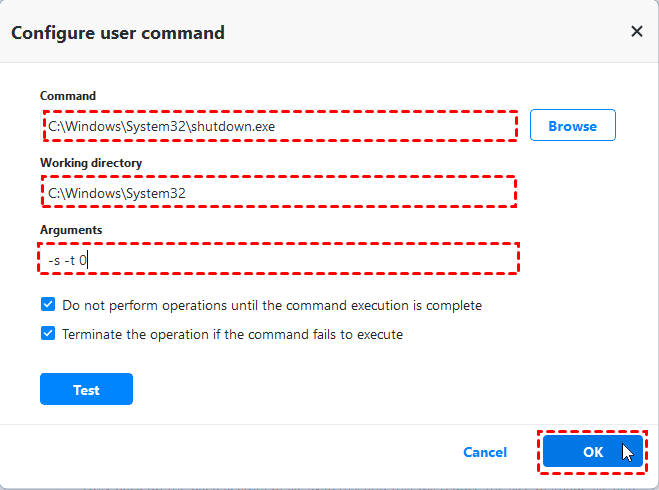
In AOMEI Backupper, you can also configure a post-command in the Options to run shutdown.exe after backup completion. In this case, the PC will also be closed down after the backup is finished.
For example, you can add the command “shutdown.exe” and configure “-s -t 0” in Arguments. Please check the configuration in the following screenshot.

 as a preferred
source on Google
as a preferred
source on Google