




How to Recover Deleted Files From xD-Picture Cards (2026)
This describes how to recover deleted files from xD Picture card efficiently, even if it's corrupted, not formatted, or recognized. Scroll down to explore more.

By Ivy Updated on March 13, 2026


In this digital age, our lives are filled with cherished memories captured through photographs and videos. The xD cards are obsolete but still used in early Fuji and Olympus cameras to store these invaluable moments.
However, like any other storage device, xD cards are not immune to data loss. Accidental deletions, formatting errors, and other unforeseen events can lead to the loss of treasured photos and videos. Don't worry, we will show you how to recover deleted files from xD-Picture cards efficiently.
| 🔎👍Top recovery tool - AOMEI FastRecovery |
|
| 🔥xD Picture card errors & fixes |
If your xD card is experiencing issues like not being recognized or formatted, transfer errors, read/write errors, or the card is physically damaged, try to repair them with the corresponding solutions first. Learn More >> |
What Is an xD Card?
XD cards(or xD-Picture cards), short for "eXtreme Digital" cards, are a type of flash memory card commonly used in digital cameras, camcorders, and other electronic devices. Its dimensions (20 mm x 25 mm x 1.78 mm) are much smaller than SmartMedia cards, the main storage device of the time.
They were developed by Fujifilm and Olympus in the early 2000s to offer high storage capacity, fast data transfer rates, and economical pricing.
- Its capacity was revolutionary at the time of its release, being as high as 2GB compared to the industry standard card of 128MB.
- It is mainly used to store pictures and video formats, including AVI, MP4, MPG, etc.
- It was sold in different brands, such as Kodak, SanDisk, Lexar, and more.
However, it was disconnected around 2009 and lost to its competitor, the security digital memory cards, which is the leader in the memory card sector.
Is It Possible to Recover Data fromxD Card?
Yes, it's possible to perform card data recovery, but the success rate varies, depending on different factors. Please be sure your xD card meets the following requirements.
| xD Card Data Recovery Requirements | Description |
|---|---|
| 1️⃣The xD card must be readable | Be sure your xD card is available in Disk Management, even if it shows up as a RAW drive. Or check if this card is in Device Manager. |
| 2️⃣ The deleted files are not overwritten |
When you delete files on xD picture card, they are simply hidden and don’t disappear immediately. Instead, the “free” space is ready for new data. If you ❌continue using this card, add new data to it, or reformat it, these files will be overwritten, and data recovery will be more challenging. |
| 3️⃣Act promptly with the right method |
A reliable data recovery software like AOMEI FastRecovery can retrieve deleted files from xD-Picture cards in most data loss scenarios. For severe data loss scenarios or physically damaged xD cards, please seek help from professional data recovery services. |
How to Recover Deleted Files from xD Card Efficiently
If the data loss is due to logical errors like accidental deletion, formatting errors, etc., you could consider using reliable data recovery software like AOMEI FastRecovery. No technical expert is required, and novice friendly.
 AOMEI FastRecovery
- Recover data from xD-Picture cards, SD or micro SD cards (SD/SDXC/SDHC/SDUC), mini SD, xD, CF, MMC, and more.
- It has a free version that recovers up to 500MB of data.
- Top algorithms - Quick Scan & Deep Scan to find deleted or lost files for complete recovery.
- Recover deleted X3F/HEIF/JPG images, AVI/MP4/MPG videos, DOC/DOCX/TXT/XLS documents, etc., over 1000 file formats.
- Organize and display data by Type or Path, allowing you to sort, search, filter, and preview files before recovery.
- Recover specific files or folders instead of all.
- Support Windows 7, 8, 10, 11, etc and Windows Server and NTFS, FAT32, exFAT, and ReFS file systems.
 100% Secure
Step 1. Scan your xD-Picture card
Connect your xD-Picture card to a Windows PC. Open AOMEI FastRecovery, hover the mouse over this card, and click Scan.
Step 2. Scan for deleted or lost files
It will run Quick Scan automatically to search for and display deleted or lost files. Under the Type section, check all the data types and formats. For specific files or folders, directly type the file name or extension in the search box.
-
You can also locate deleted files by Path if you remember this.
-
Click the Deep Scan button if the Quick Scan fails. Deep Scan searches every sector of the disk to find more files.
Step 3. Start xD card recovery
Select your desired photos and videos, and then click Recover to recover deleted files from xD picture card. Please select a new location instead of the original location to prevent data overwriting.
-
You can perform xD card data recovery for free, up to 500MB in total. To recover all files, please upgrade to the advanced edition.
-
In addition, you still can use this software torecover deleted files in Windows Server 2012, 2016, 2019, etc.
How to Repair Common xD Card Errors
The xD-Picture cards are very expensive and not easy to find nowadays. If you are still using this type of card, try to repair xD card as much as possible. Below are some common errors and corresponding solutions.
Issue 1: The xD card is not recognized
You insert an xD card into a Windows PC, but it is not available in Windows Explorer. Try to check if it shows up in the Disk Management. If not, your xD card may not be recognized.
Way 1: Try a different card reader
If your xD card is not recognized, you need to check the SD card reader or the card itself. Try to connect the xD Picture card with a different card reader and see if it's available in Windows Explorer. If not, you can still try different USB ports. Or directly use it on a different machine.
Way 2: Reinstall xD card drivers
If the problem is not related to the xD card itself, it's likely something is wrong with your operating system or drivers. Try to reinstall xD card drivers in the Device Manager.
1️⃣Type device manager in the search box and select it.
2️⃣Expand Disk Drives, right-click the xD card and click Uninstall device.
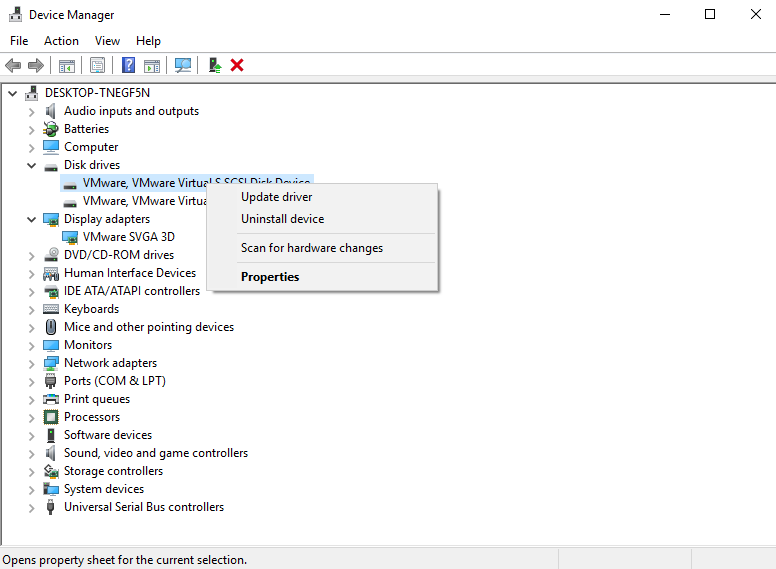
3️⃣Restart your system to let it reinstall this card automatically.
Issue 2: The xD card needs to be formatted
When inserting this card into a Windows PC, you receive the formatting error message like “You need to format the disk in drive x: before you can use it” or similar. Don’t format it as suggested and recover data from xD card first. Then, try the chkdsk command to scan xD card for errors.
1️⃣Type cmd in the search box and select Run as administrator.
2️⃣Type chkdsk /f /r and press Enter to check disk errors and repair them.
Issue 3: The xD card data transfer error
The error is usually caused by a faulty xD card reader or damaged connection pins on the xD card itself. Check if the cable connecting your xD card reader to your computer is in top shape, and replace it if it isn’t.
Issue 4: The xD card read/write errors
The read/write errors may trigger various error messages or cause data recovery failure. So you can't recover data from damaged xD card. Please repair the read/write errors first.
Way 1: Use the disk check utility
This may be caused by file system errors. You could consider using the disk check utility or chkdsk command to scan and fix found errors.
1️⃣In File Explorer, right-click the xD card and select Properties.
2️⃣Switch to the Tools tab and click Check under Error checking. Wait until the process completes.
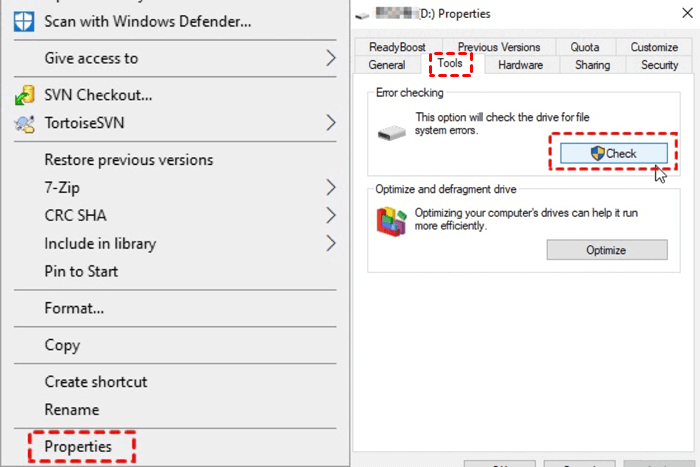
Way 2: Format xD card
If your card is still not readable, try to format it again.
1️⃣ In File Explorer, locate and right-click on the xD card, select Format.
2️⃣ Be sure the "Quick Format" is checked. Then, click “OK” to confirm you want to format the xD card.
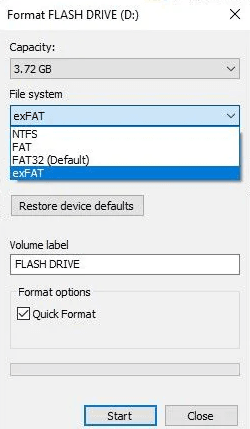
Issue 5: Physical damage to xD card
If the data loss is severe or the xD-Picture card is physically damaged, it is best to consult a professional data recovery service with specialized tools and expertise to handle complex situations.
You need to put in extra effort to learn about different data recovery services, i.e., Geek Squad, ACE Data Recovery, Secure Data Recovery, etc., from various aspects to find the most suitable software.
In addition, make sure your data is very important, considering that it is expensive. The price depends on the severity of the damage and the difficulty of recovery.
Why do you lose data on xD-Picture cards?
If you want to find the right method, it's essential to know the possible reason behind xD-Picture cards data loss.
- Accidental deletion: It is one of the most common reasons for data loss on xD cards. With just a few taps or clicks, precious memories can disappear in an instant.
- Formatting errors: Formatting an xD card without creating a backup can lead to irreversible data loss. Don’t use the full format option in the camera or on your computer. Otherwise, your data will be overwritten.
- File system corruption: Improper handling of the xD card or abrupt removal from the camera or card reader can render file system corruption and data inaccessibility.
- Card corruption: Improper use, bad sectors, viruses or malware, power outage, etc., may cause card corruption and make your data inaccessible. The recovery rate mainly depends on how serious the damage to the xD card is.
- Physical damage: Physical damage, such as water exposure or bending, can severely affect the xD card's functionality and result in data loss.
Tips to Prevent Data Loss on xD Picture Cards
1. Regularly Backup Your xD Dard or Data🥇
Back up your XD card or data to different devices regularly, such as an external disk, network drive, NAS, cloud drive, etc., and ideally before accidents happen. This ensures your memories are safe even if the XD card is damaged or corrupted. Try reliable Windows backup software- AOMEI Backupper Standard.
2. Safely Eject the xD Card
Always eject the xD card properly from your camera or card reader before removing it physically. Abrupt removal may lead to irreversible data corruption.
3. Take Care of xD Card
Handle your xD card carefully and avoid exposing it to extreme temperatures, water, or physical shocks.
4. Scan the xD Card for Errors Periodically
Perform periodic scans or run the chkdsk command on your xD card to identify and fix any potential file system errors before they lead to data loss.
5. Scan xD Card for Viruses or Malware
You can consider using built-in anti-virus software - Windows Defender or third-party software to scan the disk for malware or viruses and prevent infection and malicious deletion.
Conclusion
Losing precious photos and videos from your XD card can be distressing, but with the right approach, you can perform xD card recovery was successful. Stop using this card immediately and act quickly using reliable recovery software - AOMEI FastRecovery.
Additionally, adopting good habits like regular backups, safe handling of the XD card, scanning the card regularly, etc., can prevent future data loss. Among them, the best practice is to create a scheduled backup automatically. It will keep a copy of your data completely.

 as a preferred
source on Google
as a preferred
source on Google