




How to Recover Music from SD Card [Formatted, Damaged, etc]
Losing music files on an SD card can be very disastrous, especially if it's rare and vital music. But don't panic, this guide will show you the best way to recover music from SD card and how to prevent this situation.

By Ivy Updated on June 30, 2026


SD cards, also known as Secure Digital cards, are most commonly used as portable storage devices. It has become so popular because it is used as a secondary storage device for storing songs, pictures, videos, audio, and other files in most mobile phones and digital cameras.
Although SD cards are a reliable external storage device, files such as music, photos, audio, etc. on an SD card can still be deleted or damaged due to various reasons. One of the things that music lovers hate the most is losing their favorite songs from SD card. How to recover music from SD card? Read on, and get the best way to do it.
Why music files disappeared from SD card?
Before figuring out how to fix the problem, you need to know what's causing the problem. We summarize and list them in the following:
📌 Inadvertent deletion: It's easy to press the wrong button or choose the wrong option. When deleting redundant audio files on an SD card device, you may accidentally delete music files.
📌 Formatting: To set or change your SD card file system or get rid of some unwanted files, you might go to format the SD card, a convenient but risky technique that will wipe all data on the SD card in seconds.
📌 Improper usage of SD card: If the SD card is not securely inserted/ejected into the phone or computer, the files on the card will be lost.
📌 Virus/malware attack: Malware comes in many forms. If you're not careful, you could run into a virus that destroys all your essential data, including music files.
📌 Physical damage: Physical damage is more likely to cause your SD card to be completely disabled, corrupt your SD card, and cause your files to disappear.
The best way to recover music from SD card on Windows
Data loss is common, whether accidental or intentional. These conditions are normal for everyone and happen to almost everyone. Luckily, most data, like music files, can be recovered. To get a high success rate, please pay more attention to:
- Turn off the device and stop using the SD card immediately.
- Don't add new data to SD card.
- Don't format SD card before recovery.
- Start data recovery as soon as possible, prioritizing methods with higher success rates.
Of all the available methods, restoring files from backups and using professional data recovery software such as AOMEI FastRecovery offers the highest success rates. Try AOMEI FastRecovery if you don't create a backup.
With its advanced scanning algorithm, you can successfully recover music from SD card, whether it is formatted or corrupted. Its intuitive interface nd easy-to-follow guide make the process easy and efficient.
 AOMEI FastRecovery
- Recover deleted or lost music files such as MP3, CDA, WAV, AIFF, WMA, VQF, OGG, ARM, APE, FLAC, AAC, M4A, etc.
- Integrate Quick & Deep Scan to find as many deleted or missing files as possible.
- Organize and display data by Type or Path, along with options to sort, search, filter, and preview files.
- Recover data in any scenario, such as permanent deletion, disk formatting or corruption, lost partition, system crashes, etc.
- Support different types of SD cards, including SD/SDHC/SDXC/SDUC, microSD, XQD, CFast, etc.
- Free data recovery, up to 500MB. 🔥
 100% Secure
Steps to recover music files from formatted SD card
In this part, we will guide you how to use AOMEI Data Recovery to get back your lost files.
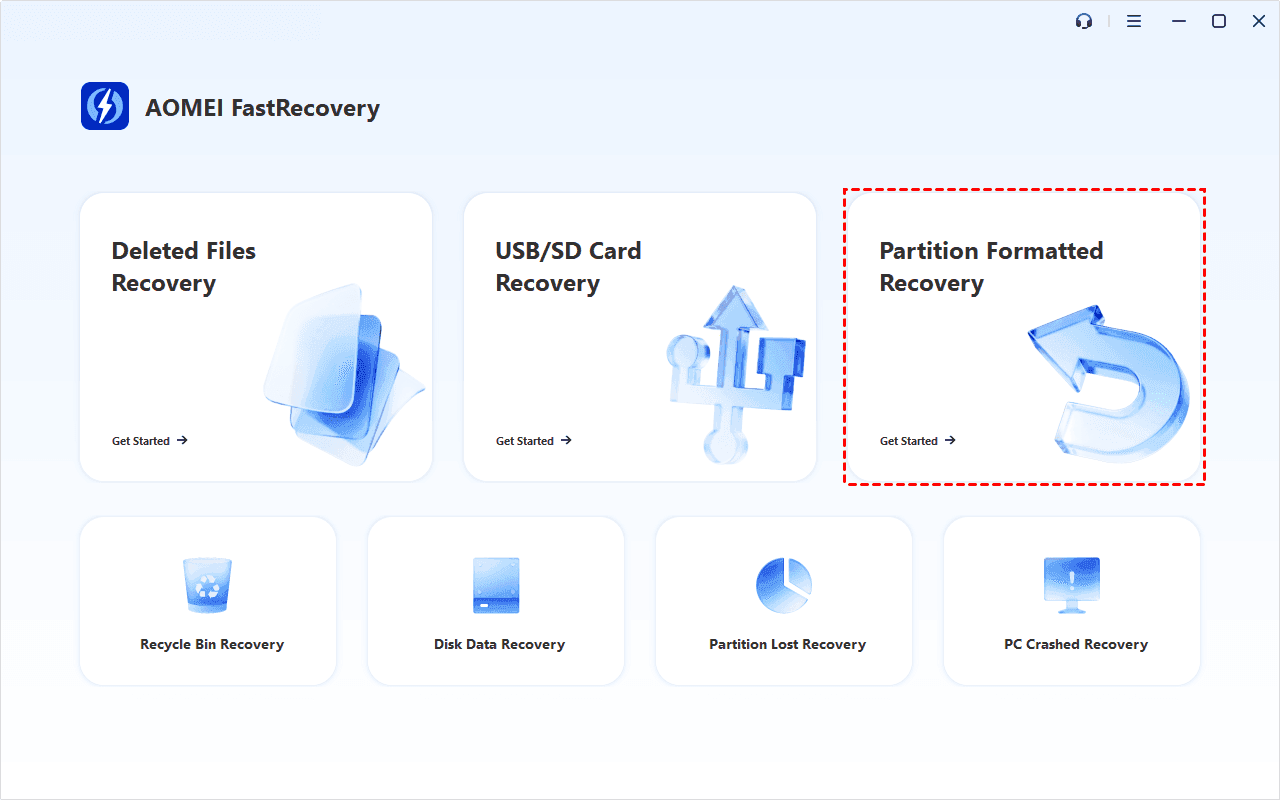
Step 1. Download and install FastRecovery on your computer. Meanwhile, connect your SD card using a USB card reader. After installing, open it and click Partition Formatted Recovery.
Step 2. Select the formatted SD card and click Scan. It will start the deep scanning process to find and display all recoverable data.
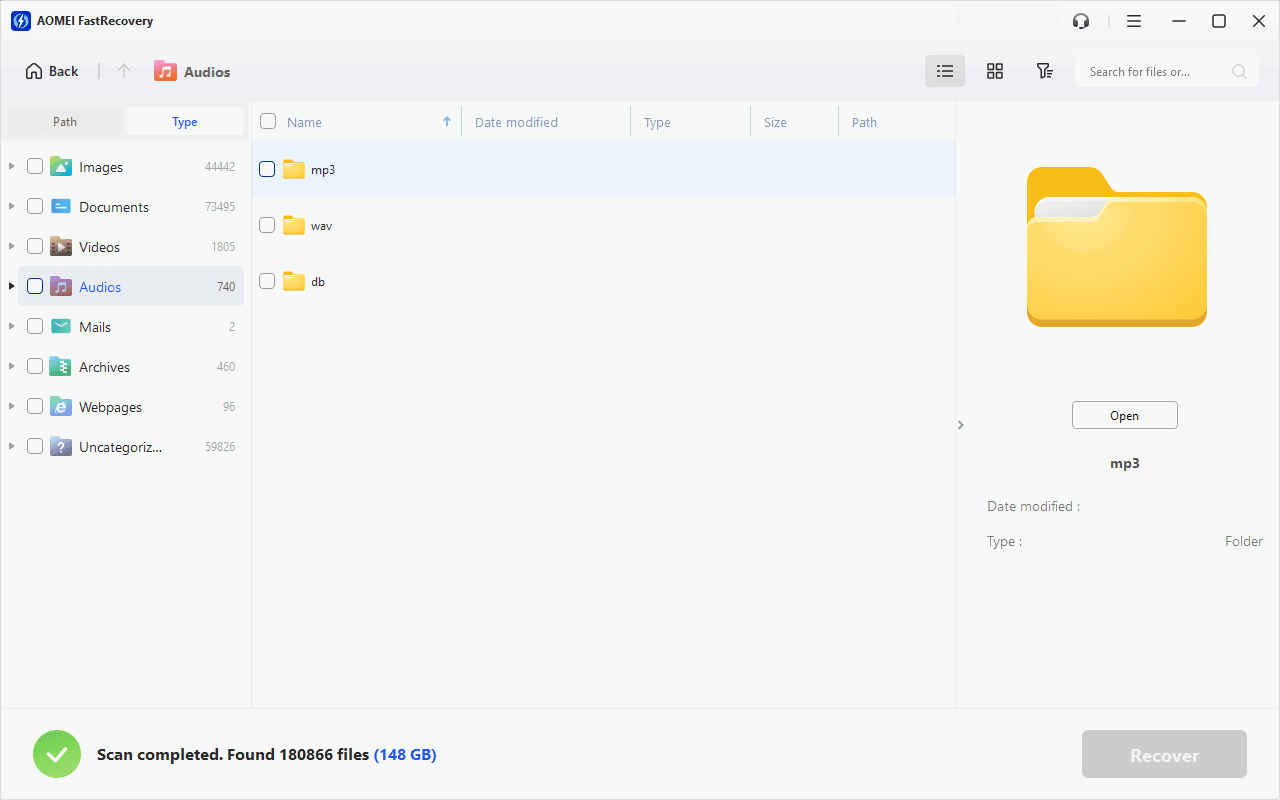
Step 3. Under the Type section, specify the Audios data type and expand it to see all music files. You can sort them or search the name to locate files quickly.
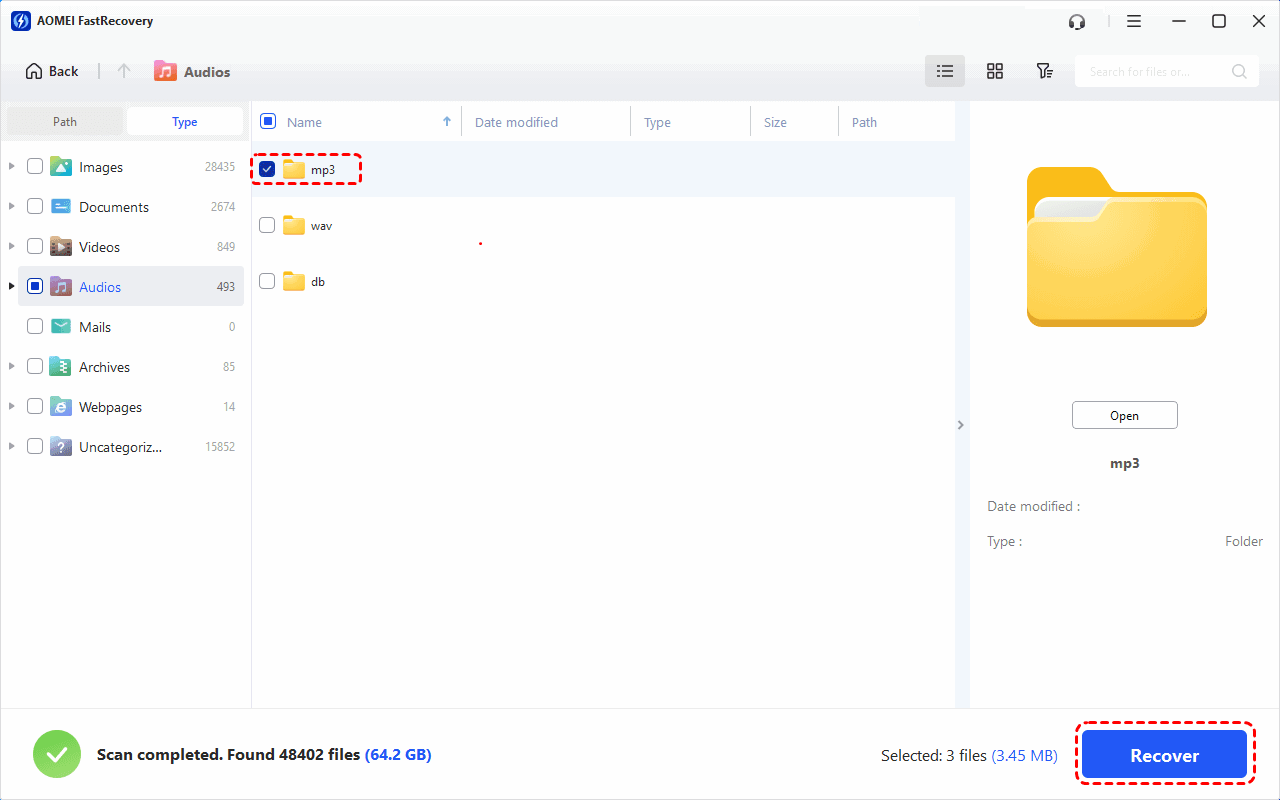
Step 4. Select your audio files (e.g., MP3 files) and click Recover. Please select a new location to save the recovered files, as restoring to the original location may result in data overwriting.
You can perform USB drive data recovery for free, up to 500MB. To recover unlimited data, please upgrade to the advanced edition of AOMEI FastRecovery.
How to recover deleted music from SD card on Android without PC
As we said before, SD cards are often used to save files on mobile devices such as Android. On the other hand, most Android phones also require SD cards because their internal storage may not be enough to store data.
When you lose some meaningful songs from an SD card on Android, you may need to get them back without a computer. Here, you can follow the steps below to recover deleted music from SD card on Android manually.
● Insert the SD card into the Android device.
● Navigate to the folder containing the audio files.
● Select the audio files you want to recover and click Restore to get your audio files back quickly. (Make sure you have enough internal storage space.)

Tips to avoid audio files loss on SD card
If you can always keep your SD card and music files safe, you don't need to worry about recovering deleted files from SD card. Here are some precautions to protect your SD card from data loss.
💿 Backups are the best way to prevent data loss, so backup data from SD card to PC or other storage devices regularly so that you can get it back in case of loss.
📝 Be sure to confirm before deleting files.
❌ Don't download music from unknown devices and untrusted websites.
⚠️ Before removing the SD card, be sure to safely remove it from the card reader so as not to interrupt any current processes and cause data corruption.
👾 Install antivirus software to prevent malware infection. The presence of malware can corrupt your files, and you will lose access to them.
❗ Never choose any random option, and try not to format your SD card by chance.
🔧 SD cards are fragile, and you must take special precautions to avoid physical damage.
Closing words
This tutorial is a straightforward guide to recovering music from SD card in seconds. SD cards help us store and carry a lot of music files on the go. But it is also true that music files loss from SD card can happen anytime due to various reasons. In this case, the best way and the safest process is to use AOMEI FastRecovery, a powerful Windows data recovery software.
Finally, protecting your device can greatly reduce data loss, so keep your SD card safe. What’s more, regularly backing up your important SD card data will prepare you for any data loss. You can let one of the best free backup software for Windows, AOMEI Backupper Standard, help you.

 as a preferred
source on Google
as a preferred
source on Google