




How to Recover Data from CFast Memory Card Safely
Losing data on a CFast card? Try powerful data recovery software - AOMEI FastRecovery, which can perform CFast card recovery successfully in a few steps.

By Ivy Updated on May 6, 2026


CFast cards are becoming increasingly popular due to their remarkable performance. Even so, they are not immune to data loss. You may lose your images and videos in different data loss scenarios, such as accidental deletion, formatting, virus infection, etc. Sometimes, you may not even be aware of it.
Fortunately, in most cases, your data is recoverable. Be calm! Keep reading this CFast card recovery guide and recover data from CFast card in a reliable way.
What Are CFast Cards?
CFast (CompactFlash) cards are the successor of the CompactFlash cards. It combines the CompactFlash card form factor with the Serial ATA (SATA) interface and offers faster read and write speeds than typical CF cards. For example, the transfer speed of CFast 2.0 is up to 600 MB/s, comparable to a high-end SSD disk.
At the same time, the CFast 2.0 also has a higher capacity, ranging from 64GB to 512GB, and supports a SATA-3 interface. All of this makes it ideal for professional photographers & videographers to shoot high-resolution images and 4k videos. It is increasingly replacing CF cards and being used in high-end cameras as well as industrial products.
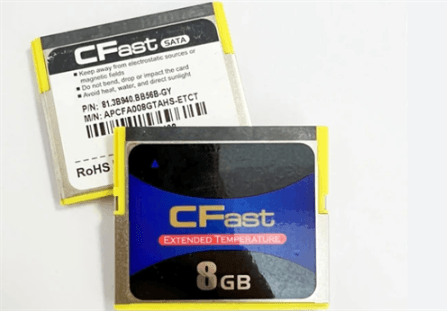
✦ Are CF and CFast cards the same?
CF cards are different from CFast cards. For example, CF cards use the PATA interface, while CFast cards use the SATA interface, with more impressive read and write speeds. So, CFast cards are usually more expensive. In addition, CF cards connect through 50-pin holes, while CFast cards consist of a SATA-compatible 7-pin signal connector and a 17-pin power supply.
✦ Which cameras use CFast cards?
CFast cards are designed for photography & videography enthusiasts, requiring higher speeds and capacities. So it’s usually used in high-end cameras, such as Canon, Atomos, Arri, Blackmagic, Sony, Nikon, etc.
Common CFast Card Data Loss Scenarios
Sometimes you can lose data, even without not realizing it. We collect some data loss scenarios in the following. Perhaps it can give you some clues to recover your data and further prevent data loss.
- Inadvertently formatting a CFast card
- Accidentally delete files
- Abruptly eject
- Virus or malware infection
- RAW file system
- MBR or partition table damage
- Physical damage, such as a drop or shock
Anyway, data recovery is the most important thing right now. To improve the success rate of CFast card recovery, please be sure your data is not overwritten. So don’t add new data to this disk or reformat it. Also, start this recovery process as soon as possible.
Your Trustworthy CFast Card Data Recovery Software
In fact, there is more than one method to perform CFast card data recovery. But any attempt will reduce the success rate of data recovery. So, considering this, we suggest you try trustworthy software to recover your data in Windows 7, 8, 10, 11, etc, and Windows Server.
With two advanced scanning methods and a high success rate, AOMEI FastRecovery will be a great choice.
 AOMEI FastRecovery
- Quick & Deep Scan: With two advanced scanning methods, you can scan deleted or lost data on the CFast card thoroughly.
- 1000+ file types: Recover deleted or lost images, videos, audio, documents, etc., with up to 1000+formats, such as CR3, X3F, HEIF, MP4, WMV, MXF, AIFF, etc..
- Flexible recovery features: Sort, search, filter, and preview files before recovery.
- Recovery scope: Support different data loss scenarios, such as accidental deletion, formatting,virus infection, lost partition, etc.
- Multiple CFast cards compatible: Support SanDisk Extreme PRO, Lexar Professional 3500x, Delkin Device Cinema, Silicon Power Cinema PRO CFX310, Acer CF100, etc.
 100% Secure
Steps to Recover CFast Memory Card Data
Whether you delete files by mistake or format a disk, you can use data recovery software like AOMEI FastRecovery to efficiently retrieve files from a CF card. Please prepare a card reader to connect the CFast card, and be sure it’s readable.
Step 1. Download and install this trustworthy data recovery software - AOMEI FastRecovery. On the main interface, click USB/SD Card Recovery.
Step 2. You'll see a list of devices. Select the CFast memory card and click Scan. It will start the deep scanning process to find and display all recoverable data.
Step 3. Under the Type section, specify a data type and expand it to see all data formats. You can sort them or search the name for quick recovery.
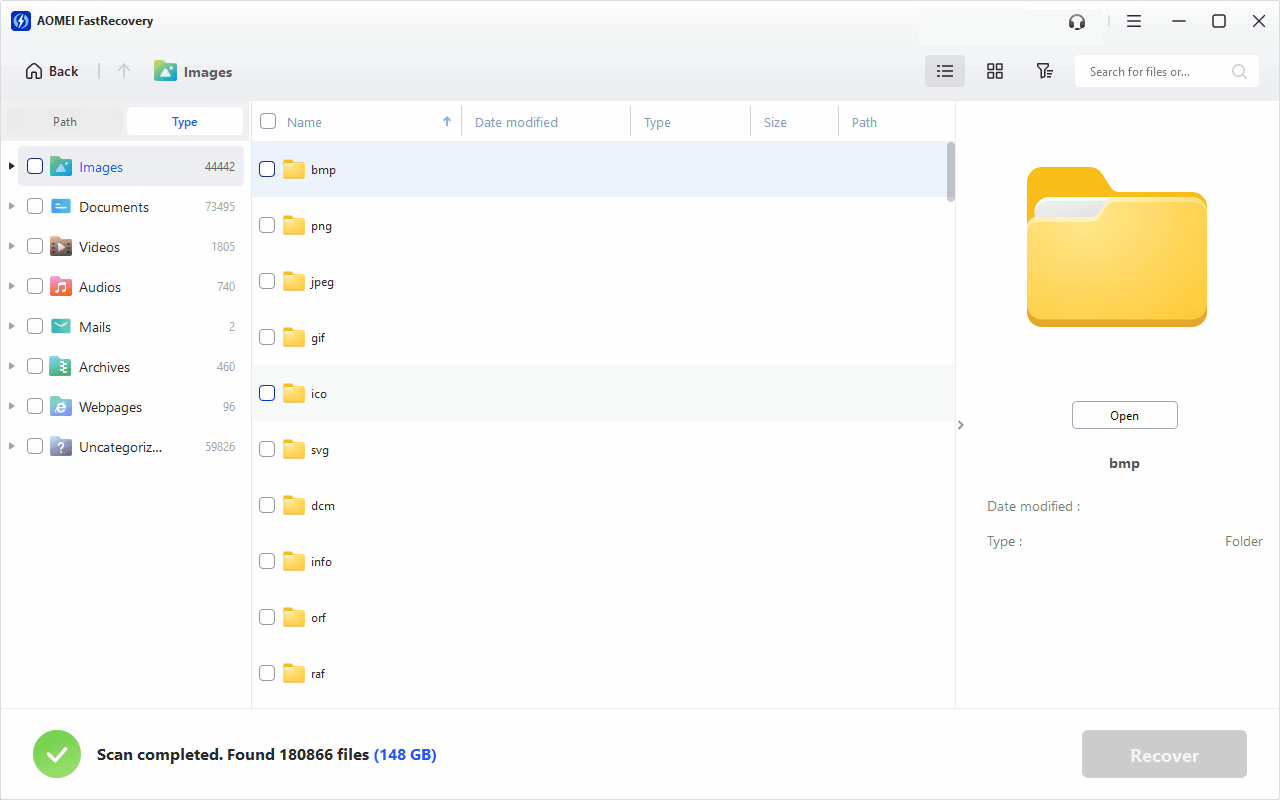
Step 4. Select all the deleted or lost photos or videos and click Recover. Please select a new location instead of the original location to prevent potential data overwriting.
You can perform CFast card data recovery for free, up to 500MB. To recover all photos or videos, please upgrade to the advanced edition of AOMEI FastRecovery.
In addition, you can still use this software to recover compact flash cards, CFexpress cards, and other storage devices, such as internal disks, external disks, flash drives, etc.
How to Prevent CFast Card Data Loss
You may not want to lose your precious photos or videos. But sometimes you will lose data due to different reasons. In order to prevent further data loss on CFast cards, here are some useful tips you can follow:
- Don’t remove the CFast cards while transferring data.
- Use CFast cards in the conditions suggested by the manufacturer. In addition to data loss, this also helps to keep a high performance.
- Take a regular backup. It will create a copy of your files currently on this disk and keep track of changes to minimize data loss. You need a reliable Windows backup software like AOMEI Backupper Standard.
- Turn on Windows Defender or employ third-party anti-virus software. It helps to scan and remove malware or viruses from unofficial websites or suspicious email links, which is a big threat to data loss.
- Be more careful with CFast cards, such as avoiding bending or dropping them.
FAQs
1. Can files be recovered from a formatted CFast card?
The answer is definitely if you format a CFast card in Windows 7, 8, 10, 11, etc. Because it will use the quick format method by default, which only deletes the file directories instead of the sectors actually containing your data. If not, data recovery will become more difficult, but not impossible.
2. Do people still use CF cards?
CF cards are still used as removable memory for higher-end digital images and video cameras. Compared with CFast cards, it will be more cost-effective. In addition, with the same capacity, its transfer speed is more than twice that of SD cards.
3. How to recover deleted photos from a CF card?
Like CFast cards, there are many reasons behind data loss on a CF card. Of course, there are many ways to recover deleted photos from a CF card, but you need to know that every attempt will reduce the success rate of data recovery. If you are not sure about the cause, try data recovery software. It’s the method with the highest success rate.
4. How to recover videos from CF card?
The easiest method to recover videos from a CF card is using data recovery software. We recommend you use FastRecovery. Its success rate is up to 95% and is able to recover videos in different formats, such as WMV files, MP4, MOV, RMX, ASF, etc.
5. How to fix a corrupted CF card?
A corrupted CF card may be due to improper use, software bugs, logical file system errors, virus infection, etc. So there are many ways to fix a corrupted CF card. If you suspect the disk has file system errors, try the CHKDSK command.
- Type cmd in the search box and select Run as administrator.
- In the Command Prompt window, type chkdsk *: /f /r and press Enter. Replace * with the CF card drive letter.
- It will start to scan this disk for logical file system errors and fix them completely. You can then close this window and check if your disk is usable.
Conclusion
CFast card recovery is essential to regain access to valuable photos or videos. Regardless of the data loss scenarios, you can use a reliable data recovery software like AOMEI FastRecovery to retrieve deleted files from a CFast card.
It can recover pictures and videos in different formats, such as X3F, HEIF, MP4, WMV, MXF, AIFF, etc., and keep their original quality, with a success rate of over 95%. In addition, it supports recovering documents, audio files, compressed files, etc.

 as a preferred
source on Google
as a preferred
source on Google