

AOMEI Backupper ProfessionalTrial
Fast and all-round Windows backup, restore, file sync and disk clone software for personal use.
 Try for Free
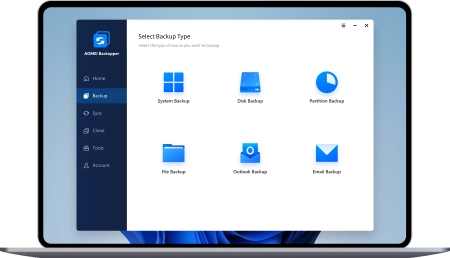

Free Windows backup, restore, file sync, and data disk cloning software for personal use.
 Users' Rating

Fast and all-round Windows backup, restore, file sync and disk clone software for personal use.
Try for Free

Fast and all-round Windows backup, restore, file sync and disk clone software for business use.
Try for Free

An enterprise-grade toolkit for data backup, disaster recovery, OS deployment, and disk cloning across unlimited PCs.
Try for Free

The easiest solution for Windows Server data backup, disaster recovery, synchronization, and disk cloning.
Try for Free

An enterprise-grade toolkit for data backup, disaster recovery, OS deployment, and disk cloning across unlimited PCs and servers.
Try for Free

Free, easy file and folder sync software for Mac users.
Download Freeware
Not sure which edition is right for you? Compare all editions in-depth
Choose Standard for personal Windows backup, basic file sync, and data disk cloning; Professional for advanced personal features such as differential backup, and automatic backup cleanup; Workstation for advanced backup, restore and synchronization on business Windows PCs; Server for these capabilities on Windows Server systems; Technician for IT maintenance and technical services across Windows PCs; or Technician Plus for IT maintenance and technical services covering both PCs and servers.
All AOMEI Backupper editions are free to download, with no account or payment details required. Standard is also free to use for personal, non-commercial purposes, with no time limit on its included features. Paid editions offer a 30-day free trial, with all cloning features and Disk Wipe unavailable during the trial. A paid license is required to unlock these features or continue using a paid edition after the trial expires.
Find the installer in your browser’s download list or your Downloads folder, then open it and follow the on-screen instructions. Make sure you selected an edition compatible with your Windows system. After installation, launch AOMEI Backupper and choose the backup task you want to create.
All AOMEI Backupper Windows editions support Windows 11, 10, 8.1, 8, and 7. Server and Technician Plus additionally support Windows Server systems, including Windows Server 2025, 2022, 2019, 2016, 2012, and SBS 2011.
Check your internet connection and try downloading again using the official links on this page. If an incomplete installer was saved, delete it before downloading a fresh copy. You can also try another browser. If the problem persists, contact [email protected] with the download link and any error message you received.

Centrally manage backup and recovery for VMware & Hyper-V VMs, Windows PCs & servers, and Microsoft SQL Server databases from a single dashboard.
Download FreewareLearn More >>
Quickly and easily recover deleted or lost files from Windows computers and external storage devices, even without a backup.
Download FreewareLearn More >>
Easily and safely backup, transfer and manage data for iPhone, iPad and iPod touch.
Download FreewareLearn More >>
All‑in‑one Windows disk partition manager to resize, move, merge and split partitions safely without data loss.
Download FreewareLearn More >>Read what users say about their backup experience and why they trust AOMEI Backupper to keep their files, system, and disks safe and sound.

This is the best free edition that I have used. It works very well with incremental backups. I restored backups to my new Windows 11 mini PC from my old Windows 10 PC, and it has worked great so far. I recommend AOMEI Backupper.
AOMEI Backupper is very easy to use through a bootable CD or USB image, making backup and recovery tasks convenient even when you need to work outside the normal Windows environment.
I've used AOMEI software for years, and its restore function has consistently helped me recover an operating system when it wasn't working properly. I also appreciate being able to check whether my backups were successful before needing them.
All the other functions and features that users of the AOMEI Backupper free version can effectively use are still highly useful - they cover most of the backup needs of any home user and are worth downloading and installing.
I use AOMEI Backupper to protect my Windows computers with full system image and file backups. I find the interface very easy to navigate, even for users without much technical knowledge. The scheduling feature is also useful for keeping my backups up to date.

Please leave your valid email address to enjoy better service and get updates about our products. You can unsubscribe at any time. By downloading, you are agreeing to AOMEI’s Privacy Policy .