



Best Partition Magic Server Free Download for Windows Server
Partition Magic Server is the tool to help you mange your disks and partitions easily and safely. Refer to this guide to get the reliable and powerful partition manager for Windows Server.

By Hedy Updated on June 4, 2026


What is Partition Magic Server?
Partition Magic Server refers to professional disk partition management software designed for Windows Server operating systems. The term originally came from the famous PartitionMagic utility, which was once considered the gold standard for partition resizing and disk management. Back in the Windows XP and Windows Server 2003 era, it felt almost magical because users could resize partitions without formatting the drive. At the time, that capability was groundbreaking.
Today, however, the phrase has evolved into a broader industry term. Many IT administrators now use “Partition Magic Server” to describe modern server partition managers capable of handling advanced storage tasks safely. These tools allow administrators to resize partitions, clone disks, convert between MBR and GPT, migrate operating systems, recover lost partitions, and optimize SSD performance.
Why is this important? Servers are the beating heart of businesses. A poorly managed server partition can cause performance bottlenecks, wasted storage space, or even system downtime. Imagine running a restaurant kitchen where one shelf is overloaded while another sits empty. That is exactly what happens when partitions are not balanced correctly.
Modern partition tools are no longer just about dividing storage. They now play a major role in system migration, virtualization, disaster recovery, and storage optimization. Many modern tools also support Windows Server 2012, 2016, 2019, 2022, and even emerging 2025 server environments.
Best partition magic server alternatives in 2026
Finding the best server partition software depends on your environment, budget, and technical needs. Some businesses prioritize enterprise deployment, while others focus on affordability and ease of use.
Here are the most recognized alternatives currently dominating the market.
|
Software |
Best for |
Key features |
Server support |
|
AOMEI Partition Software |
Business environments |
Partition resize, clone, GPT conversion |
Yes |
|
EaseUS Partition Master Server |
Ease of use |
Migration, partition recovery, cloning |
Yes |
|
MiniTool Partition Wizard |
Advanced users |
Recovery, benchmarking, partition repair |
Yes |
|
Parted Magic |
Bootable toolkit |
Cloning, secure erase, diagnostics |
Limited |
Reliable partition magic Server manager-AOMEI Partition Software
AOMEI Partition Software is a reliable partition magic Server manager designed for Windows Server environments. It helps businesses and IT administrators manage hard drives, SSDs, and partitions safely and efficiently without complicated command lines or risky manual operations.
As a professional disk partition management solution, it supports Windows Server 2025, 2022, 2019, 2016, 2012, 2008, and Windows PCs. With its intuitive interface and advanced technologies, users can optimize disk performance, reorganize partitions, and solve disk-related problems with minimal downtime.
Compared with traditional partition tools, AOMEI Partition Software provides a more flexible and secure way to manage server storage. It combines powerful features with easy-to-use operations, making it suitable for both beginners and experienced administrators.
✍ Key advantages include:
✔️ Resize, move, merge, split, and create partitions without data loss
✔️ Extend system partitions to solve low disk space issues
✔️ Clone disks or migrate OS to SSD/HDD easily
✔️ Convert MBR to GPT without deleting partitions
✔️ Rebuild MBR to repair boot issues
✔️ Allocate free space from one partition to another directly
✔️ Securely wipe SSDs and hard drives
✔️ Convert dynamic disks to basic disks safely
✔️ Support for RAID hardware and large-capacity disks
 AOMEI Partition Software
A safe and reliable disk partition management tool that helps you migrate OS to SSD or HDD, reorganize disk space, and improve overall PC performance.
How to resize partition with the professional Server partition manager
The “Resize Partition” feature is one of the core functions offered by AOMEI Partition Software. It enables users to flexibly change the size of partitions on a Server hard drive, making disk space management easier and more efficient. Whether you need to extend a partition with low free space or shrink a large volume to create unallocated space, this feature provides a simple and secure solution.
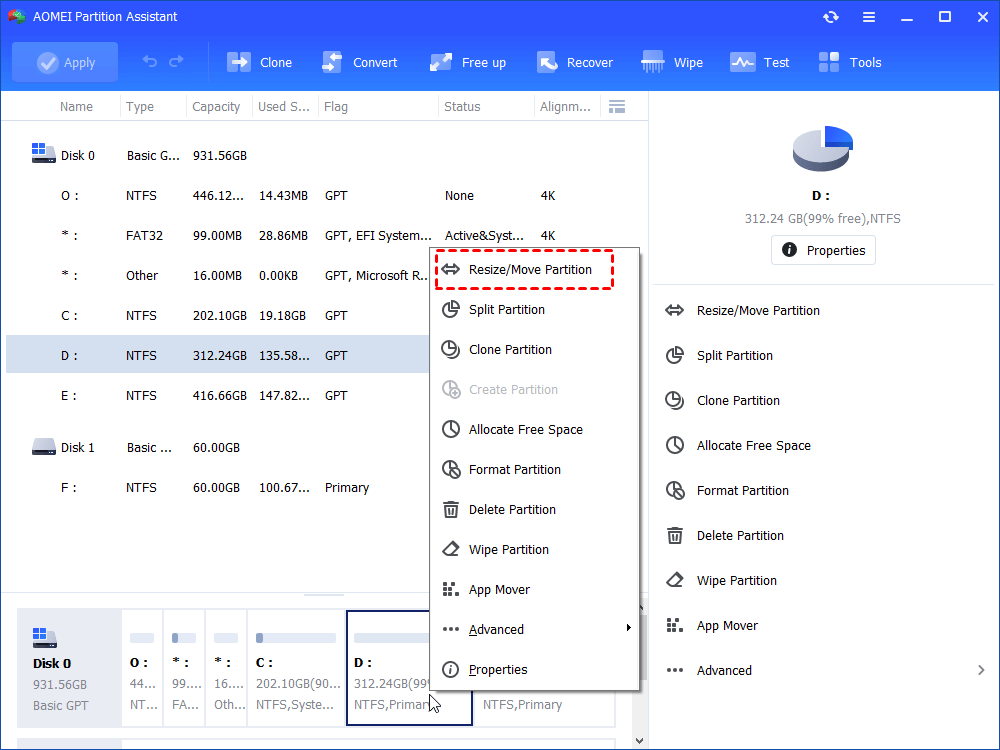
Step 1. Open this partition software, and right-click a partition you want to shrink, here we choose the D partition, and choose “Resize/Move Partition”.
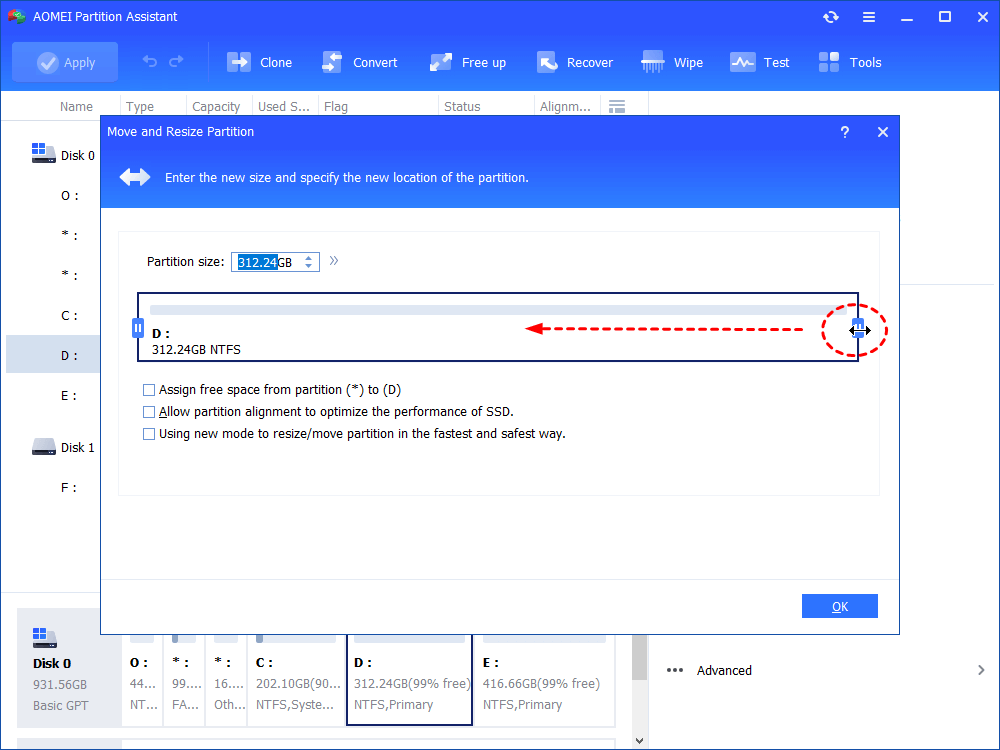
Step 2. In this window, drag the bar leftward to shrink the partition, and hit “OK”.
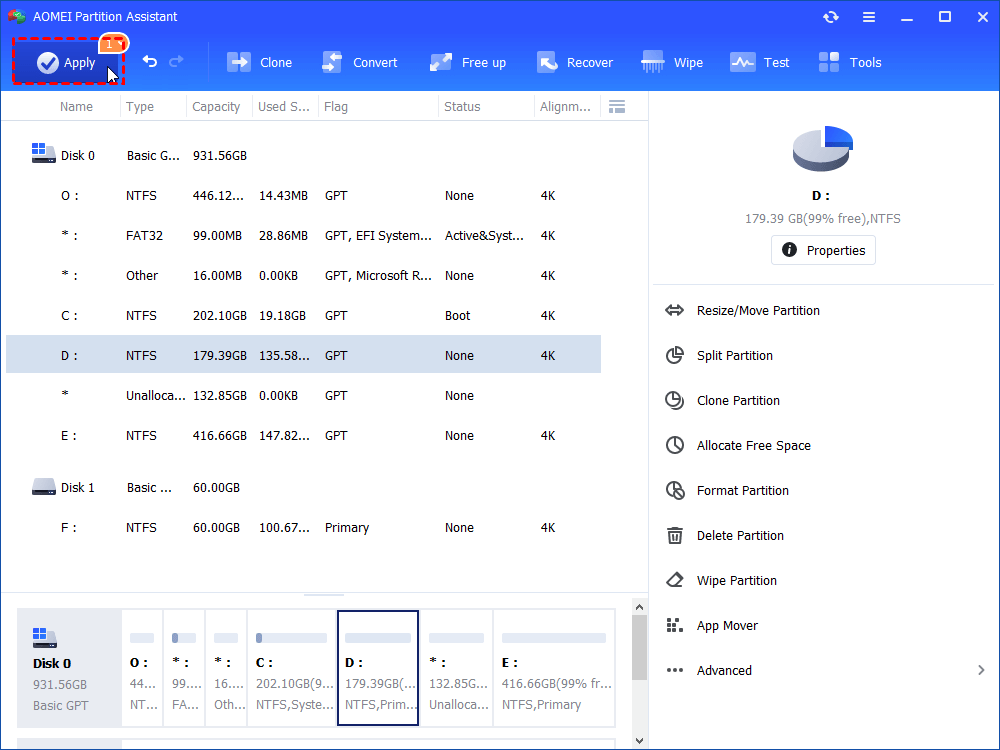
Step 3. And click “Apply” > “Proceed” in the main interface to commit the operation.
FAQs
1. Is PartitionMagic still supported in 2026?
No. The original PartitionMagic software was discontinued years ago and does not officially support modern Windows Server operating systems or GPT disks.
2. Can partition software resize a server partition without data loss?
Yes. Most modern server partition managers can resize or extend partitions without deleting data, although backups are still strongly recommended.
3. Is GPT better than MBR for servers?
GPT is generally better for modern servers because it supports larger drives, more partitions, and UEFI boot mode compatibility.
4. Why do IT administrators use third-party partition tools instead of Windows Disk Management?
Third-party tools often provide advanced features like partition migration, SSD alignment, cloning, recovery, and non-adjacent partition resizing that built-in Windows tools cannot fully handle.
Conclusion
Partition Magic Server software has evolved from a classic partition utility into a powerful storage management solution for modern Windows Server systems. Today, tools like AOMEI Partition Software help administrators resize partitions, convert MBR/GPT, and optimize server performance safely without data loss. With advanced features, broad Server support, and user-friendly operation, modern partition managers have become essential tools for efficient server storage management.

 as a preferred
source on Google
as a preferred
source on Google